VGInterface.com
Search Downloads


Go Back   LoTROInterface > LotRO Stand-Alone Plugins > Other

Category: OtherBuffBars
Interface Information
Download
Pengoros's Portal Bug Reports Feature Requests
How do I install this? (FAQ)
Name: BuffBars   Popular!
Author:
Date: 12-08-2012 04:28 PM
Size: 248.89 Kb
Version: 2.1.0
Rate File: 5 out of 5 with 61 votes  
Pictures
Click to enlarge 

Views: 0
Size: 344.09 Kb
Dimensions: 582 x 536
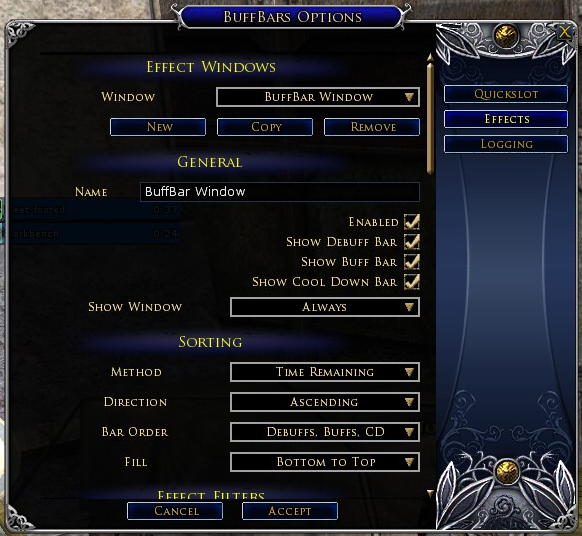
Options Dialog
 
Click to enlarge 

Views: 0
Size: 36.89 Kb
Dimensions: 276 x 85
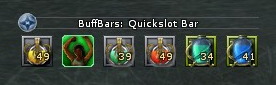
Quickslot Bar
 
Click to enlarge 

Views: 0
Size: 147.41 Kb
Dimensions: 671 x 124
3 Effect Windows(Buffs, Debuffs, Cooldowns)
 
Click to enlarge 

Views: 0
Size: 64.19 Kb
Dimensions: 446 x 74
Effect Slider
 
Description
Current Version: 2.1.0
Date: 12/8/2012

About
This plugin provides a bar view(icon, name, timer) or slider view(all effects on one bar) of buffs, debuffs, and pot cooldowns you have on your character. It also includes a dynamic quickslot bar that will popup when curable debuffs or low morale/power conditions exist on you character to enable you to quickly clear the effect.

Click here to see a video showing the plugin in action.

Installation Instructions
Unzip the PengorosPlugins folder to your Documents/The Lord of the Rings Online/Plugins folder.

The zip file is also compatible with Bredic's LotRO Mod Manager, simply drag the zip file onto the manager window and activate it.

Start
  • After logging into a character type /plugins load BuffBars to load the plugin
  • Type /buffbars options to customize the plugin. You will want to do this at least once in order to set pots or skills for the quickslot bar(s)

General
  • You can move the effect windows and quickslot bars when the UI is unlocked via Ctrl+\
  • You can open up the options dialog by right clicking an existing bar and choosing options or by typing /buffbars options

Effect Windows
Effect windows contain one or more sections of bars, buffs, debuffs, and cooldowns. A bar consists of an icon, name, timer, and a bar graph indicating the remaining time.
  • Each window can be customized to show buffs, debuffs, cool downs or any combination of the three
  • You can create multiple windows to show buffs in one, debuffs in another, and cool downs in a third for example
  • Effects are color coded based on category
  • Filter effects based on category, name, is it curable, and duration so that you only see effects you are interested in
  • Effects can be sorted by name, duration, or category
  • Bars can be filled from the top down or the bottom up
  • Customize the bar display to remove the icon, name, and or timer to suit your needs
  • Effects can optionally flash when they are about to expire
  • Effects can always be ignored or always shown regardless of filters (right click the effect and choose always show or ignore)
  • Show the window always, only in combat, or only out of combat
  • Optionally disable a window instead of deleting it.
  • The windows are fully customizable including effect colors, bar widths, font size, etc

Effect Sliders
Effect sliders contain all the buffs and debuffs in one bar. It accomplishes this by compressing larger time values into a smaller area so that you see the items that are most relevant. What this means is that as effects get closer to 0 they will move more quickly across the bar.
  • Each slider can be customized to show buffs and or debuffs
  • You can create multiple sliders to show specific effects on certain bars, buffs on one and debuffs on the other for example
  • You can pick the bar orientation and which direction the icons move
  • Filter effects based on category, name, is it curable, and duration so that you only see effects you are interested in
  • Effects can always be ignored or always shown regardless of filters (right click the effect and choose always show or ignore)
  • Show the window always, only in combat, or only out of combat
  • Optionally disable a window instead of deleting it.
  • The windows are fully customizable including effect colors, bar widths, font size, etc

Quickslot Bars
The quickslot bar is a dynamic bar that will show pots or skills when you character has certain conditions like low morale/power or curable debuffs. The conditions which show quickslots are driven by triggers. A trigger allows you to set specific conditions like only things with 'wound' in the name or show this quickslot when I don't have a motivated buff. The triggers are very flexible.
  • You can create more than one bar for different situations each with a unique name
  • Quickslots are shown based on triggers
  • Triggers are customizable and include options like effect name, effect category, curable, is the effect present or not present.
  • Slot skills or pots for each effect type by dragging the desired item to the appropriate place in the options window
  • Show the bar always, only in combat, or only out of combat
  • The level when a morale or power pot is displayed is a customizable
  • Optionally disable a bar instead of deleting it.

Effect Logging
The plugin can optionally log effects you receive to your general chat log. To enable this either check the logging enabled option in the options dialog or type /buffbars log enable to start the logging. Logging can be disabled by unchecking the option or typing /buffbars log disable

Mob Debuffs and Crowd Control
The plugin now supports showing timers for mob debuffs and crowd control. There are triggers that you can add specifically for this. In order for it to work you must be running the Combat Analysis plugin which feeds BuffBars the required info in order to display them. It can be found here.


Known Issues
  • Only load the plugin when the UI is locked and not hidden. The current lua api doesn't have support for querying the current state.
  • Pot cooldowns are tracked base on quantities due to lack of api support. This means it is possible to fake out the system by decreasing a pot stack size by 1. In event this happens simply right click the cooldown bar to reset it.
  • The Turbine event system sometimes calls the effect removed event early. This results in what appears to be the effect being removed prematurely. It is most evident on the effect slider when the effect doesn't slide all the way to 0.

Change Log
1.0 - (9/8/2010) Initial Release
1.1 - (9/30/2010) Added some new features and small bug fixes
  • Effect Slider added
  • Tooltips for the options dialog added
  • Removed the turbine dependency for easier installation
  • Fixed the problem with the plugin preventing scroll mouse zoom
  • Added localization support
1.1.1 - (9/30/2010) Bug fixes
  • Added support for Bredic's LotRO Mod Manager
  • Fixed a problem with the quickslots not showing up on the options page
1.1.2 - (10/1/2010) Bug fix
  • Removed effects with no duration from the slider
1.1.3 - (10/4/2010) Compatibility update
1.1.4 - (11/6/2010) Bullroarer update
  • Added support for the Bullroarer client (the plugin will continue to work on Live as well)
  • Added a fix for the saving and loading of the settings file on EU clients
1.1.5 - (12/2/2010) Fixes/Localization
  • Added a french translation
  • Added a german translation
  • Fixed compatibility problems with the new turbine plugin folders
  • Fixed event listeners clobbering other plugin listeners
1.1.6 - (12/2/2010) Fix for an issue with the new turbine quickslot class
1.1.7 - (12/8/2010) bug fixes
  • Fixed a problem with french and german translations and the EU patch update
  • Fixed a problem with slider items not showing the context menu on a right click
  • Fixed a problem with the timer not showing on the slider items
1.2.0 - (5/12/2011) bug fixes and quickslot update
  • Converted all quickslot options to the more flexible trigger system
  • Fixed a problem with not being able to reslot an item in a quickslot if the stack went to 0
  • Fixed the "attempt to perform arithmetic on field '?'" bug
1.2.1 - (10/3/2011) disabled inventory functions to prevent a client crash due to a lotro lua bug
1.2.2 - (10/19/2011) enabled inventory functions and added RoI pots to the cooldown list
2.0.0 - (3/23/2012)
  • All windows use triggers now to determine whether or not to show a matching effect
  • The options have been converted to use the new in game plugin manager window
  • Mob debuffs and CC can now be shown if the CombatAnalysis plugin is running
2.0.1 - (3/28/2012) Bug fix for localized client settings. Players experiencing this problem may need to delete their BuffBarSettins.plugindata file
2.0.2 - (4/2/2012) A fix for the problems encountered with black/white lists and matching text with special characters.
2.0.3 - (4/3/2012) Fixed the problem with trigger windows not opening and CA effect icons. Added support for choosing the locale and updated the German translation.
2.0.4 - (6/15/2012) Fixed a couple bugs relating to settings. The settings will now reset themselves if they are corrupted.
2.0.5 - (11/30/2012) Updated for Riders of Rohan
  • Added new pots introduced in RoR
  • You can now configure windows/quickslots/sliders to be visible based on mounted status
  • Added buttons to configure cc and debuffs coming from CombatAnalysis(4.2.0)
  • Fixed some outstanding bugs with morale/power levels and effect target name matching
2.1.0 - (12/8/2012) Added support for storing quickslots/windows/sliders on an account level or character level.

Special Thanks
I'd like to give a special thanks to Vevenalia for translating the plugin into french and helping me debug some of the weird translation issues. Also many thanks to Taralas and Farothhen for the german translation.
Archive List (Old Versions)
File Name
Version
Size
Author
Date
2.0.5
254.92 Kb
Pengoros
11-30-2012 03:29 AM
2.0.4
253.86 Kb
Pengoros
06-15-2012 12:56 PM
2.0.3
253.60 Kb
Pengoros
04-03-2012 06:34 PM
2.0.2
251.78 Kb
Pengoros
04-02-2012 05:46 PM
2.0.1
251.39 Kb
Pengoros
03-28-2012 02:48 PM
2.0.0
251.25 Kb
Pengoros
03-23-2012 03:22 PM
1.2.2
233.85 Kb
Pengoros
10-19-2011 02:25 PM
1.2.1
232.91 Kb
Pengoros
10-03-2011 02:29 PM
1.2.0
233.19 Kb
Pengoros
05-12-2011 09:55 AM
1.1.7
227.48 Kb
Pengoros
12-08-2010 11:02 AM
1.1.6
227.53 Kb
Pengoros
12-02-2010 09:58 PM
1.1.5
227.52 Kb
Pengoros
12-02-2010 05:59 PM
1.1.4
215.06 Kb
Pengoros
11-06-2010 10:37 PM
1.1.3
214.34 Kb
Pengoros
10-04-2010 09:42 PM
1.1.2
214.02 Kb
Pengoros
10-01-2010 02:47 PM
1.1.1
207.96 Kb
Pengoros
09-30-2010 05:55 PM
1.1
207.31 Kb
Pengoros
09-30-2010 12:31 PM
1.0
187.43 Kb
Pengoros
09-08-2010 03:00 PM
File Statistics
User Rating:
5 out of 5 with 61 votes
Downloads: 253750
Views: 379330
Favorites: 304
Uploaded By:
 
Last Modified: N/A

View Pictures. Download Now! Post A Comment


Post A Reply
Author Comments Comment Options
Old 05-17-2013, 02:38 PM  
magill
The Undying

Forum posts: 64
File comments: 124
Uploads: 0
an interesting error

...ugins\PengorosPlugins\BuffBars\EffectBarSetting s.lua:139: attempt to index field '?' (a nil value)

This was from another toon casting ? at me.

action was throwing something, my toon then fell down with the Eye with the slash through it above ...

probably one of the Halloween "tricks", but I don't know.
magill is offline Report comment to moderator   Reply With Quote Reply With Quote
Old 04-05-2013, 02:08 AM  
Elrigh
The Indomitable
 
Elrigh's Avatar

Forum posts: 12
File comments: 15
Uploads: 0
Any chance to implement a warningfunction in the style of Effectwarn?

A visual warning for curable Debuffs besides the Quickslot? In Raids I often miss the Debuffs or Low Morale/Power. A big warning would be a great thing.
Elrigh is offline Report comment to moderator   Reply With Quote Reply With Quote
Old 03-28-2013, 03:02 PM  
Callo
The Wary
 
Callo's Avatar

Forum posts: 0
File comments: 5
Uploads: 0
Question Custom Effect Trigger

When trying to add a Custom Effect Trigger, when I click on Custom in the Template field the Accept button is always greyed out. Am I doing something wrong here? I can't figure it out
Callo is offline Report comment to moderator   Reply With Quote Reply With Quote
Old 03-01-2013, 07:09 PM  
magill
The Undying

Forum posts: 64
File comments: 124
Uploads: 0
probably a stupid question

Been using buffbars for the sliders and list for ages...
Decided to try creating a Quickslot bar...

Nada...

At best I have been able to create (apparently) an arbitrary bar called Xyzzy.

Its enabled and set to always. But...
1- It never shows up.
2- I can not populate it with more than one thing.

Goal, Id like to create a bar with pets in it for my LM.
magill is offline Report comment to moderator   Reply With Quote Reply With Quote
Old 02-26-2013, 03:01 PM  
Elrigh
The Indomitable
 
Elrigh's Avatar

Forum posts: 12
File comments: 15
Uploads: 0
Thats a Direct X Problem, which will be (hopefully) fixed with Update 10. Its already mentioned in the Patchnotes from Bullroarer.
Elrigh is offline Report comment to moderator   Reply With Quote Reply With Quote
Old 02-26-2013, 02:50 PM  
Mawane
The Wary

Forum posts: 0
File comments: 3
Uploads: 0
all buffs/debuffs are flickering, anyone else has that too? it's really annoying
Mawane is offline Report comment to moderator   Reply With Quote Reply With Quote
Old 02-23-2013, 01:25 PM  
Ronux
The Wary

Forum posts: 0
File comments: 6
Uploads: 0
First of all, I want to say that this mod is amazing. I was wondering how I would go about making burglar gambles on the target show. I do have the combat analysis installed and working, and I have made sure debuffs and mob debuffs are on. I can see my tricks on the target, but no other target debuffs show. Any help would be appreciated.
Ronux is offline Report comment to moderator   Reply With Quote Reply With Quote
Old 02-02-2013, 12:57 PM  
Buldozer
The Wary

Forum posts: 0
File comments: 1
Uploads: 0
LM stun immunity tracking

I've installed the latest version of buffbars as of this day, but somehow I can't configure it properly to track stun immunity on felowship. What I'd really like, would be a bar for everyone protected, with a countdown - and if I could click somewhere on that bar, to select that toon, it'd be even nicer ... bet even tracking the immunities with a clearly visible toon name would be great. Can someone pls explain how to do that?
Buldozer is offline Report comment to moderator   Reply With Quote Reply With Quote
Old 01-26-2013, 10:23 PM  
Wisp701
The Wary

Forum posts: 0
File comments: 1
Uploads: 0
RK Master of Tragedy

Anyone know how to get the Master of Tragedy buffs show up in the sldier tracking windows. When traited the of Tragedy Buff tiers up 1 through 5. When you get to tier 5 you can cast any writ for 0 induction. I'd like to add it to a custom slider window to pop up once it hits 5. The actual text on the buff is "Master of Tragedy -5". I have a number of other customer buff trackers, so I know how to add buff or de-buff effect, but I cannot get these to show.

Anyone know the trick or if BuffBars can track that? Perhaps its not technically a "buff" even though it shows up under my character alongside the other buff... ideas?

Thanks,

Last edited by Wisp701 : 01-26-2013 at 11:01 PM.
Wisp701 is offline Report comment to moderator   Reply With Quote Reply With Quote
Old 01-26-2013, 09:17 PM  
Garalathdelas
The Wary
 
Garalathdelas's Avatar

Forum posts: 0
File comments: 27
Uploads: 0
Quote:
Does anyone know how to setup Buffbars to work with the 'Moors Stun/Root pots?
That used to work on my creep, but now I can't get any BuffBars stuff to work up there.
Garalathdelas is offline Report comment to moderator   Reply With Quote Reply With Quote
Old 01-23-2013, 02:39 PM  
Almagnus1
The Undefeated
Interface Author - Click to view interfaces

Forum posts: 8
File comments: 56
Uploads: 2
Does anyone know how to setup Buffbars to work with the 'Moors Stun/Root pots?

This would make for a pretty sweet template too.
Almagnus1 is offline Report comment to moderator   Reply With Quote Reply With Quote
Old 01-06-2013, 10:56 PM  
Garalathdelas
The Wary
 
Garalathdelas's Avatar

Forum posts: 0
File comments: 27
Uploads: 0
How would I add the cooldown for a specific skill to the timer bar?

I'm also having some trouble getting the potion triggers to appear on my monster character. I even tried setting the morale potion trigger to pop at 100% and nothing's happening. Is there something different using this creepside?

Last edited by Garalathdelas : 01-07-2013 at 01:30 AM.
Garalathdelas is offline Report comment to moderator   Reply With Quote Reply With Quote
Old 01-01-2013, 08:21 PM  
Brewel120
The Wary

Forum posts: 0
File comments: 1
Uploads: 0
Burg debuffs

I've notice that a couple of the debuffs namely- disable and addle are not tracked by the buff bars is that a bug or am i doing something worng? Addle and disable also doesn't come on combat analysis either. Also was wondering is there no way to add bleeds to buff bars as well?
Brewel120 is offline Report comment to moderator   Reply With Quote Reply With Quote
Old 01-01-2013, 06:05 AM  
Lielsen
The Wary

Forum posts: 0
File comments: 2
Uploads: 0
Exclamation corrupt and reset

Hi!

I was waiting for this update for Rohan!

But I'm having a problem... when I log in, it says "configuration is corrupted and reseted". I loose the changes in locations (effect window/slider and quickslot) and it reset all the potions I selected.

Any idea what may be wrong?

This is a great plug-in and I would love to use it 100% again.


Thanks in advance.
Lielsen is offline Report comment to moderator   Reply With Quote Reply With Quote
Old 12-11-2012, 08:57 PM  
tanlis
The Wary

Forum posts: 0
File comments: 1
Uploads: 0
One of the features that I really liked that was part of version 2.0 was that the buff/debuff effect tooltip window(the same one you get when you look at the one under your morale/power bar) would display when hovering over an effect on BuffBars slider.

I just updated to 2.1 and I've noticed this does not appear to be available anymore.

Was there a problem? Would it be possible for this to be brought back?

Thanks.
tanlis is offline Report comment to moderator   Reply With Quote Reply With Quote
Post A Reply

 
Category Jump:
Search this Category:
 

All times are GMT -5. The time now is 10:39 AM.


Our Network
EQInterface | EQ2Interface | Minion | WoWInterface | VGInterface | LoTROInterface | MMOInterface | Swtorui