 |
| Category: Maps, coordinates & compassesWaypoint |
| Interface Information |
|
| Name: |
Waypoint  |
| Author: |
|
| Date: |
04-11-2021 01:04 PM |
| Size: |
25.27 Kb |
| Version: |
1.9 |
| Rate File: |
 |
| Patch & Add-on List |
File Name |
Version |
Size |
Author |
Date |
Type |
|
2.0 |
63.13 Kb |
|
08-05-2020 02:50 PM |
Patch |
|
2.0 |
3.84 Kb |
|
06-28-2020 12:16 PM |
Patch |
Waypoint 1.9
by Lunarwater
about:
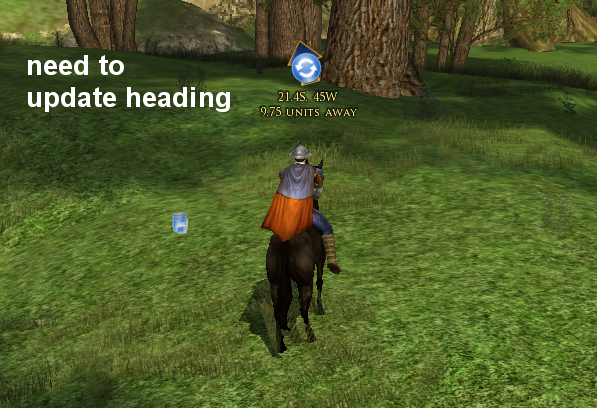
Waypoint is a simple addon to assist in targeting your character in the right direction instead of having to look at the map a ton. It is more of a proof of concept until we get better lua support for location tracking, but is still in a usable state.
KNOWN ISSUES:- I'll be the first to warn you that it uses /loc, and therefore you will incur some chattab spam. I would recommend you create a new chat tab vs using general chat so you don't have to see the output of /loc. If this is a problem for you please do not use at this time. I am hoping one day Turbine will release an API method for getting location & direction info and then this will go away.
- /loc data is different Inside dungeons. Initial
- My lotro characters is only level 16, so I have not tried this in other regions. If you encounter problems in another region you can assist me by recording /loc values, along with ;loc for that same location and posting below.
- Attempting to navigate coordinates between regions will not work as expected. They use different coordinate systems, and will result in the arrow pointing in wrong direction. Try to stick to navigating coordinates within the same zone for now.
CHANGELOG:
Version 1.9 : - Fixing number parsing for 64bit DE client
Version 1.8 : - Fixing chatlog location parsing (again >.<)
Version 1.7 : - Fixing chatlog location parsing
Version 1.6 : - Fixing chatlog location parsing
Version 1.5 : - Bug fix submitted regarding improper listing of east and west for french and german versions of the game. (thanks Venogorn!)
Version 1.4: - Fixed waypoint to properly determine location with recent changes to game
- While I'm not sure if it will help, I make the Waypoint work indoors.
Version 1.3 : - Changed chat channel parser for changes in RoI Update 6
- Fixed but when user was facing due north, coordinates would not get parsed. (thanks Garan)
- Remove extranious output to chat channel by plugin
- Added plugin manager icon and description
Version 1.2 : - changes necessary for it to work in German and French LoTRO client
- changes necessary for it to work better with LoTRO Compendium
- small tweak to LPC plugin configuration file that was incorrect
Version 1.1 : - Made it so you can click on things that are behind the transparent portions of waypoint.
- Calculate # of meters vs generic units for distance
- Save position of waypoint so it remembers where you last placed it on screen.
- Adding LPC file
Version 1.0 : initial release
INSTALL:
- Delete any older Waypoint install from your Plugins folder
(i.e. C:\Documents and Settings\Lunarwater\My Documents\The Lord of the Rings Online\Plugins\Waypoint)
- Copy the entire Waypoint folder into your LOTRO plugins folder
(i.e. C:\Documents and Settings\Lunarwater\My Documents\The Lord of the Rings Online\Plugins\Waypoint)
- Start LOTRO. Once in game type: /plugins load Waypoint
USAGE:
/way help : shows Waypoint help
/way show : shows Waypoint
/way hide : hides Waypoint
/way target <coordinate> : target a coordinate for waypoint
(i.e. /way target 21.4S 45W)
Once a target is set, an arrow will appear on your screen. You will need to click the middle of arrow for it to know where u are at and what direction you are facing. The arrow will then point in a direction like a compass. Simply rotate your character and move in that direction. Periodically you can click arrow again to check your distance from target & check that you are still headed in correct direction.
You can also make a shortcut to periodically do a /loc if you wish to hit
a key to update the waypoint. (i.e. /shortcut <slot #> /loc )
License:
http://www.apache.org/licenses/LICENSE-2.0
|
| Archive List (Old Versions) |
File Name |
Version |
Size |
Author |
Date |
|
1.8 |
25.24 Kb |
lunarwtr |
09-28-2020 11:23 AM |
|
1.7 |
25.23 Kb |
lunarwtr |
08-07-2020 07:53 AM |
|
1.6 |
25.23 Kb |
lunarwtr |
06-30-2020 08:56 PM |
|
1.5 |
27.46 Kb |
lunarwtr |
08-01-2015 09:34 AM |
|
1.4 |
27.41 Kb |
lunarwtr |
10-16-2012 07:47 PM |
|
1.3 |
27.26 Kb |
lunarwtr |
03-14-2012 08:00 PM |
|
1.2 |
25.83 Kb |
lunarwtr |
01-05-2012 09:32 PM |
|
1.1 |
25.39 Kb |
lunarwtr |
12-30-2011 01:07 PM |
|
1.0 |
23.08 Kb |
lunarwtr |
11-05-2011 05:09 PM |
| File Statistics |
| User Rating: |
|
| Downloads: |
225619 |
| Views: |
231379 |
| Favorites: |
106 |
| Uploaded By: |
|
| Last Modified: |
N/A |
|
|  |
|
 |
|
 11-09-2022, 08:06 AM
|
|
The Undying
Forum posts: 121
File comments: 344
Uploads: 11
|
Re: question: moving plugin
Quote:
|
Hello, before installing it, can we move the arrow so that it is higher than the character?
|
Yes. I think if you mouse over the to left of arrow will have a drag handle that appears |


|


|
|
11-09-2022, 05:27 AM
|
|
The Wary
Forum posts: 2
File comments: 22
Uploads: 0
|
question: moving plugin
Hello, before installing it, can we move the arrow so that it is higher than the character?
|
|
|
|
|
04-21-2022, 06:22 PM
|
|
The Wary
Forum posts: 0
File comments: 6
Uploads: 0
|
Quote:
The only plugin I see that is v12.10 is "StableGuy".
EDIT: It looks like stableguy addin is bundling waypoint in their zip download. My guess is this is confusing the installer. Please install stableguy & then reinstall waypoint afterward to resolve.
|
Thank you very much - that solved it.
Last edited by Taliseian : 04-21-2022 at 06:22 PM.
|
|
|
|
|
04-19-2022, 05:23 PM
|
|
The Undying
Forum posts: 121
File comments: 344
Uploads: 11
|
Quote:
Thanks for making a great addon!
Curious if you could look at they way it's listed in LOTRO Plugin Compendium.
It wants to update to v12.10 which would cause the addon to stop working.
Thanks....
|
The only plugin I see that is v12.10 is "StableGuy".
EDIT: It looks like stableguy addin is bundling waypoint in their zip download. My guess is this is confusing the installer. Please install stableguy & then reinstall waypoint afterward to resolve.
Last edited by lunarwtr : 04-19-2022 at 05:33 PM.
|
|
|
|
|
04-18-2022, 06:45 PM
|
|
The Wary
Forum posts: 0
File comments: 6
Uploads: 0
|
Thanks for making a great addon!
Curious if you could look at they way it's listed in LOTRO Plugin Compendium.
It wants to update to v12.10 which would cause the addon to stop working.
Thanks....
|
|
|
|
|
03-21-2022, 03:17 PM
|
|
The Undying
Forum posts: 121
File comments: 344
Uploads: 11
|
Re: using /way syntax suggestion
Quote:
|
Rather than needing to type the word, "target" into the command line could you modify so that the assumed command is "target" when you type in /way by itself. ie. I could use /way 32.0s 52.0w it would work. Have it so if you type in /way with no coordinates it would give the help.
|
Thank you for the suggestions. |
|
|
|
|
03-21-2022, 02:56 PM
|
|
The Wary
Forum posts: 2
File comments: 11
Uploads: 0
|
using /way syntax suggestion
Rather than needing to type the word, "target" into the command line could you modify so that the assumed command is "target" when you type in /way by itself. ie. I could use /way 32.0s 52.0w it would work. Have it so if you type in /way with no coordinates it would give the help.
|
|
|
|
|
11-29-2021, 08:36 PM
|
|
The Undying
Forum posts: 121
File comments: 344
Uploads: 11
|
Quote:
Hello, after installing the "turbine" plugin, the Waypoint plugin works.
I have a question does it work for the quests in the books? because I am making a quest of the book and on the arrow there is always a question mark.?
Thank you.
|
By itself waypoint does not have the coordinates for the quests you might be on. If you happen to know the coordinates you can type something like..
/way target 21.4S 45W
and it will then start directing you to those coordinates in your current zone.
Some plugins like MoorMaps I believe have integrations with it. the quest compendium plugin I made is way out of date but had integrations as well. |
|
|
|
|
11-28-2021, 06:41 AM
|
|
The Wary
Forum posts: 2
File comments: 22
Uploads: 0
|
Hello, after installing the "turbine" plugin, the Waypoint plugin works.
I have a question does it work for the quests in the books? because I am making a quest of the book and on the arrow there is always a question mark.?
Thank you.
Last edited by magdalena001 : 11-28-2021 at 12:52 PM.
|
|
|
|
|
11-27-2021, 08:40 PM
|
|
The Undying
Forum posts: 121
File comments: 344
Uploads: 11
|
Quote:
Hello before installing your plugin.
Can we move the arrow to put it a little higher or below the character?
Thank you.
|
When you mouse over the arrow, an you can drag & drop it from the corner anchor. |
|
|
|
|
11-27-2021, 03:45 PM
|
|
The Wary
Forum posts: 2
File comments: 22
Uploads: 0
|
Hello before installing your plugin.
Can we move the arrow to put it a little higher or below the character?
Thank you.
|
|
|
|
|
04-11-2021, 01:05 PM
|
|
The Undying
Forum posts: 121
File comments: 344
Uploads: 11
|
A fix has been submitted.
|
|
|
|
|
04-11-2021, 12:33 PM
|
|
The Undying
Forum posts: 121
File comments: 344
Uploads: 11
|
Re: Re: Re: waypoint is Broken (German Client)
How exactly do I reproduce this? I downloaded DE files, but the plugin data folder seems to be saving numbers correctly. Is there a way to confirm I'm using 32bit vs 64bit client?
nevermind. Google answered me.
Last edited by lunarwtr : 04-11-2021 at 12:34 PM.
|
|
|
|
|
03-31-2021, 06:59 AM
|
|
The Wary
Forum posts: 0
File comments: 79
Uploads: 1
|
Re: Re: waypoint is Broken (German Client)
Quote:
This is most likely due to the undocumented change in the 64-bit client and will likely require Lunarwater to implement a change in the plugin. For more info, see
https://www.lotrointerface.com/forum...ead.php?t=3836
Note, this change only affects the 64-bit DE/FR clients, so you should be able to use the 32-bit client just fine until Lunarwater has a chance to account for this in the plugin.
|
Yes exactly! Some users from my German community wrote me that Waypoint 1.8 works fine with the 32Bit German client. But not with the 64 Bit German Client |
|
|
|
|
03-29-2021, 03:29 PM
|
|
The Undying
Forum posts: 341
File comments: 981
Uploads: 20
|
Re: waypoint is Broken (German Client)
Quote:
Waypoint does not seem to work anymore. At least not in the German client. In english it works as usual.
If you enter coordinates with /way target 10.10n 10.10w in the German client, the following error comes back
...ings Online\Plugins\Lunarwater\Waypoint\Waypoint.lua:24 4: attempt to compare nil with number
The coordinates are only an example! In the English client it works as usual. Tested 1.8 and 1.7
|
This is most likely due to the undocumented change in the 64-bit client and will likely require Lunarwater to implement a change in the plugin. For more info, see
https://www.lotrointerface.com/forum...ead.php?t=3836
Note, this change only affects the 64-bit DE/FR clients, so you should be able to use the 32-bit client just fine until Lunarwater has a chance to account for this in the plugin. |
|
|
|
All times are GMT -5. The time now is 01:47 AM.
|
|




 11-09-2022, 05:27 AM


