.
Extended and enhanced panels
And choose between default or less store buttons
Introduction :
Here is a collection of extended and enhanced panels codes gathered in 3 variants of the default Lotro user interface theme :
- The first one offers the extended and enhanced panels with the default ingame store buttons.
- The second one removes some of the most annoying/intrusive store buttons.
- The third removes some of the most annoying/intrusive store buttons and adds a custom short toolbar, for advanced users only.
These custom panels are designed for high resolution screens: Screen resolutions
below 1024X768 are not supported, 1440X900 or higher is highly recommended. However 4k screens resolution or higher are badly supported at the present day in lotro as some texts are difficult to read.
These panel customizations are included by default in all the skins figuring in JRR Skins Collection.
This release can be used as well as a skin to enjoy convenient enhancements within lotro's default themes (as a hero or as a monster player) or as well as a skin developing resource.
Step by step installation :
- Download to your desktop the zip file hosted on this page.
- Unpack it using windows right click unzip embedded function, or with a dedicated software such as 7zip (free software), Peazip (free software), or Winrar...).
- Once the zip file is unpacked on your desktop, check if the new created folder is called "ExtendedEnhancedPanels" or "ExtendedEnhancedPanels *something more*".
if it is the longer name, double left click on it to enter the folder then you should be facing the right "ExtendedEnhancedPanels" folder.
- Copy (or cut) it, then paste it in your ..\Documents\The Lord of the Rings Online\ui\skins\ folder.
Tipycally, on windows vista and seven it looks like C:\ User(s) \ your account name \ documents \ The Lord of the Rings Online\ui\skins\
on Windows XP, it should look like C:\Documents and Settings\username\My Documents\The Lord of the Rings Online\ui\skins\
If ui and/or skins (don't forget the *s*) folders don't exist, then create it, and then copy in it the ExtendedEnhancedPanels folder.
- Now, the skin will be available in Lotro the next time run it !
- To allocate the skin to one of your characters, log him/her, then open the ingame option panel ( *O* key)
--> select UI settings tab --> go to "user current skin" and use the scrollable selection box to select Enhanced Panels.
- To apply the new panel settings you have to logoff then relog your character.
Featured enhancements and credits :
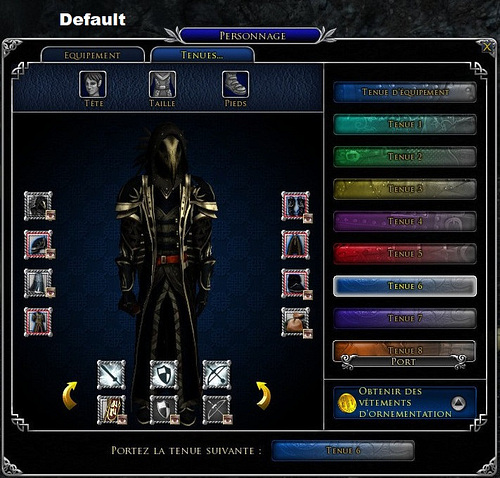
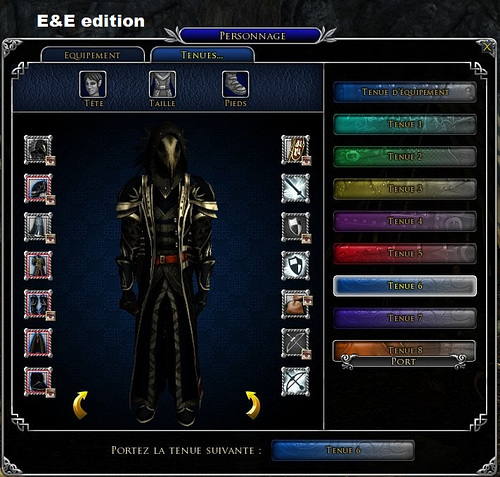
- A A much bigger dressing room by Brygard, modified a first time by Jack, then by Adra.
- Numerical PVP rank icons & vitals pvp rank display fix, by Adra.
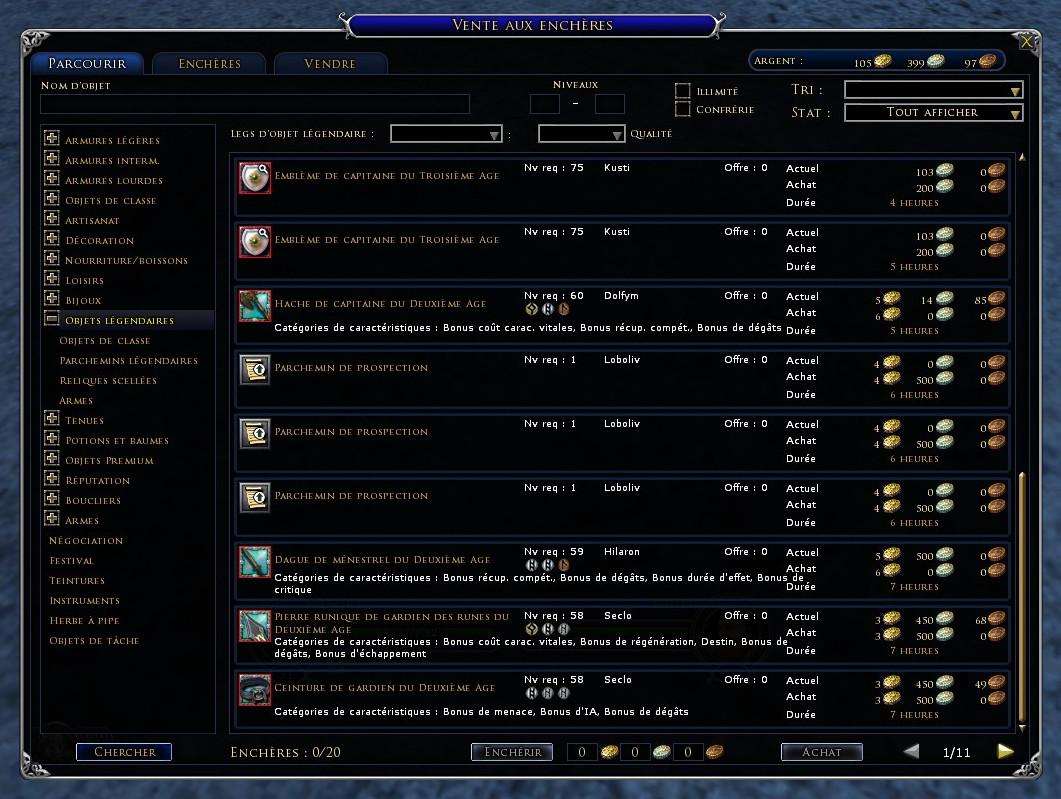
- A Larger Auction Panel, by Thrashfinger, modified by Wicky71 then by Adra to fix localization issues.
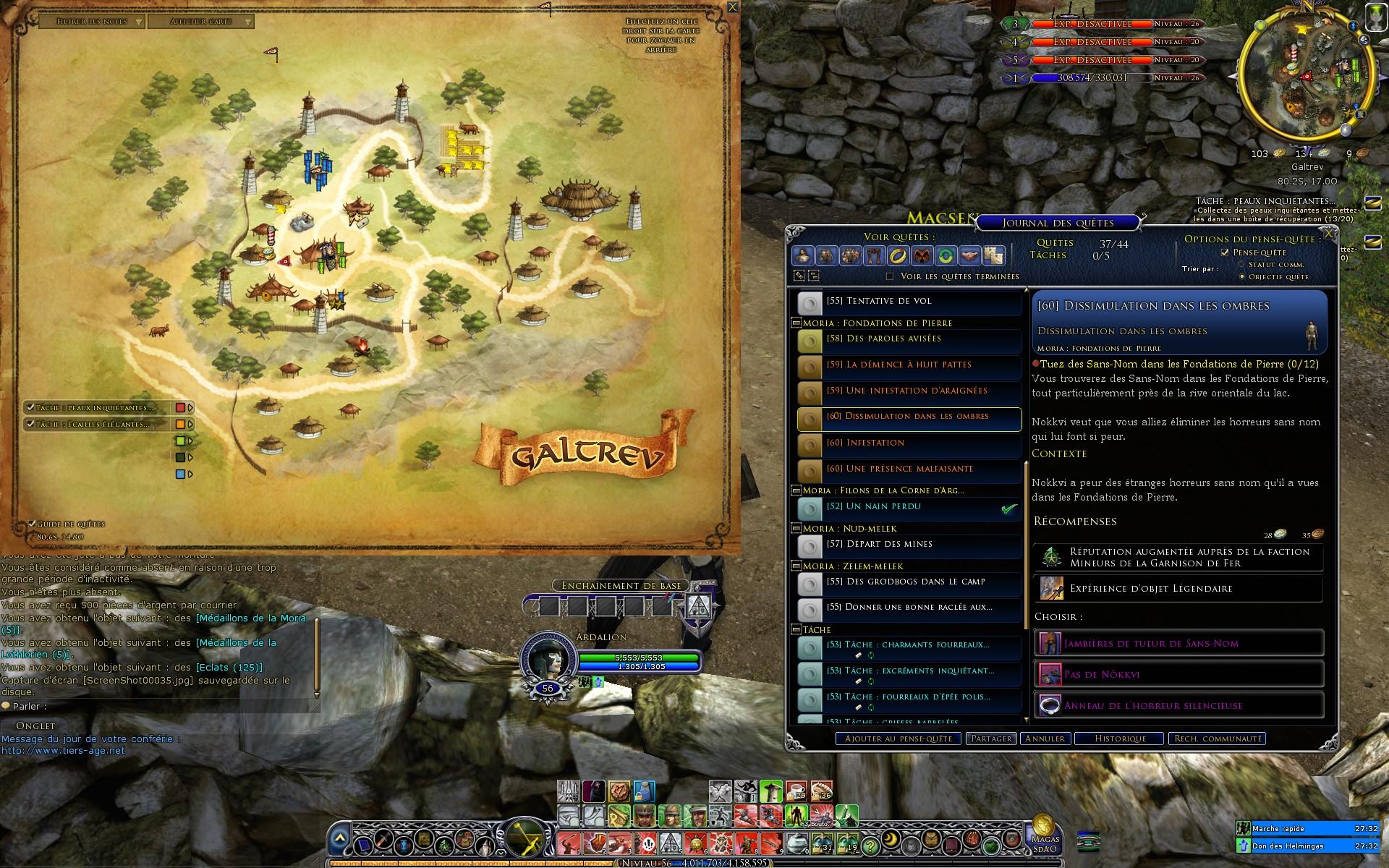
- Transparent map tracker, by Hazado. (It simply turns invisible some graphical elements, the drag bar remains usable despite it is invisible).
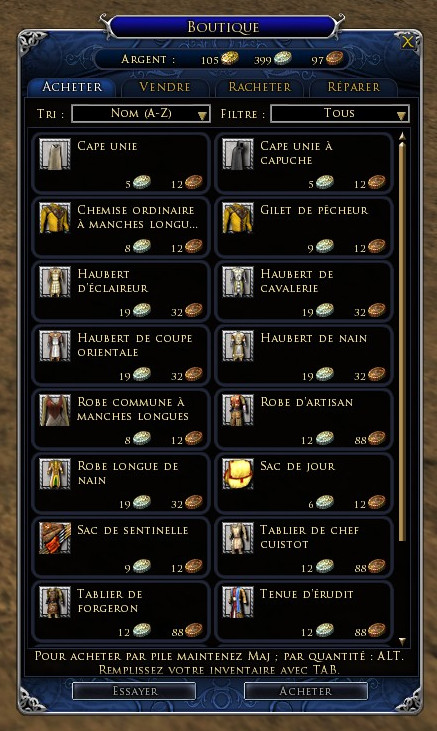
- Extended Mail and vendor parts from "Firefern's Crafting, Vendor and Dressing Room" by Mirarkitty.
- Extended Barter by The Old One, modified by Adra.
- Map window from Eclipse UI, by Eclipse. The map is smaller, but in fact, it is displayed at its actual size, this means no more zooming blur !
- Custom Saruman rings, by Adra. (with a Photoshop file beside it, allowing you to make your own if you want to)
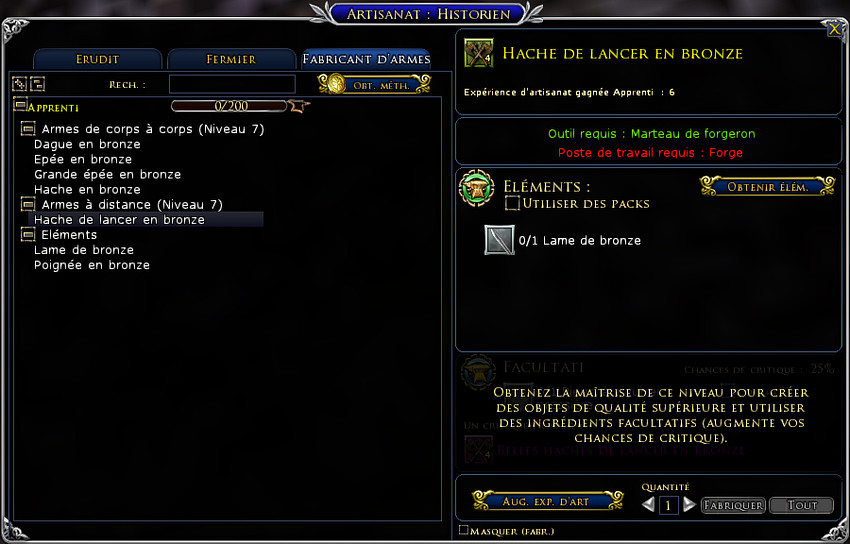
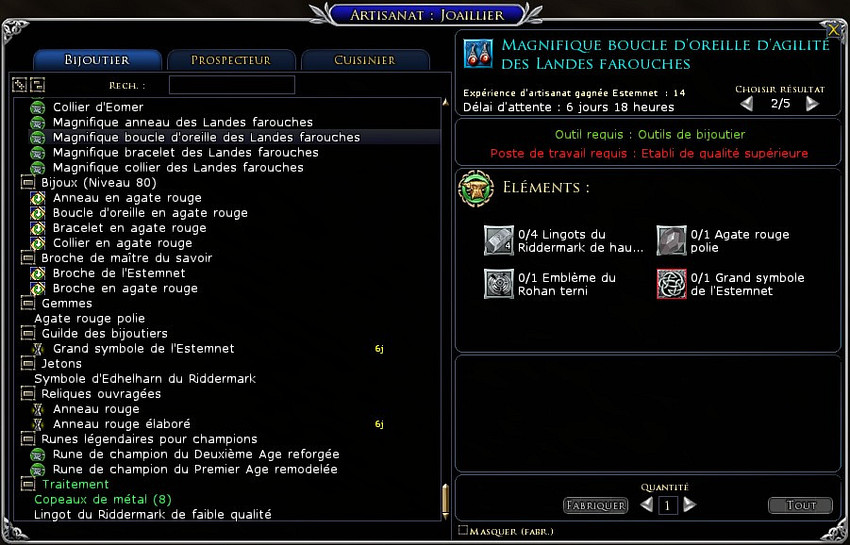
- Extended Crafting Panel by Adra.
- Mainly based on Elwe's No Store Button, some of the most intrusive lotro store buttons have been disabled within various UI panels. (I left, by choice, the main tool bar store button active).
- Compact connection Status icon. Now you can stick it to the left of your screen or to the right of an UI element. By Adra.
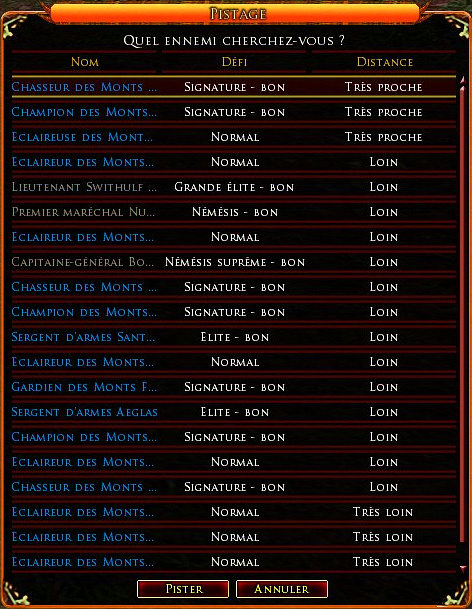
- Taller enemies tracking panel. Now displays 20 names at once instead of 8 by default. By Adra.
- Extended inspect panel, by HunterGreen and Adra.
- Outfits character panel slots reorganized by Adra.
- Extended target of target vital frame. Not alive target frame is almost unchanged compared to default skin.
- [b]A few minor text display fixes for the french lotro client. Some other elements remains unfixable yet in this panel.
. . . Store buttons removed, on the dedicated profile :- Character panel : Equipment tab (enhance) & Appearance tab (buy outfits) buttons
- Destiny barter
- Crafting panel : buy recipes / buy mats / accelerate buttons
FAQ (Frequently Asked Questions) :
- How do I uninstall a skin from my computer ?
Simply delete the skin folder you had previously copied onto your from your hard drive (I mean in
...Documents\The Lord of the Rings Online\ui\skins\ folder), that's all.
- The 3D portrait from my vital bar zoom or dezoom each time I load a new area.
This is a well known issue since years. It is caused by the player vital panel code used in skins. This bug comes from the lotro client itself, I cannot fix it through the skin code, I can only disable the 3d portrait sizing line of code in the skins to bypass it, like it was the case in JRR skins and E&E panels before I re-enabled it in order to fix the other 3D portrait zooming and de-centering issues introduced by lotro update 33.1. So, whatever I do some people will be unsatisfied until the devs fix some of their game bugs. However, while waiting for a game fix there are several ways to overcome it :
- Set your vital frame size to 1.00 in ui settings options tab.
- Disable 3D portrait in lotro ingame options.
- Roll back to Extended and Enhanced Panels v25.1 while praying for the devs decide some day to spend a few minutes to fix their fucking bugs.
- Delete this line of code from the skindefinition.xml file of each skin you use :
Code:
<Element ID="PlayerPortrait" X="23" Y="25" Width="56" Height="56"> </Element>
- You also have the possibility to fully replace the "regular" player vital frame by a plugin made one, as for example : https://www.lotrointerface.com/downl...1-Athelas.html
- The map is no more fullscreen !
This is not a bug, this is a skinning choice, it is really convenient in some situations, and on multi screen systems.
Indeed the map is displayed at its actual size, without the zooming blur.
How can I restore the fullscreen map ?
Use a text editor software (as Windows notepad) to open the skindefinition.xml file located in the folder of the theme you want to tweak, then look for these lines (you can use Control F) and delete them :
Code:
<PanelFile ID="ID_UISkin_MapPanel">
<Element ID="MapBackground" X="0" Y="0" Width="1024" Height="768"> </Element>
</PanelFile>
then save changes in the file then relaunch lotro.
- Can I tweak the size and/or the location of the windowed map on my screen ?
Unfortunately NO, this is an unofficial skinning tweak and it do not supports changing its size or its location on your screen.
It seems the only values presently supported are these default ones.
- My character doesn't show in the dressroom !
JRR skins doesn't supports resolutions with a height below 768 pixels.
If you run Lotro with a resolution height equal to 768, you have to play in fullscreen mode to get the dressroom correctly displaying the character.
Higher resolutions allow to play indifferently in fullscreen or windowed modes.
- The auction house panel is too big !
Your screen resolution is too low ! ^^
If you run Lotro with a resolution height equal to 768, you have to play in fullscreen mode to get the auction house panel entirely displayed and usable.
Higher resolutions allow to play indifferently in fullscreen or windowed modes.
Release notes :
Code:
v34
No change except a new naming : Skin names are aligned on the left, in the ingame option panel.
You must delete the previous Extended & Enhanced Panels installation folder before installing this new version.
You will have to re-select your chosen skin on each of your characters.
Don't forget the panel customizations (including toolbar) will be applied only after the next log in of your character.
v33.4f
- I suppressed some deprecated panel customization codes:
"panel displayed when applying an item on a legendary Item"
"Taller legendary item dismantling result window"
"Taller Legacy Extraction panel"
"Store button removal in relic master panel"
"Expanded master loot window"
"Store button removal in wallet panel"
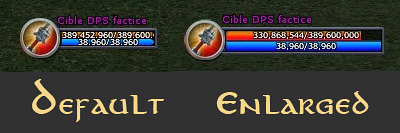
- I enlarged the target's target vital frame, targeted objects frame is almost unchanged compared to default skin.
 v33.4e
- fix an error in v33.4d
v33.4d
- Adjusted a bit the location of the 3D portrait within the vital bar.
- Deleted the expanded master loot window panel code as it is broken since years.
v33.4
Fixes some player and opponent vital frames issues introduced by Lotro update 33.1
v33.3
Added a third profile : EEPanels less store buttons+compactbar
It merges the CompactBar toolbar with E&E panels less intrusive store buttons.
Caution, this is a custom toolbar :
It requires to edit two values in the skindefinition.xml file
if your screen resolution isn't 1920 x 1080.
v25.1
Fixed location of the outfit panels incompatibility overlay icons.
v25
I reorganized the icons from the character panel's outfits tab.
I failed to guess the name of the runekeeper's satchel show/hide button, as it is not documented in U25 skinning pack.
So it remains to its default location and is not well aligned yet to the satchel icon bottom.
I also had a look at the extended master loot window and even tried to put it to 28 (7 lines x 4 columns) chest slots.
I used the most recent code source from the U25 skinning pack update. (However it seems this code is the same than previous).
Unfortunately, it failed to solve the current issue displaying only 10+1 slots.
v.7.23.4
- Fixed "buy more mithril coins" button location on the barter panel.
- Fixed the location of the text and the select button for the 8th cosmetic equipment in the inspect panel
v.7.23.2
- removed the extended quest panel
v.7.23.1.8
- Partial patch for the issues newly introduced in the quest panel by a lotro update.
v.6.22.4
- Updated/fixed/rebalanced the extended quest panel for lotro update 22.4
v.6.22.1.3
- Fixed and updated the Panel displayed when applying an item on a legendary Item. It was affected by a lotro client update.
v.6.22.1.2
- Introduced a new extended panel : the inspect window ! By HunterGreen and Adra.
- Removed a few obsolete lines of code from the quest book panel.
v.5.21
Lotro update 21.2 introduced 2 new filter buttons on the quest log panel
This update consists only in a rebalancing of this panel to move properly these buttons at the bottom of the panel.
Thanks to Andvarion, ScottK and Osdor for taking me aware about this issue and about its solving from Siloren.
A special big thank to Siloren (software engineer in Standing Stones Games) for working and communicating about the panel code entries which made this fix possible.
v.5.17
- Fixed a minor display issue in vital portraits. The first letter of certain very long name targets was hidden.
v.4.16
- Added : Taller Panel displayed when applying an item (scroll, crystal, xp...) on a legendary Item. Now displays 8 LI instead of 6 by default.
- Added : Compact connection Status icon. Now you can stick it to the left of your screen or to the right of an UI element.
- Added : Taller enemies tracking panel. Now displays 20 names at once instead of 8 by default.
v.4.15
- In quest book panel, a button called "add slots" was not well located, this is now fixed.
v.4.14b
-Corrected a minor display issue in the extended loot window.
v.4.14
- Fixed "lv100" display on auction house search tab and player inspect window for french lotro client and probably German clients too.
v.4.12
- Vital bar codes updated for U12.1
- Added simplified contextual quickslot (pop up skills)
v.4.11b
- Fixed the opponent portrait issue introduced with Lotro update 12.1
v.4.10
- UPDATED : Auction house -> Moved the "unlock slots" button, to the bottom left of the panel.
- UPDATED : Vital bars -> Player and opponent vital bars no more have the default 1 pixel shift between heath and power bars.
v.4.9-3
- UPDATED the auction panel to fix many german localization minor issues.
v.4.9-2
- UPDATED the quest log again to optimize it with all the localizations.
v.4.9
- UPDATED the quest log to fix some French localization issues with the new "buy now" mithril buttons.
v.4.8d
- UPDATED again the dressing room : Dragbar more handy and right rotate button better centered.
v.4.8c
- UPDATED the dressing room to make the dye panel cleaner.
v.4.8b
- UPDATED : Enlarged the crafting panel
- ADDED : Taller Legacy Extraction panel
- ADDED : Extended legendary item dismantling result window
- REMOVED : Deed log "accelerate" buttons removal (outdated)
- REMOVED : Customized Instance finder panel (outdated)
v.4.6
Updated the code which allows to display 20 items instead of 10 in the master loot panel and the need/greed/pass panel.
v.4.3
- Fix for update 9 : No more custom code for the stable master panel.
v.4.2b
- Please delete any previous installation of Enhanced and extended panel before installing this one.
- Renamed the skins in the skin choice list from the option panel : EEPanels
- Splitted Extended and enhanced panel into 2 profiles : less store buttons and default store buttons.
v.4.2
- Small update of the player and opponent vital bar codes. (They are used to move the numerical PVP rank icon).
v.4.1
- Master loot list window can now show a maximum of 14 items simultaneously instead of 10 by default.
v.3.4e
A last fix to enable LotrOnion support. It's fully working now :)
Please manually delete any previous installation before copy/pasting this one in your plugin folder.
v.3.4d
Hotfix : the game was unable to read the new name in v3.4c, this is now fixed ! :o
v.3.4c
- First attempt to add LotrOnion support ^^
v33.4e
- fix an error in v33.4d
v33.4d
- Adjusted a bit the location of the 3D portrait within the vital bar.
- Deleted the expanded master loot window panel code as it is broken since years.
v33.4
Fixes some player and opponent vital frames issues introduced by Lotro update 33.1
v33.3
Added a third profile : EEPanels less store buttons+compactbar
It merges the CompactBar toolbar with E&E panels less intrusive store buttons.
Caution, this is a custom toolbar :
It requires to edit two values in the skindefinition.xml file
if your screen resolution isn't 1920 x 1080.
v25.1
Fixed location of the outfit panels incompatibility overlay icons.
v25
I reorganized the icons from the character panel's outfits tab.
I failed to guess the name of the runekeeper's satchel show/hide button, as it is not documented in U25 skinning pack.
So it remains to its default location and is not well aligned yet to the satchel icon bottom.
I also had a look at the extended master loot window and even tried to put it to 28 (7 lines x 4 columns) chest slots.
I used the most recent code source from the U25 skinning pack update. (However it seems this code is the same than previous).
Unfortunately, it failed to solve the current issue displaying only 10+1 slots.
v.7.23.4
- Fixed "buy more mithril coins" button location on the barter panel.
- Fixed the location of the text and the select button for the 8th cosmetic equipment in the inspect panel
v.7.23.2
- removed the extended quest panel
v.7.23.1.8
- Partial patch for the issues newly introduced in the quest panel by a lotro update.
v.6.22.4
- Updated/fixed/rebalanced the extended quest panel for lotro update 22.4
v.6.22.1.3
- Fixed and updated the Panel displayed when applying an item on a legendary Item. It was affected by a lotro client update.
v.6.22.1.2
- Introduced a new extended panel : the inspect window ! By HunterGreen and Adra.
- Removed a few obsolete lines of code from the quest book panel.
v.5.21
Lotro update 21.2 introduced 2 new filter buttons on the quest log panel
This update consists only in a rebalancing of this panel to move properly these buttons at the bottom of the panel.
Thanks to Andvarion, ScottK and Osdor for taking me aware about this issue and about its solving from Siloren.
A special big thank to Siloren (software engineer in Standing Stones Games) for working and communicating about the panel code entries which made this fix possible.
v.5.17
- Fixed a minor display issue in vital portraits. The first letter of certain very long name targets was hidden.
v.4.16
- Added : Taller Panel displayed when applying an item (scroll, crystal, xp...) on a legendary Item. Now displays 8 LI instead of 6 by default.
- Added : Compact connection Status icon. Now you can stick it to the left of your screen or to the right of an UI element.
- Added : Taller enemies tracking panel. Now displays 20 names at once instead of 8 by default.
v.4.15
- In quest book panel, a button called "add slots" was not well located, this is now fixed.
v.4.14b
-Corrected a minor display issue in the extended loot window.
v.4.14
- Fixed "lv100" display on auction house search tab and player inspect window for french lotro client and probably German clients too.
v.4.12
- Vital bar codes updated for U12.1
- Added simplified contextual quickslot (pop up skills)
v.4.11b
- Fixed the opponent portrait issue introduced with Lotro update 12.1
v.4.10
- UPDATED : Auction house -> Moved the "unlock slots" button, to the bottom left of the panel.
- UPDATED : Vital bars -> Player and opponent vital bars no more have the default 1 pixel shift between heath and power bars.
v.4.9-3
- UPDATED the auction panel to fix many german localization minor issues.
v.4.9-2
- UPDATED the quest log again to optimize it with all the localizations.
v.4.9
- UPDATED the quest log to fix some French localization issues with the new "buy now" mithril buttons.
v.4.8d
- UPDATED again the dressing room : Dragbar more handy and right rotate button better centered.
v.4.8c
- UPDATED the dressing room to make the dye panel cleaner.
v.4.8b
- UPDATED : Enlarged the crafting panel
- ADDED : Taller Legacy Extraction panel
- ADDED : Extended legendary item dismantling result window
- REMOVED : Deed log "accelerate" buttons removal (outdated)
- REMOVED : Customized Instance finder panel (outdated)
v.4.6
Updated the code which allows to display 20 items instead of 10 in the master loot panel and the need/greed/pass panel.
v.4.3
- Fix for update 9 : No more custom code for the stable master panel.
v.4.2b
- Please delete any previous installation of Enhanced and extended panel before installing this one.
- Renamed the skins in the skin choice list from the option panel : EEPanels
- Splitted Extended and enhanced panel into 2 profiles : less store buttons and default store buttons.
v.4.2
- Small update of the player and opponent vital bar codes. (They are used to move the numerical PVP rank icon).
v.4.1
- Master loot list window can now show a maximum of 14 items simultaneously instead of 10 by default.
v.3.4e
A last fix to enable LotrOnion support. It's fully working now :)
Please manually delete any previous installation before copy/pasting this one in your plugin folder.
v.3.4d
Hotfix : the game was unable to read the new name in v3.4c, this is now fixed ! :o
v.3.4c
- First attempt to add LotrOnion support ^^
- LotrOnion is a MMOUI Minion plugin which allows you to update in one click all your previously installed lotro plugins !
- The Zip file internal "path finder" folder structure has been removed to support LotrOnion requirements.
- Installation : Download and install this release as usual. Future updates will be supported through LotrOnion. (manual updates will be of course still supported !).
- Since I changed the installation folder's name, please delete any previous installation folder (called "extended panels xx") to avoid old version still featured ingame in skin choice list.
- The update version number isn't not mentioned any more in the ingame selection menu's skin name.
- Instance finder panel customizations are disabled for full Rise of Rohan expansion beta support.
v.3.4b
- Updated the wallet code.
v.3.4
- I Re-organised the virtues positions on the "circle" virtues panel.
The previous arrangement, realized by Artificieren, was outdated since Rise of Isengard expansion was released.
- Modified a bit the the crafting panel's title-bar height position.
v.3.3b
- I removed the store buttons and fixed two French localization issues from the Instance Finder panel.
v.3.3
- Removed store button from relic master panel.
- Optimized some codes.
v.3.2
- Some of the most intrusive store buttons within UI panels are now disabled.
v.2.9b
- I Forgot, on auction house panel, to copy the line defining its background, this is now fixed.
v.2.9
- Modified a little bit the dress room title bar position.
- Corrected the bottom border of the auction house.
v.2.8
- Introduced a reforged crafting panel. It is intended to fix German and French localization issues.
- Fixed a minor French localization issue on auction house panel.
v.2.6
- Fixed both player and opponent vital bars height, which has been increased with 5th anniversary update.
v.2.4
- Fixed the player/opponent portrait becoming smaller or bigger when entering a new area.
(it occurred only if vital bar scale wasn't set to 1.0)
v.2.3
- Added JRR's extended quest panel.
- Added JRR's numerical PVP rank icons & vitals pvp rank display fix.
- Auction panel reworked to fix german (fix by Wicky71) and french issues, also fixes the bottom border issue.
v.2.2
Update 6 release - Just removed the outdated "
extended skirmish" panel.
v.2.0
This version 2 can be considered as well as a skin maker starting base as well as a ready-to-use skin dedicated to enhance Lotro's default theme.
- The dressing room has been updated a bit.
Added components :
-
Transparent map tracker by Hazado
-
Larger Auction Panel v2.0.6 by Thrashfinger
- Mail and vendor parts from "
Firefern's Crafting, Vendor and Dressing Room" by Mirarkitty
- VirtuesOrganized by Artificeren.
-
Map window from Eclipse UI, by Eclipse aka Shivega.
- Custom Saruman rings, with a photoshop file to make your own if you want to.
-
Virtues Organized by artificeren
v.1.0
- This
Extended barter version doesn't cut any more the last displayed object, page up and down are moved to the right bottom to avoid trading with a missed click.
- This
Extended skirmish version doesn't cut the last displayed destination.
Other screenshots :
extended crafting panel with default store buttons
extended crafting panel without store buttons
Taller enemies tracking panel : 20 names at once
Compact connection Status icon :
Default
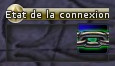
Compact

You can receive an automatic email notification on each new release of this skin.
For this, just register on lotrointerface.com (it's free) with a valid email address,
then click on the "add to my favourites" button on this page
(near the top right of the page, below download button).
You can turn this option ON and OFF here (first frame).




 11-10-2023, 12:25 PM


 A Clean, Simple, Beautiful Skin!


