 |
 |
 |
|
 |


|
|||||||


|  |
| ||||||||||||||||||||||||||||||||||||||||||||||||||||||||||||||||||||||||||||||||||||||||||||||||||||||||||||||||||||||||||||||||||||||||||||||||||||||||||||||||||||||||||||||||||||||||||||||||||||||||||||||||||||||||||||||||||||||||||||||||||||||||||||||||||||||||||||||||||||||||||||||||||||||||||||||||||||||||||||||||||||||||||||||||||||||||||||||||||||||||||||||||||||||||||||||||||||||||||||||||||||||||||||||||||||||||||||||||||||||||||||||||||||||||||||||||||||||||||||||||||||||||||||||||||||||||||||||||||||||||||||




 |
|
 05-12-2023, 08:44 AM
|
||||
|
The Wary
Forum posts: 0
File comments: 21
Uploads: 3
|
Re: Re: Re: Outdated
Quote:
you may find the locale-file for french language at this path: "C:\Users\**Your Name**\Documents\The Lord of the Rings Online\Plugins\HabnaPlugins\HugeBag\Locale\fr.lua" . But if you want to change that file, you have to use UTF-8 Encoding. Best way is to use Notepad++ (Freeware) for that and make a backup before you overwrite that file. If you dont do so, the plugin may not work anymore. Also you must use specific Code for special characters, as described in Code.txt (e.g.: ò=\195\178, so you have to use \195\178 for displaying an ò-Character), that will be found at the same path. Last edited by burgus34 : 05-12-2023 at 08:49 AM. |
|||


|


|

|
05-12-2023, 05:16 AM
|
||||
|
The Wary
Forum posts: 0
File comments: 4
Uploads: 0
|
Re: Re: Outdated
Quote:
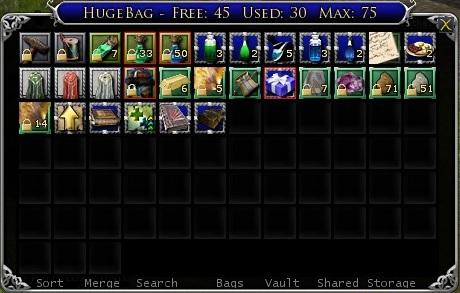
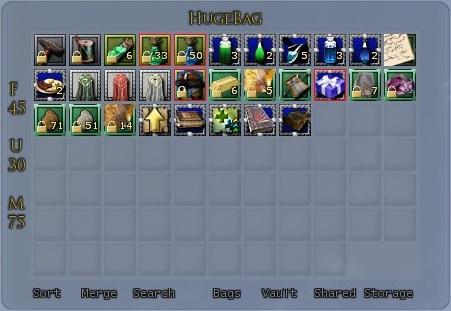
Thanks for your work on this plugin ! I have a question about it. I'm playing with the game in french and I use the window mode for this plugin. When I use the shorter name in the bottom part of the bags, I see well "T F R B V SS", but when I use the longer name, I only see "Sacs Coffre Stockage Partagé" (Bags Vault Shared Vault). i tried to look in the different lua files because I thought maybe a variable is missing in the layout, but I didn't find anything. Do you have an idea about how to make appear the text for "sort, merge..." ? Regards, Alktor Last edited by Alktor : 05-12-2023 at 05:18 AM. |
|||
|
|
|
|
04-09-2023, 12:00 AM
|
||||
|
The Wary
Forum posts: 0
File comments: 21
Uploads: 3
|
Re: Outdated
Quote:
Yes this is obsolete, but some of us have reworked on it and make it useable. Some Comments before Nadia have postet a working version of this, with all of the patches included to make it work again. The Download can be found here (see the Post from Nadia - thx for that!): https://hdro-guide.de/wp-content/upl...HugeBag2.0.zip I have checked this, because I've reactivated my account and it worked fine for me, but it must be installed by Hand. So first install the HugeBag-Plugin with the PluginCompendium und overwrite the content with the files in the new archive you have downloaded and unziped. The Structure is the same (see instruction for install to locate the drawer for installation). Last edited by burgus34 : 04-09-2023 at 12:20 AM. |
|||
|
|
|
|
04-08-2023, 06:45 PM
|
|||
|
The Wary

Forum posts: 0
File comments: 1
Uploads: 0
|
Outdated
This plugin unfortunately is outdated, it does not work with the current LOTRO game update.
This plugin needs to be re-categorized as outdated; so those who use the LOTRO Plugin Compendium, don't think that this still works correctly. I also do not know if the author themselves will ever update this again, since I have sent in a bug report; and there are still bug reports unanswered, besides mine. |
||
|
|
|
|
02-17-2023, 02:11 AM
|
||||
|
The Undying
Forum posts: 341
File comments: 981
Uploads: 20
|
Re: Beyond the edge
Quote:
ex: for a window TempWindow of class Turbine.UI.Window, you can create a handler: Code:
TempWindow.PositionChanged=function(sender,args)
    local tmpLeft=TempWindow:GetLeft()
    local tmpTop=TempWindow:GetTop()
    local setPos=false
    local screenWidth=Turbine.UI.Display:GetWidth()
    local screenHeight=Turbine.UI.Display:GetHeight()
    if tmpLeft+TempWindow:GetWidth()>screenWidth then
        tmpLeft=screenWidth-TempWindow:GetWidth()
        setPos=true
    end
    if tmpTop+TempWindow:GetHeight()>screenHeight then
        tmpTop=screenHeight-TempWindow:GetHeight()
        setPos=true
    end
    if setPos then
        TempWindow:SetPosition(tmpLeft,tmpTop)
    end
end
Since you said that you don't know Lua, the best thing would be to find a plugin that performs the action you are looking for - most of my plugins support some limitations on some of their windows - and look into their Lua files, locate the PositionChanged event handler for a window that limits it's position on screen and see how it is implemented. That's the same technique that you would use to learn about any aspect of Lua code, find and example and dissect it to see how it works. |
|||
|
|
|
|
02-17-2023, 12:51 AM
|
|||
|
The Wary

Forum posts: 2
File comments: 45
Uploads: 2
|
Beyond the edge
I have a question for the programmers among you; how do I make it so that a script cannot be moved beyond the monitor border?
It bothers me that HugeBag can be moved beyond the edge, I would very much like to change that. I hope someone can help me with this.  |
||
|
|
|
|
02-16-2023, 09:57 AM
|
|||
|
The Wary
Forum posts: 2
File comments: 45
Uploads: 2
|
I have now taken the liberty of bundling the plugin with a large part of the fixes contributed by the community and uploading it. I have also deleted all data, restarted the plugin quasi once and it works without problems.
Included are the fixes for: - Original pocket windows stay closed - Carry-alls Fix - Category Fix - Patch for Sort - Patch for 135 Slots - New German translation A huge thanks to XFaern, Richard M Nixon and burgus34 for the fixes and patches, since I don't know a thing about lua.^^ Download-Link: https://hdro-guide.de/wp-content/upl...HugeBag2.0.zip |
||
|
|
|
|
07-23-2022, 03:46 PM
|
|||
|
The Wary
Forum posts: 0
File comments: 1
Uploads: 0
|
 Thank you so much!
For now I have found a workaround:
- use default inventory interface to put all inventory slots into Bag 1 - assign the key you want to use for inventory to "Bag 2" - press the "Bag 2" button and rejoice - HugeBag will open, but default will not Still looking into why the intended bugfix by Turbine does not work with HugeBag out of the box. |
||
|
|
|
|
05-17-2022, 09:33 AM
|
|||
|
The Wary
Forum posts: 1
File comments: 2
Uploads: 0
|
Nice plugin except the default bags are still showing.
Agreed. Is there no way to hide the default bags, isinit that the entire point of using a separate bag plugin? Honestly, quite mind boggling. |
||
|
|
|
|
01-02-2022, 06:01 AM
|
|||
|
The Wary
Forum posts: 0
File comments: 1
Uploads: 0
|
"got the message;
...line\Plugins\HabnaPlugins\HugeBag\settingsWidge t.lua:40: bad argument #2 to 'format' (number expected, got string) and the plugin not work..." Just modify line 17 to if GLocale == "en" or GLocale == "fr" then tA, tR, tG, tB = 0.3, 0.3, 0.3, 0.3; IF you play in FR, for example, and this plugin will still work! Last edited by chander : 01-02-2022 at 06:01 AM. |
||
|
|
|
|
09-19-2021, 05:22 AM
|
|||
|
The Wary
Forum posts: 0
File comments: 17
Uploads: 0
|
got the message;
...line\Plugins\HabnaPlugins\HugeBag\settingsWidge t.lua:40: bad argument #2 to 'format' (number expected, got string) and the plugin not work... |
||
|
|
|
|
08-04-2021, 10:04 PM
|
|||
|
The Wary
Forum posts: 0
File comments: 1
Uploads: 0
|
Nice plugin except the default bags are still showing.
|
||
|
|
|
|
06-25-2021, 01:14 PM
|
|||
|
The Wary
Forum posts: 0
File comments: 8
Uploads: 0
|
HugeBag dosen't work with 64Bit client - Please help!!!!
Hi
This Plugin is very special and absolutely cool. Is it possible to fix this plugin that this is running under the 64bit client? The errors are:
Cheers Hawk |
||
|
|
|
|
04-05-2021, 03:39 PM
|
|||
|
The Undefeated
Forum posts: 6
File comments: 18
Uploads: 0
|
How do I hide the normal bags so that only the HugeBag inventory shows up?
|
||
|
|
|
|


All times are GMT -5. The time now is 03:20 AM.
 |
© MMOUI
vBulletin® - Copyright ©2000 - 2024, Jelsoft Enterprises Ltd. |
 |
