 |
| Category: Bags, Bank & InventoryAlt Inventory |
| Interface Information |
|
| Name: |
Alt Inventory  |
| Author: |
|
| Date: |
12-03-2023 10:54 AM |
| Size: |
279.31 Kb |
| Version: |
3.10 |
| Rate File: |
 |
Alt Inventory 3.0
|
| |
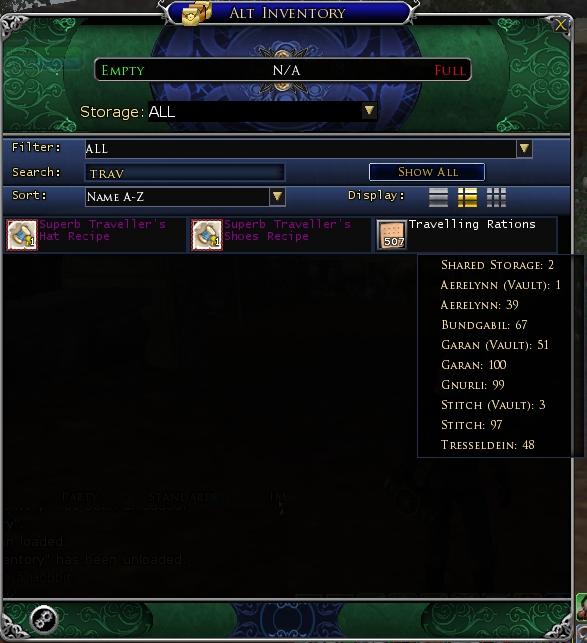
Using filter on "ALL" display to quickly find all Travelling Rations. Detail pop-up shown
|
| |
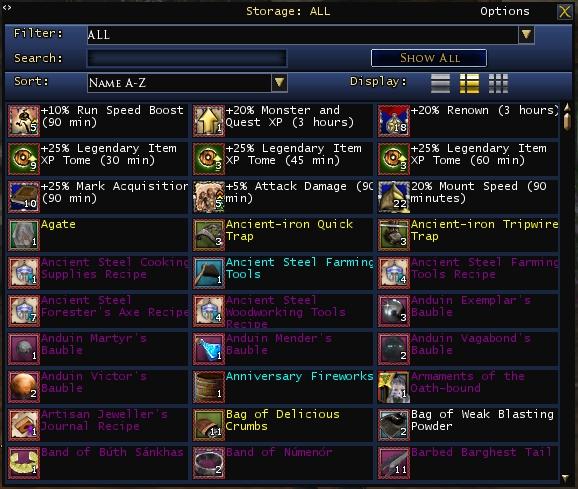
Minimal Header view for those who don't want the "Turbine Vault" look.
|
| |
If you are an altaholic like me, you have spent countless hours logging characters in and out looking for where you put crafting supplies or trophies. Alt Inventory allows you to view a snapshot of your alt's bag inventory, vault and shared storage without leaving game so that you know which character has how many of which items.
NOTE: THIS AND ALL OTHER INVENTORY PLUGINS ONLY HAVE ACCESS TO BAGS, EQUIPPED ITEMS, VAULT AND SHARED STORAGE CURRENTLY. There is no access to Housing Storage or Wardrobe. As soon as Turbine grants Lua plugins access to any other form of storage I and most other developers will add that to our plugins.
Alt Inventory allows you to quickly and easily view all of your inventory for your character, your alts, all vaults, and shared storage in one view. You can filter the display by item category or enter a case-insensitive search (accent-insensitive as well so this works for DE and FR clients as well!) for an item by name. You can sort the view by Name, reverse Name, Category or Quality. You can also choose to display icons and text, text only or icons only. The window is resizable and movable, will disappear for clean screenshots and can be opened from an icon when desired or by the chat command "/altinventory show".
New for version 3.09, you can now define Groups for your Inventory. See the version log and latest post for more details.
As this is a fairly complicated new feature, I will be publishing a video demonstrating how to define and use Groups.
Version 3.0 now focuses only on inventory display. The Item Tracking features are now a separate plugin, ItemTracker and all non-inventory displays will be in AltViewer. This separation of functionality allows the plugin to function far more efficiently as well as allowing all of the inventories to be merged into a single display.
Quantity details can be viewed by hovering over the name of the item. In the "ALL" view, this will display how many of the item are in each type of storage by character. In an individual storage view (single character, vault or Shared Storage) the detail will show how many are in each container within that storage ("Chests" for vaults and Shared Storage and "Bags" for character).
Tooltips will display when you hover over the icon of any item that your current character can access - if you open your vault, then any item in the vault will show a tooltip even after leaving the vault-keeper until you unload the plugin. Items with a grey and red dotted border will not display a tooltip.
Known Issues:
Future plans: Fix known issues
___________________Version Log____________________
NOTE: I have cleared the version log since 3.0 is a significant code change from prior versions and the bugs/fixes from the prior versions are no longer relevant. The change log now starts with version 3.01. The "Version History.txt" however does cover all prior versions.
Ver 3.10
Fixed bug that prevented resizing undocked group panels
Fixed bug that would cause undocked panels with no items to show a gold background due to the item list being empty
Fixed bug in display mode buttons (text only, icon+text, icon only) which generated an error and prevented switching display modes.
Added "Save as Default" and "Load Default" to Group maintenance. Now you can define your group setup once, save it as a default setup and then load it on each alt so you don't have to manually set it up all over again for each alt. Once loaded, you can still customize each alt's view if desired, this just makes it easy to save any common groups you may want to load on an alt
Zoom mechanism and UI fonts have been completely revamped to enable icon zooming and user selected fonts while still enabling the custom groups. This should be a more flexible approach, allowing users to select the size/face of the font to use and eliminating some odd scaling issues as well as the resizing race condition that was added with the Groups functionality that was locking up the client when zoomed.
Updated options window to support user selected fonts
Added Timing Delay to options window - this delay is used to fix some of the bizarre timing issues with rendering embedded controls using stretchmode. If you are experiencing issues with the item controls not rendering properly at zooms>1 then you can try to increase these times slightly - it will slow down the response of the window to many events but should eliminate many issues with rendering. This time is expressed in seconds, so .01 will add 1 hundredth of a second to the delay. Note, this delay ONLY affects the plugin when zoom>1
Fixed a long standing bug in drop-down list sizing that cropped off the bottom of the list at certain font sizes
Fixed a bug introduced in 3.09 that could generate an error message (but was otherwise harmless) when detaching items from mail if the UI had not yet been displayed
Added a height lock to undocked group windows. You can now specify a specific height for a window. You can enable height locking on the Group Maintenance window or by right clicking the Title bar in the group window and selecting "Max Height" from the menu. Once height locked, a border will appear at the bottom of the window when the group is not docked. You can drag that border to resize the group window. If you right click the border, you can turn height locking off and the window will again grow and shrink based on the number of items in the group.
This will help alleviate the situation where a group extends all the way to the bottom of the screen before displaying a scrollbar but the user would like a smaller window (with a scrollbar).
Improved some processng (although there is still room for further improvement) when swapping inventory dislays or filtering/searching.
Note: the first access to the "All" inventory display after loading the plugin will still have a significant delay (usually less than 10 seconds but it can be longer if you have a great many alts, a mechanical hard drive, or a slower computer) since the data is not accessed until "All" is selected to cut down on plugin load time.
Note: if using zoom>1, you will likely see icons briefly displaying outside the plugin's window as you change displays, scroll, expand/collapse, etc. This is due to a bug in the SetStrechMode API call that allows controls to display outside their parent (bounding) control which requires a calculation to determine which icons need to be hidden to prevent displaying outside their parent. This means that items being scrolled will have their icons disappear at the top and bottom of the list so as not to display partially outside the list. It's not perfect but works.
Implemented the improved DropDownList (from MoorMap) for the Filter list. This allows typing part of a category name and the filter list will display only those filters that contain the typed portion - with the growing list of categories, currently over 250, this seemed a useful feature to implement here. Note, the category filter list will only display the categories that actually exist in one of the currently displayed windows (either docked or un-docked) so the entire 256 list of entries may not always be shown even without user entered text (there's no point allowing filtering on a category that has no items on the current display, the absence of the filter should be sufficient if you really want to know that there are no matching items)
Fixed an issue that arose when SSG removed the "Corsair" item category in U38.
Fixed bug in GroupMaint that could cause an error creating a new group depending on current display settings.
Updated DE/FR translations to include missing translations upto U38 (inclusive)
Ver 3.09.01 This is just a couple of bug fixes for 3.09. Note, Zoom remains disabled, this release only fixes the two bugs noted below.
Fixed Search/Filter bug - search text and filter choices are now properly applied
Fixed Display Mode - the Display Mode (text only, icon & text, icon only) is now properly applied
Ver 3.09
NOTE: ZOOM IS TEMPORARILY DISABLED IN VER 3.09 - due to a client crash issue arising from a conflict with the new group displays, the zoom feature is currently disabled. I will be looking into this ASAP and hope to have a solution soon. Unfortunately, due to the nature of the crash, it may take awhile to debug it.
Users that wish to continue using Zoom should NOT install version 3.09
Updated the Item Category table for all of the categories missing through U37
Added display Groups. You can now define groups for your inventory displays. The items displayed in a group can be defined by category or item name or custom item name (for unique crafted items)
Item Groups can now have a floating display or be docked in the regular inventory display. When floating, they will be visible at all times (except when the UI is hidden) but can be collapsed so that only the header shows.
All Item Groups can be collapsed, whether floating or in the regular inventory display.
So, if you want the gear you switch to for DPS to all be displayed together, create a Group named "DPS" and then drag each of your DPS gear items to that group. Note, items are still unique, so they can only exist in one group at a time. If an item is used for DPS and, say, tanking, it would be best to have a "Gear" group as well for such shared items
When docked, Groups can be moved up or down in the display list so that you can better organize your groups.
The initial "Main" group is a catch-all and can not have any criteria added to it. All items not assigned to another group will be displayed in the main group. You can, however rename the Main group (but it will still be the main group)
Each type of inventory can have its own set of display groups, ALL, Bags, Vault, and Shared. You can alternately set groups to use the Bags display groups if desired.
To create a new group, simply right click on the display header or any group header and choose "New", fill in a name and some criteria (or it will be empty) and click "Add".
To rename a group or update criteria, simply right click the group header, update the name or add the items to criteria (you can type names or drag an instance of the item to one of the criteria lists) and click Save.
To delete a group, right click the header and select "Delete" - there is a confirmation dialog, but after confirming, it can not be undone (you will have to recreate the group)
To add criteria, either type a name and click "Add" or drag an item to one of the criteria lists. You can manually check/uncheck categories in the Category criteria. Note, if you try to add a name or category to more than one group of the same inventory type (bags, vault, shared, etc) you will get an error. Remove the item/category from the existing group before trying to add it to a different group.
To remove criteria, on the group maintenance window, either right click a criteria and click "Remove" or click the "Clear" button to remove all criteria of that type from the group.
Ver 3.08
Fixed bug in "Show ALL" that did not automatically refresh view after resetting search text.
Added Equipped Items display - character name with ' (EI)' - there is no "ALL" version of EI (it wouldn't make sense).
Note: Equipped Items do not count toward your inventory totals since they are not in your bags or storage
Due to limitations in the API, tooltips will only display for the logged in character - only the Item Name is displayed when hovering over equipped items for alts
Known issue: the "item wear" mannequin currently only updates when the display is refreshed
Ver 3.07
Added ability to Zoom the interface for large screens. To zoom, open the options window and select one of the zoom options at the bottom of the General Options tab.
NOTE: Due to underlying inconsistancies in the handling of sizing when a window is stretched (zoomed), the built-in resizing had to be disabled. To resize the inventory window when zoomed, hold either Alt or Shift and then drag the border (or any of the background) of the window to resize
Fixed bug in compact view that would sometimes cause the window to resize improperly.
Fixed but that caused a creep in the positioning and size of the compact window between unloading and reloading the plugin.
Ver 3.06
Fix due to SSG Lua API Listbox change
Ver 3.05
Fixed bug reported by bsmorgan when refreshing vault for "ALL" characters.
Added "Load with ALL View" option requested by bsmorgan
Ver 3.04 Implemented workaround for the bug introduce by U13 when suppressing the built in bags.
Ver 3.03 Minor bug fixes
Fixed bug when turning on "Current bags display total items" with current character selected and then adding an item to inventory reported by Bill Magill.
Reimplemented the "/altinventory toggle" command
Fixed bug when clicking Cancel in Options dialog reported by RJFerret.
Ver 3.02
Re-implemented the ability to utilize the current character items directly from AltInventory
Re-implemented drag/drop for current items both into and out of AltInventory. Note, drag/drop will ONLY work when displaying the current character's bags.
Re-enabled "Replace Bags" option.
Added "Use Mini Icon" option. Changes the 32x32 square icon to a 16x16 round icon suitable for placement on the compass ring.
Fixed a bug which sometimes prevented the Sort from being properly applied when adding an item (items were sometimes being added in incorrect positions).
Fixed the missing quantity column in Text only display
Doubled the width of the item entries for Text only display to allow for extra long item names
Ver 3.01
Minor bug fix for icon positioning typo in DE and FR clients
____________________Installation__________________ __
To install the Alt Inventory plugin, unzip the entire zip file to your Plugins folder. If you had the game running when you installed the plugin, you will have to type "/plugins refresh" or close and restart the game.
To run the plugin, simply load it. Type "/plugins load altinventory" in your game chat window or set the plugin to load automatically from the Turbine Plugin Manager (type "/plugins manager" in chat or access from the System menu).
When you first close the Alt Inventory window, the icon will appear in the lower left corner of your display, you can drag it to any location you want by holding Ctrl while you drag it and the next time it loads it will remember it's location.
|
| Archive List (Old Versions) |
File Name |
Version |
Size |
Author |
Date |
|
3.09.01 |
260.07 Kb |
Garan |
10-22-2023 09:12 AM |
|
3.09 |
258.47 Kb |
Garan |
10-07-2023 07:04 PM |
|
3.08 |
219.51 Kb |
Garan |
09-18-2023 06:39 PM |
|
3.07 |
213.94 Kb |
Garan |
09-26-2021 11:26 AM |
|
3.06 |
209.75 Kb |
Garan |
10-09-2017 04:13 PM |
|
3.05 |
206.50 Kb |
Garan |
06-11-2015 06:09 AM |
|
3.04 |
206.31 Kb |
Garan |
04-20-2014 10:34 PM |
|
3.03 |
206.07 Kb |
Garan |
02-25-2013 04:11 PM |
|
3.02 |
205.90 Kb |
Garan |
02-14-2013 11:04 PM |
|
3.01 |
200.67 Kb |
Garan |
02-04-2013 08:35 PM |
|
3.0 |
200.58 Kb |
Garan |
02-04-2013 09:03 AM |
|
2.11c |
402.22 Kb |
Garan |
12-09-2012 09:54 PM |
|
2.11b |
404.23 Kb |
Garan |
11-27-2012 10:18 PM |
|
2.11a |
410.86 Kb |
Garan |
05-18-2012 07:21 AM |
|
2.11 |
410.67 Kb |
Garan |
05-17-2012 03:21 PM |
|
2.10 |
410.24 Kb |
Garan |
05-15-2012 10:00 PM |
|
2.09 |
348.21 Kb |
Garan |
04-27-2012 10:28 PM |
|
2.08 |
347.02 Kb |
Garan |
04-04-2012 11:50 PM |
|
2.07 |
361.14 Kb |
Garan |
02-17-2012 01:13 PM |
|
2.06 |
339.83 Kb |
Garan |
01-05-2012 12:11 AM |
| File Statistics |
| User Rating: |
|
| Downloads: |
329778 |
| Views: |
652424 |
| Favorites: |
221 |
| Uploaded By: |
|
| Last Modified: |
12-03-2023 12:55 PM by Garan |
|
|  |
|
 |
|
 04-22-2024, 01:30 PM
|
|
The Undying
Forum posts: 341
File comments: 981
Uploads: 20
|
Odd new bug
An odd bug has started showing up in floating group displays which causes the list of items to disappear (and sometimes the entire group display disappears). This just started happening after the last game update so I need to figure out what changed to cause this which might take some time as the code that determines item visibility is quite complicated due to issues with zoomed icons  This IS however at the top of the ToDo list as it breaks a significant part of the functionality of AltInventory.
EDIT: Well, I've identified part of the problem but exposed another odder underlying problem. Hopefully I will be able to track that one down and get it all fixed soon.
Last edited by Garan : 04-26-2024 at 06:51 PM.
|


|


|
|
01-31-2024, 04:28 PM
|
|
The Wary
Forum posts: 0
File comments: 3
Uploads: 0
|
Quote:
|
If the LI has been given a custom named during reforge you should be able to enter that custom name in the upper list in the group maintenance and the LI should then sort correctly. Using the generic names may not work real well due to how SSG handles LI names.
|
That's it, thank you. In addition is case sensitive in custon name.
Greetings |
|
|
|
|
01-29-2024, 01:35 PM
|
|
The Undying
Forum posts: 341
File comments: 981
Uploads: 20
|
Quote:
|
Originally Posted by Raguflo
An issue in relation to new group feature is that I can't move LI to a new group for swapping purpose. Rest of items seem moving well.
|
If the LI has been given a custom named during reforge you should be able to enter that custom name in the upper list in the group maintenance and the LI should then sort correctly. Using the generic names may not work real well due to how SSG handles LI names. |
|
|
|
|
01-29-2024, 12:45 PM
|
|
The Wary
Forum posts: 0
File comments: 3
Uploads: 0
|
Quote:
Thanks for the feedback. I'm on the road for the next month or so and will not be able to dig into this for awhile.
There is a glitch that I am working on which causes the icons to be blank at times, particularly when using the zoomed icons or filters. I hope to have that resolved soon.
I did noticed in the image you posted that you are using the compact view. I will have to do some more testing with that view. However, the image you posted seems to demonstrate the plugin working correctly - that is, you have the icon+text mode selected and all of the icons and text are displaying correctly for the items in the image. I'm not quite sure what you were trying to show. Only the currently selected display option is gold to indicate that it is currently selected - the others are not disabled, just not selected. If you are unable to change display modes, that might indicate another control conflicting with the buttons, which might be a bug in the compact view. I will test it when I am back home.
|
Sorry for misunderstanding. That image is one of the picture that you post for this plugin. I wanted to say I don't see my plugin as that picture, only descriptions and some icons as you commented before. I usualy use the mosaic display for this same reason.
An issue in relation to new group feature is that I can't move LI to a new group for swapping purpose. Rest of items seem moving well. |
|
|
|
|
01-29-2024, 08:26 AM
|
|
The Undying
Forum posts: 341
File comments: 981
Uploads: 20
|
Quote:
|
Originally Posted by Raguflo
I have an issue displaying inventory. Only I can see the third one of the display options correctly.
The other two as this image:
https://www.lotrointerface.com/downloads/full2591.jpg
I see only description of some items, not for all. Sometimes I can refresh window and I can see a few more, but not for all again.
In addition in mosaic display, sometimes I can't see all the items in my inventory until I press show all button. It seems that can't display a new row automatically.
Maybe for the new group release? A good idea indeed for swapping into builds.
Grettings |
Thanks for the feedback. I'm on the road for the next month or so and will not be able to dig into this for awhile.
There is a glitch that I am working on which causes the icons to be blank at times, particularly when using the zoomed icons or filters. I hope to have that resolved soon.
I did noticed in the image you posted that you are using the compact view. I will have to do some more testing with that view. However, the image you posted seems to demonstrate the plugin working correctly - that is, you have the icon+text mode selected and all of the icons and text are displaying correctly for the items in the image. I'm not quite sure what you were trying to show. Only the currently selected display option is gold to indicate that it is currently selected - the others are not disabled, just not selected. If you are unable to change display modes, that might indicate another control conflicting with the buttons, which might be a bug in the compact view. I will test it when I am back home. |
|
|
|
|
01-28-2024, 10:16 AM
|
|
The Wary
Forum posts: 0
File comments: 3
Uploads: 0
|
I have an issue displaying inventory. Only I can see the third one of the display options correctly.
The other two as this image:
https://www.lotrointerface.com/downloads/full2591.jpg
I see only description of some items, not for all. Sometimes I can refresh window and I can see a few more, but not for all again.
In addition in mosaic display, sometimes I can't see all the items in my inventory until I press show all button. It seems that can't display a new row automatically.
Maybe for the new group release? A good idea indeed for swapping into builds.
Grettings |
|
|
|
|
01-17-2024, 10:59 AM
|
|
The Undying
Forum posts: 341
File comments: 981
Uploads: 20
|
Quote:
|
Originally Posted by Vuldyn
Just got done fully setting up Alt Inventory Groups, and I must say they are incredibly useful! Not only is it great to be able to sort your inventory in a custom fashion, but its also turned out to be the best gear-swapping plugin I've found. Being able to have specific 'DPS' and 'Tank' groups has made it very easy to re-equip without accidentally equipping an old piece.
|
Thanks, glad you're finding it useful. |
|
|
|
|
01-17-2024, 10:27 AM
|
|
The Wary
Forum posts: 0
File comments: 3
Uploads: 0
|
Just got done fully setting up Alt Inventory Groups, and I must say they are incredibly useful! Not only is it great to be able to sort your inventory in a custom fashion, but its also turned out to be the best gear-swapping plugin I've found. Being able to have specific 'DPS' and 'Tank' groups has made it very easy to re-equip without accidentally equipping an old piece.
|
|
|
|
|
01-02-2024, 06:00 PM
|
|
The Undying
Forum posts: 341
File comments: 981
Uploads: 20
|
Quote:
|
Originally Posted by Vuldyn
Hi Garan,
I've just recently migrated over to using this plugin as an all-in-one inventory and alt inventory solution, and it is working quite well.
I would appreciate an easy 1-click button that returns my view to my current character's inventory. Perhaps only shown if you choose to replace in-game bags?
A simple button would replace the common use-case of getting back to my own inventory after making a search or looking in someone else's vault etc.
Thanks!
|
Hi Vuldyn,
Thanks for the feedback. Oddly enough, I just ran into a similar issue myself, I had forgotten that I had searched another character's inventory and was wondering why an item I was looking for was not showing up in an undocked window. I agree that a button or other feature to not only return you to your own inventory but to also act as a reminder that the current display is not your own inventory would be handy. I will be adding this to the ToDo list. |
|
|
|
|
01-02-2024, 05:34 PM
|
|
The Wary
Forum posts: 0
File comments: 3
Uploads: 0
|
Hi Garan,
I've just recently migrated over to using this plugin as an all-in-one inventory and alt inventory solution, and it is working quite well.
I would appreciate an easy 1-click button that returns my view to my current character's inventory. Perhaps only shown if you choose to replace in-game bags?
A simple button would replace the common use-case of getting back to my own inventory after making a search or looking in someone else's vault etc.
Thanks!
|
|
|
|
|
12-03-2023, 12:53 PM
|
|
The Undying
Forum posts: 341
File comments: 981
Uploads: 20
|
Ver 3.10
Ver 3.10 is now available.
First, this version properly fixes the issue with the change SSG made to the Corsair->Mariner category code (no need to manually edit the category file).
Second, this version fixes a number of issues with the group features, particularly conflicts with the zoom feature and inefficiencies in filter/sort features. The groups should now work considerably smoother - if you ever notice items that don't appear to display in an undocked group, you should be able to fix this by docking the group and then undocking the group (right click the header to open group maintenance, click the docked checkbox, save the group, uncheck the docked checkbox and re-save the group).
Third, this version re-enables the ability to set a zoom factor for item icons. Note, there are a number of possible glitches due to bugs in the API - SetStretchMode is an undocumented, unsupported feature that was never fully implemented by Turbine, so the zooming capability is a tiny bit flaky. Most notably, when scrolling an inventory list, icons will tend to render outside their parent control (you will see part or all of an icon outside its window) until they get manually clipped by the plugin. The manual clipping is delayed in order to catch these odd cases but depending on your machine's speed, the delay may not be sufficient. If you see icons continually being displayed outside the window that do not immediately (in less than a second) get removed, you can increase the delay in the settings, the 'Timing Delays' tab.
Known issues:
There are a few edge cases in the display of items, particularly in undocked displays. I will continue to track down, account for these and fix them in a future update.
Most of the interface now supports user scalable fonts. The group headers are still a fixed font and will be updated in a future release. The button controls provided by the API have a fixed height (and thus fixed font) - this will also be addressed in a future update.
|
|
|
|
|
11-09-2023, 07:10 PM
|
|
The Wary
Forum posts: 4
File comments: 2
Uploads: 0
|
Re: Re: AltInventory won't load since LOTRO's update 38
Please read my post regarding the problem with U38 immediately before your post. This is a problem caused by a change that SSG made and not your file/folder hierarchy.
Thanks
Thanks bigtime! It is my fault, I didn't read the whole thread first!
I'll get right to it.
Thanks again ~ Sam
|
|
|
|
|
11-09-2023, 05:26 PM
|
|
The Undying
Forum posts: 341
File comments: 981
Uploads: 20
|
Re: AltInventory won't load since LOTRO's update 38
Quote:
|
Originally Posted by SamGoofus
Hi Garan,
AltInventory has been my #1 plugin for some time, I hate to say I'm having problems!
For some reason, after LOTRO added update 38 (yesterday) all of my plugins went *poof* and I had to reload them from the Compendium. I don't use a lot, and they have all worked together in the past. When I logged in after the update, they all loaded fine, except AltInventory.
I checked and found this post, so I installed Version 3.09, and got the same results. Trying what I could, even Version 3.08, got the same results. I think.
When I try to load it with the Plugin Manager in the game, the message is this:
…\Plugins\GaranStuff\AltInventory\InventoryWindow. lua:1312: table index is nil
…ings Online\Plugins\GaranStuff\AltInventory\Main.lua:56 8: Failed to import package "GaranStuff.AltInventory.InventoryWindow"
…\Plugins\GaranStuff\AltInventory\InventoryWindow. lua:1312: table index is nil
…ings Online\Plugins\GaranStuff\AltInventory\Main.lua:56 8: Failed to import package "GaranStuff.AltInventory.InventoryWindow"
…\Plugins\GaranStuff\AltInventory\InventoryWindow. lua:1312: table index is nil
…ings Online\Plugins\GaranStuff\AltInventory\Main.lua:56 8: Failed to import package "GaranStuff.AltInventory.InventoryWindow".
I won't pretend to understand it, but something about it says I've been doing something stupid, and it has to do with file/folder hierarchy! My actual 'The Lord of the Rings Online' folder in Documents has changed as well, taking away my Music folder and some clutter, leaving only CEF, Plugin Data, and Plugins. I did reassemble the rest from other copies of the folder I have saved.
So, what did I do to your poor plugin? I'm so ashamed…
Thanks ~ Sam
|
Please read my post regarding the problem with U38 immediately before your post. This is a problem caused by a change that SSG made and not your file/folder hierarchy.
Thanks
Last edited by Garan : 11-09-2023 at 06:52 PM.
|
|
|
|
|
11-09-2023, 04:18 PM
|
|
The Wary
Forum posts: 4
File comments: 2
Uploads: 0
|
AltInventory won't load since LOTRO's update 38
Hi Garan,
AltInventory has been my #1 plugin for some time, I hate to say I'm having problems!
For some reason, after LOTRO added update 38 (yesterday) all of my plugins went *poof* and I had to reload them from the Compendium. I don't use a lot, and they have all worked together in the past. When I logged in after the update, they all loaded fine, except AltInventory.
I checked and found this post, so I installed Version 3.09, and got the same results. Trying what I could, even Version 3.08, got the same results. I think.
When I try to load it with the Plugin Manager in the game, the message is this:
…\Plugins\GaranStuff\AltInventory\InventoryWindow. lua:1312: table index is nil
…ings Online\Plugins\GaranStuff\AltInventory\Main.lua:56 8: Failed to import package "GaranStuff.AltInventory.InventoryWindow"
…\Plugins\GaranStuff\AltInventory\InventoryWindow. lua:1312: table index is nil
…ings Online\Plugins\GaranStuff\AltInventory\Main.lua:56 8: Failed to import package "GaranStuff.AltInventory.InventoryWindow"
…\Plugins\GaranStuff\AltInventory\InventoryWindow. lua:1312: table index is nil
…ings Online\Plugins\GaranStuff\AltInventory\Main.lua:56 8: Failed to import package "GaranStuff.AltInventory.InventoryWindow".
I won't pretend to understand it, but something about it says I've been doing something stupid, and it has to do with file/folder hierarchy! My actual 'The Lord of the Rings Online' folder in Documents has changed as well, taking away my Music folder and some clutter, leaving only CEF, Plugin Data, and Plugins. I did reassemble the rest from other copies of the folder I have saved.
So, what did I do to your poor plugin? I'm so ashamed…
Thanks ~ Sam
|
|
|
|
|
11-08-2023, 07:54 PM
|
|
The Undying
Forum posts: 341
File comments: 981
Uploads: 20
|
Problem with U38
In U38, SSG changed the Turbine.Gameplay.ItemCategory.Corsair to Turbine.Gameplay.ItemCategory.Mariner
This will be properly addressed in 3.10 and may be published as a hotfix 3.09.02 if 3.10 is delayed much further. Anyone who wishes to fix their local copy before that can simply use a text editor to open the file ItemCategory.lua in the "...plugins\GaranStuff\AltInventory" folder and change all instances of "Corsair" to "Mariner". There should be two instances of "Turbine.Gameplay.ItemCategory.Corsair" and 3 instances of "Corsair". Once you have changed these, save the file and the plugin should load properly.
|
|
|
|
All times are GMT -5. The time now is 06:11 AM.
|
|




 This IS however at the top of the ToDo list as it breaks a significant part of the functionality of AltInventory.
 01-31-2024, 04:28 PM


