 |
| Category: RolePlay & MusicSongbook |
| Interface Information |
|
| Name: |
Songbook  |
| Author: |
|
| Date: |
04-06-2021 11:26 AM |
| Size: |
129.01 Kb |
| Version: |
0.93 |
| Rate File: |
 |
Overview
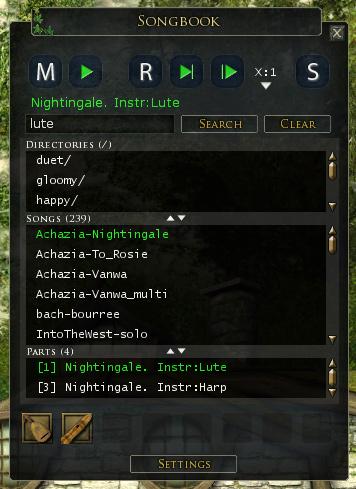
Songbook is a plugin for browsing your abc song files and playing them with a click of a button. The plugin consists of two parts, an in-game plugin which displays the song library, and an external windows program that generates a list of your abc song files in a format that the plugin can read. The external program is realized as a HTA file (VBScript) so that it's fairly easy to check for safety.
Features
- Browse all your abc files in-game
- Toggle music mode
- Select and play a song just by clicking with your mouse
- Support for starting synced play and making a ready check
- Moveable and resizable window
- Support for subdirectories
- Support for songs with multiple parts
- Display of actual song names and not just the filename
- Complimentary multi part abc file, Oolannin sota!
- Optional song parts display which can be used to view and directly select parts.
- Support for German clients (big thanks to Thorsongori for translations and testing!)
- Support for French clients (big thanks to Vevenalia for translations and testing!)
- Search feature
- Custom commands for pasting song information to a chat channel *experimental*
- slots for instruments or other items/skills (which are saved per character)
Installation
- If you haven't used plugins before it's good to read this post first
- Unzip the plugin to your 'Documents/The Lord of the Rings Online/Plugins' folder
- If you have upgraded from a previous version, you probably have to run the songbook.hta file before your song library works again. See instructions below.
How to use
- IMPORTANT - Before loading the plugin, use the supplied songbook.hta file (or this native windows application) to build your library. Double click the file to run it, or just make a shortcut to it and place it anywhere you want. Run it whenever you have made changes to your song library. You can also use a great tool by Arnhor, especially if you have problems with building being slow.
- To load the plugin type /plugins load songbook.
- Click M button to toggle music mode (make sure you have an instrument equipped).
- Select a song by clicking it and then press play button to start playing. There's also buttons for synced play and making a ready check.
- Click and drag from the bottom right corner of the window to resize it.
- Click and drag the title bar to move the window.
- Closing the window will save its position and size.
- Drag the separator lines to scale the sizes of directory, song, and part lists.
- If the song has multiple parts, you can click little arrows next to the part number ( marked X: ) to switch selected part.
- Custom commands can be cycled with the mouse wheel when the mouse is over the "S" (short for Share) button
- Answers to commonly asked questions can be found here.
Command line options
- /songbook show - shows the Songbook window
- /songbook hide - hides the Songbook window
- /songbook toggle - toggles the Songbook window
- /songbook - lists command line options
Known issues and comments
- Songs with special characters, such as accents, in their file names will not play with the plugin. This seems to be a problem with the plugin API.
Future plans
Version history
0.93 (06/04/2021)- Localization fixes for update 29
0.92 (15/07/2013)- Fixed account name reading for library generator (hta/exe)
0.91 (21/05/2013)
0.90 (12/01/2013)- Added option to change button opacity
- Added option to add or remove instrument slots
- Added checks to keep window inside game window
- Pressing enter on search field should start search
- Fixed a crash with empty song list
- Added localization fixes
- Plugin outputs version on load
- Added icon for plugin manager
0.83 (03/10/2011)- new setting for displaying song description first
- localization fix for instrument slots
- French and German text fixes, big thanks to Lya for helping out!
0.82 (27/06/2011)- Added German translations for instrument slots
- Fixed a crash with slots and items that are no longer in inventory
0.81 (14/06/2011)- fixed error with loading instrument settings
- fixed search and song description setting not saving correctly
0.80 (12/06/2011)- added 8 slots for instruments or other items/skills (saved per character)
- added an option to show full description in the song list
- songbook button can no longer be moved outside the screen
0.74 (05/06/2011)- fixed a nasty bug with directory list code
- removed forced z-order setting
0.73 (02/06/2011)- now the directory list works more like a real directory browser
- corrected sync keyword with French translation
0.72 (24/2/2011)- .ABC extension no longer shown in song list
- fixed a problem with tracks that have multiple T: lines
- tried to fix problems with string conversions of settings
- settings are now saved on unload
- made the launch button semi-transparent when not active
- .hta file now finds files with .txt extension
- window can be closed with esc (but it might still show game menu as well)
0.71 (29/11/2010)- button location is now saved with other settings
0.70 (29/11/2010)- new feature: Search
- new feature: Custom commands *experimental*
- support for Nov 29 patch
- added a movable start button/icon
- new settings window
- list labels now display the number of list items
- made song part arrow buttons larger
- fixed hta parsing for songs with .ABC extension
- made hta a bit clearer when username is not found
- plugin now uses native ClearItems and CheckBox
- plugin now hides when F12 is pressed
Rest of the version history is in the readme file for those interested.
Have fun!
-Chiran, Laurelin (EU)
|
| Archive List (Old Versions) |
File Name |
Version |
Size |
Author |
Date |
|
0.92 |
128.85 Kb |
Chiran |
07-15-2013 05:36 AM |
|
0.91 |
129.43 Kb |
Chiran |
05-21-2013 10:52 AM |
|
0.90 |
129.42 Kb |
Chiran |
01-12-2013 08:56 AM |
|
0.83 |
79.05 Kb |
Chiran |
10-03-2011 02:01 PM |
| File Statistics |
| User Rating: |
|
| Downloads: |
260089 |
| Views: |
781514 |
| Favorites: |
179 |
| Uploaded By: |
|
| Last Modified: |
04-20-2021 06:52 AM by Chiran |
|
|  |
|
 |
|
 02-16-2022, 09:44 PM
|
|
The Wary
Forum posts: 1
File comments: 26
Uploads: 0
|
-Mod Possibility-
I was wondering if a countdown timer option is possible. Next to Band - Song title to show how much time is left for the .abc I find myself unsure sometimes if a song has ended, or if it is just a break.
Another thought I just had. Can there be an option for playlists? Play an entire folder of songs maybe back to back.
Thanks again for this glorious mod. I log in sometimes just to mess with music. It's a great addition to LOTRO.
|


|


|
|
11-16-2021, 01:17 AM
|
|
The Wary
Forum posts: 1
File comments: 26
Uploads: 0
|
Thank You
Thanks for this mod, having fun with it.
|
|
|
|
|
10-28-2021, 02:19 PM
|
|
The Wary
Forum posts: 0
File comments: 5
Uploads: 0
|
I have made an updated version of the discover_songs.pl script for Linux / MacOS.
To run it: - The modified script is here.
- Save the file into your Plugins/Chiran folder (the same folder where Songbook.hta resides).
- You can try double-clicking the script, and it may work depending on your system settings.
- If not, then open a command-line terminal and run the following command:
- MacOS:
perl "/Users/username/Library/Application Support/com.turbine.lotroclient/Plugins/Chiran/discover_songs.pl"
- Linux:
perl "/home/username/The Lord of the Rings Online/Plugins/Chiran/discover_songs.pl"
I have worked on it to harden the script against anomalies that I have seen:
- Directories with spaces in the name (i.e. The Lord of the Rings Online)
- Byte-order-mark characters
- Missing X: records
- x: instead of X: records
- Multiple T: records
- Files that are CR-delimited
- Installing Songbook.Plugindata files
I helped the original author add some of these improvements, but after a number of changes, he said I should just post the improved script myself.
The original author's script is here.
Last edited by kbulgrien : 11-18-2022 at 09:22 PM.
|
|
|
|
|
06-07-2021, 04:34 PM
|
|
The Wary
Forum posts: 0
File comments: 3
Uploads: 0
|
If you remove all custom commands in settings, the plugin doesn't load anymore
...gs Online\Plugins\Chiran\Songbook\SongbookWindow.lua: 1549: attempt to index field '?' (a nil value)
|
|
|
|
|
06-07-2021, 04:00 PM
|
|
The Wary
Forum posts: 0
File comments: 3
Uploads: 0
|
Not working in french (and maybe in german)
Hello,
Currently, Songbook isn't working in french for /readycheck and /playstart commands due to accents (/voirprêt, /débutmusique).
If you convert the file SongbookLang.lua from UTF-8 (no BOM) to ANSI, it works 
PS: I guess that the /readycheck command doesn't work as well in German because /bereitschaftspr\195\188fung is utf-8 too. The \195\188 notation works for other texts in french but not in the commands, maybe LOTRO made a change that doesn't allow UTF-8 for commands... I think, that if you replace \195\188 with ü it will works (in ANSI coding)
Last edited by champy : 06-07-2021 at 04:21 PM.
|
|
|
|
|
04-24-2021, 10:34 PM
|
|
The Wary
Forum posts: 0
File comments: 2
Uploads: 0
|
Which windows version are you using? I have to admit that the .hta file is a bit antiquated and some security setting or antivirus program could block it. Although, at least on my Windows 10 machine with an antivirus program it does run ok. You could also try the .exe version, which is now in a new location here (I also updated it to the plugin description). Or you could try Songbook filler by Arnhor.
-Chiran
Hi.
Running Windows 7 64bit. I did try the new one you linked in your updates and description, but it didn't do anything. I updated after my original .hta didn't work, and then when the new one didn't either, I was worried it would lose all the other songs. It didn't, but still gave the same error and didn't add the new ones.
I did try the Wan file, but although it ran, it didn't seem to change anything.
Using the new exe file did work though and my new songs have been added to my list (well one has, so I'm assuming they all did).
Thank you! |
|
|
|
|
04-21-2021, 11:05 AM
|
|
The Undefeated
Forum posts: 5
File comments: 7
Uploads: 0
|
Re: Re: Suggestion for Ad Hoc Band Functionality
Quote:
Hi Zyriel,
This is certainly a very interesting idea. And at least in theory, many parts of it are possible. You also very nicely lay out possible problems. However, I think the showstopper is that the plugin can only write to PluginData folder in a certain format. Since the music system reads songs from Music directory and in abc format, this means that the songs would not be accessible to it. 
-Chiran
|
Thanks for looking into it! I didn't think it would work, but I had to ask |
|
|
|
|
04-20-2021, 06:57 AM
|
|
The Undying
Forum posts: 27
File comments: 308
Uploads: 2
|
Quote:
I've just added some songs for the first time in a while, and tried to run the .hta file. I got an error so came to the page to see if there was an update.
I've updated, but on running the .hta file again I'm getting the same error, so I'm not sure what to do.
I took a screenshot, but it won't let me add one. The error text reads: "C:\Users (big long string of words that point to the right location) \songbook.hta is not a valid Win32 application."
Any idea what's causing this and how I can make it do its thing so I can find my songs in my library?
|
Which windows version are you using? I have to admit that the .hta file is a bit antiquated and some security setting or antivirus program could block it. Although, at least on my Windows 10 machine with an antivirus program it does run ok. You could also try the .exe version, which is now in a new location here (I also updated it to the plugin description). Or you could try Songbook filler by Arnhor.
-Chiran |
|
|
|
|
04-20-2021, 06:49 AM
|
|
The Undying
Forum posts: 27
File comments: 308
Uploads: 2
|
Re: Suggestion for Ad Hoc Band Functionality
Quote:
Greetings!
I've posted a few suggestions for new music features in the forums, but someone pointed out that my latest suggestion might be possible via the LUA.
The idea is this: A random group is put together for a multi part song. Only the band leader has the .abc file. The Band Leader would have an interface to assign parts to the various group members. Once a part is assigned, a pop up box tells the member what instrument to install. Clicking "OK" would tell the band leader the player is ready. Once all group members have the correct instrument installed, the Band Leader would hit "Sync". This would transfer the assigned portions of the song to the respective group members and automatically put them in Sync Mode using the transferred song data. Once everyone is in Sync Mode, the Band Leader would then hit the Sync Start and play would begin.
The challenges, as I see them, would be: 1) Writing a new Band Leader UI that would allow the leader to assign parts to the other members, 2) Writing new code to parse the chat channel for Band Leader commands (i.e. sending the command to popup a message to tell the member which instrument to load, and then another command back that tells the band leader they are ready.), 3) Writing the code to somehow transfer a properly formatted section of the leader's .abc file to the various members and save them to disk.
The third challenge alone makes the other two look easy. I am not aware of a LUA feature that allows for client to client data transfers, so the transferring of the song data would need to be done via chat channel. I see several potential problems with this including: 1) If the part was long, the data could be truncated by the chat line limit, 2) If the channels were down, that would disable this feature entirely, 3) If the data was ill formatted due to improper word wrapping or spacing, the song would not play correctly.
If these issues could be overcome, and these features implemented, it would be a great boon to the music community as it would allow for more opportunities for multi part musical performances using any available (and willing) player who has the proper training and instruments on hand. Asking the devs for this has garnered only silence on their part, so I hope you can at least consider this and report on it's feasibility. Thank you for your time and consideration.
Cheers,
Zyriel (Zyrael of Gladden)
|
Hi Zyriel,
This is certainly a very interesting idea. And at least in theory, many parts of it are possible. You also very nicely lay out possible problems. However, I think the showstopper is that the plugin can only write to PluginData folder in a certain format. Since the music system reads songs from Music directory and in abc format, this means that the songs would not be accessible to it.
-Chiran |
|
|
|
|
04-18-2021, 05:09 PM
|
|
The Wary
Forum posts: 0
File comments: 2
Uploads: 0
|
Hi.
I've just added some songs for the first time in a while, and tried to run the .hta file. I got an error so came to the page to see if there was an update.
I've updated, but on running the .hta file again I'm getting the same error, so I'm not sure what to do.
I took a screenshot, but it won't let me add one. The error text reads: "C:\Users (big long string of words that point to the right location) \songbook.hta is not a valid Win32 application."
Any idea what's causing this and how I can make it do its thing so I can find my songs in my library?
|
|
|
|
|
04-17-2021, 11:28 AM
|
|
The Undefeated
Forum posts: 5
File comments: 7
Uploads: 0
|
Suggestion for Ad Hoc Band Functionality
Greetings!
I've posted a few suggestions for new music features in the forums, but someone pointed out that my latest suggestion might be possible via the LUA.
The idea is this: A random group is put together for a multi part song. Only the band leader has the .abc file. The Band Leader would have an interface to assign parts to the various group members. Once a part is assigned, a pop up box tells the member what instrument to install. Clicking "OK" would tell the band leader the player is ready. Once all group members have the correct instrument installed, the Band Leader would hit "Sync". This would transfer the assigned portions of the song to the respective group members and automatically put them in Sync Mode using the transferred song data. Once everyone is in Sync Mode, the Band Leader would then hit the Sync Start and play would begin.
The challenges, as I see them, would be: 1) Writing a new Band Leader UI that would allow the leader to assign parts to the other members, 2) Writing new code to parse the chat channel for Band Leader commands (i.e. sending the command to popup a message to tell the member which instrument to load, and then another command back that tells the band leader they are ready.), 3) Writing the code to somehow transfer a properly formatted section of the leader's .abc file to the various members and save them to disk.
The third challenge alone makes the other two look easy. I am not aware of a LUA feature that allows for client to client data transfers, so the transferring of the song data would need to be done via chat channel. I see several potential problems with this including: 1) If the part was long, the data could be truncated by the chat line limit, 2) If the channels were down, that would disable this feature entirely, 3) If the data was ill formatted due to improper word wrapping or spacing, the song would not play correctly.
If these issues could be overcome, and these features implemented, it would be a great boon to the music community as it would allow for more opportunities for multi part musical performances using any available (and willing) player who has the proper training and instruments on hand. Asking the devs for this has garnered only silence on their part, so I hope you can at least consider this and report on it's feasibility. Thank you for your time and consideration.
Cheers,
Zyriel (Zyrael of Gladden)
Last edited by Zyriel : 04-17-2021 at 11:29 AM.
|
|
|
|
|
04-06-2021, 11:30 AM
|
|
The Undying
Forum posts: 27
File comments: 308
Uploads: 2
|
I updated the plugin, and hopefully it will now work with update 29. Thanks go mostly to Garan who provided some tips and example code on the plugin author forums.
-Chiran
|
|
|
|
|
04-06-2021, 07:10 AM
|
|
The Undying
Forum posts: 27
File comments: 308
Uploads: 2
|
Quote:
Hello,
it give some Errors Since the newest Update 29
...gs Online\Plugins\Chiran\Songbook\SettingsWindow.lua: 139: attempt to perform arithmetic on field 'ToggleOpacity' (a nil value)
can you fix this?
|
Oh I see. Looks like it is related to an old issue that has plagued plugin developers for years, namely how different language versions of Lotro handle decimals. Thanks for reporting it, I'll try to have a look.
-Chiran |
|
|
|
|
04-03-2021, 07:50 AM
|
|
The Wary
Forum posts: 0
File comments: 8
Uploads: 0
|
Hello,
it give some Errors Since the newest Update 29
...gs Online\Plugins\Chiran\Songbook\SettingsWindow.lua: 139: attempt to perform arithmetic on field 'ToggleOpacity' (a nil value)
can you fix this?
|
|
|
|
|
11-29-2020, 09:21 AM
|
|
The Wary
Forum posts: 0
File comments: 9
Uploads: 0
|
Songbook filler
Actually, i like the idea of a WAN folder by WebDav.
My NAS can easily make that happen. Still there is the issue with die Songbook Datafile
which has no idea of the files in a distant folder.
Not to speak of a certain knowledge to set this up on your buddies computers
Which can be anyoing if they are not even able to copy a folder from one position
to another and you have to walk every step a 100 times.
So i came up with my own simple solution to keep my fellow musicians up to speed with our songs.
I made it multilingual...
In Khuzdul:
http://macs3d.com/downloads/Updater_Khuzdul.jpg
and In German :
http://macs3d.com/downloads/Updater_German.jpg
It does all the work with our songs and provides a correct datafile to Songbook by simply hitting the Update Button.
The only thing it requiers is an Internetconnection and a zip file with all the songs somewhere on a webeserver.
If anybody wants to use ist - feel free to ask for it 
cheers
Fizzle of Belegaer
Last edited by Fizzle : 11-29-2020 at 09:25 AM.
|
|
|
|
|
|
All times are GMT -5. The time now is 03:43 AM.
|
|




 11-16-2021, 01:17 AM


