 |
| Category: Action Bars & Main BarMysticBars |
| Interface Information |
|
| Name: |
MysticBars  |
| Author: |
|
| Date: |
01-20-2024 08:02 AM |
| Size: |
215.93 Kb |
| Version: |
v3.2.6_2 |
| Rate File: |
 |
Manage your bars. Have them hidden by default and only show in combat, when low on health, class abi
|
| |
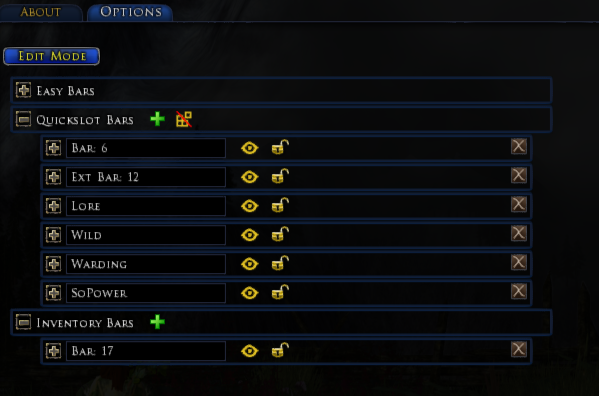
Main menu allows editing Easy Bars, Quickslot Bars, or Inventory Bars.
|
| |
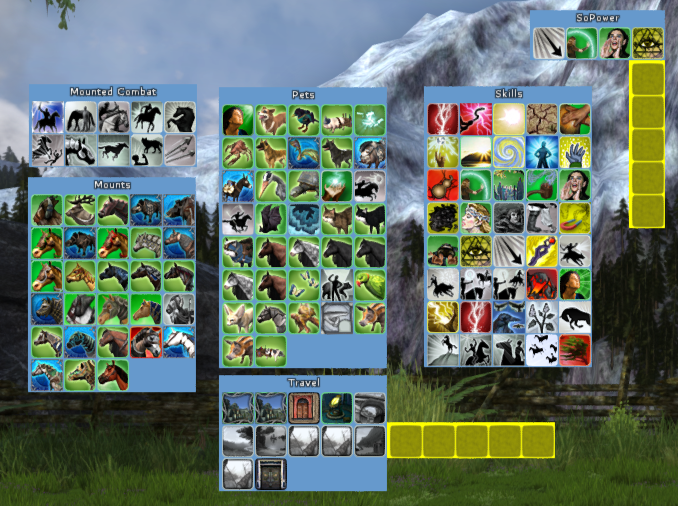
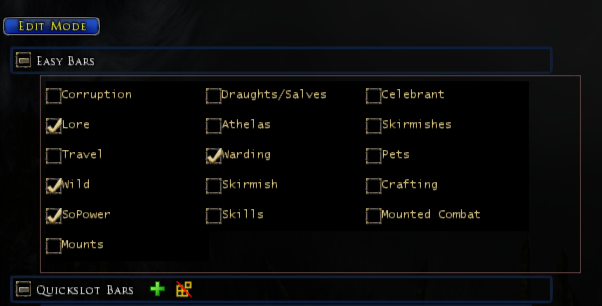
Easy Bars create an entire bar, triggers, etc from existing skills.
|
| |
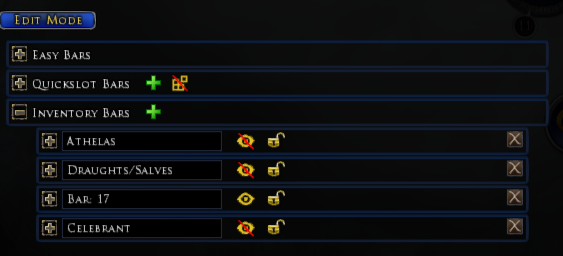
Inventory bars allow creating bars containing inventory items.
|
| |
Welcome to MysticBars
(the plugin formerly known as TonicBars)
The concept is a Bar (quickbar) manager. It will allow you to create Bars and manage different attributes for them. To compliment traditional bars, is a new concept called Extensions. The idea though is that you select a quickslot on your main bar you want to extend. You then indicate which direction you want this bar to extend into. There is a list of predefined configurations such as: Hunter Travel, Warden Travel, LM Combat Pets, LM Cosmetic Pets, and many more.
MysticBars Can:- Organize skills, items, mounts, pets, and more onto Quick-Bars for easy access.
- Automatically Manage your Classes skills to unclutter the screen
- Stances
- Tiered
- Defeat Response
- And More!
- Trigger those bars to display under certain circumstances.
- In-combat
- Poisoned, Wounded, Feared, Diseased
- Based on Class Specific Buffs!!!
- Alt, Control, Shift Pressed
- Health/Power Drops below some Percentage
- Customize the Bars in terms of:
- How many Rows / Columns of quickslots to show (aka, the size of the bar)
- Spacing between the quickslots
- Size of quickslots (will improve this soon)
- Bar Background Color, Bar Opacity, Shortcut Opacity, Remove Opacity when moused over
- Add Extensions to a bar (hide skills, but get to them Quick)
- Display Extension when moused over
- Display Extension when moused over & Roll up the selection to main bar
- Randomly pick a shortcut on mouse over
- Cycle through shortcuts on the extension on mouse over
- Copy bars, Reset Bars, Copy the entire bar setup from another character on the same server.
For more information on where to install plugins and how to use them:
Turbine How-To-Use-LUA-Plugins Thread
Suggestions, Comments, Problems?
If you are having issues, please read the above section and if you are still having an issue:
Please leave a comment. Hoping to open a GitHub account for this at some point.
Feel free to contact me on this thread,
Send me an IM, or
Send me an email at: [email protected]
v3.2.6
-Attempted fix on Copy profile bug.
-Fixed migration issue from v2.9.1 for certain classes
v3.2.5
-Fixing hover issue with certain Extensions.
v3.2.4
-Fixing auto-loading up extensions to always connect the extension.
v3.2.3
-Fixes issues with auto upgrading triggered options!
v3.2.2
-Fixes issues with auto reloading easybars!
v3.2.1
-Fixes upgrades of bars with Extensions!
v3.2.0
-Another cleanup expedition. Performance of the entire Plugin should be greatly improved.
-Added Hover options in the menu's to help identify bars.
-Fixed issues loading to and from different language clients. This should work now!
-Added General Panel with Profile moves.
v.3.1.6
-Fixed a bunch of issues with Extension Bars (locking, naming, refreshing)
-Internally setup logging managers
-Internally fixed includes
v3.1.5
-GIANT fix incoming. All Buff bars were broken... new fix add tons of functionality. Bars can now be triggered from ANY buff "seen" on a character. This might not work the first load of the plugin but should after playing your character and reloading MysticBars! These Buffs are tracked in a new user file "MysticBarsBuffs.plugindata". These are populated in the "Buffs" section of Bar Settings.
-Auto HIDE a bar when Trigger options are selected (Buffs, Triggers, Class specific like hunter focus, furvor, attunement, balance, etc.). This should make it a little less confusing (hopefully).
-Fixing Hunter Focus bars
- Found quite a bit broken languge support, will fix in future release.
|
| Archive List (Old Versions) |
File Name |
Version |
Size |
Author |
Date |
|
v3.2.6 |
215.93 Kb |
NuclearTonic |
01-19-2024 10:26 PM |
|
v3.2.5 |
215.57 Kb |
NuclearTonic |
01-17-2024 08:59 PM |
|
v3.2.4 |
215.38 Kb |
NuclearTonic |
01-16-2024 08:48 AM |
|
v3.2.3_2 |
215.34 Kb |
NuclearTonic |
01-15-2024 01:39 PM |
|
v3.2.3 |
215.34 Kb |
NuclearTonic |
01-15-2024 12:45 PM |
|
v3.2.2 |
215.29 Kb |
NuclearTonic |
01-14-2024 07:04 PM |
|
v3.2.1 |
215.16 Kb |
NuclearTonic |
01-13-2024 09:18 AM |
|
v3.2.0 |
215.14 Kb |
NuclearTonic |
01-11-2024 07:40 PM |
|
v3.1.6_2 |
211.59 Kb |
NuclearTonic |
01-07-2024 08:56 PM |
|
v3.1.6 |
211.61 Kb |
NuclearTonic |
01-07-2024 08:49 PM |
|
v3.1.5 |
201.22 Kb |
NuclearTonic |
01-06-2024 04:15 PM |
|
v3.1.4 |
200.59 Kb |
NuclearTonic |
01-06-2024 08:38 AM |
|
v3.1.3 |
198.98 Kb |
NuclearTonic |
01-05-2024 04:39 AM |
|
v3.1.2 |
193.39 Kb |
NuclearTonic |
01-04-2024 09:50 AM |
|
v3.1.2 |
193.39 Kb |
NuclearTonic |
01-04-2024 09:50 AM |
|
v3.1.1 |
188.65 Kb |
NuclearTonic |
01-02-2024 02:02 PM |
|
v3.1.0 |
189.81 Kb |
NuclearTonic |
01-01-2024 10:26 PM |
|
v3.0.1_beta |
347.62 Kb |
NuclearTonic |
08-25-2022 06:32 PM |
|
v3.0.0_beta |
347.43 Kb |
NuclearTonic |
08-22-2022 09:29 AM |
|
v2.9.1 |
334.46 Kb |
NuclearTonic |
10-20-2012 06:31 PM |
|
v2.9 |
334.50 Kb |
NuclearTonic |
10-20-2012 07:57 AM |
|
v2.8.4 |
333.99 Kb |
NuclearTonic |
09-08-2012 07:35 AM |
|
v2.8.3 |
333.86 Kb |
NuclearTonic |
09-07-2012 07:48 PM |
|
v2.8.2 |
333.92 Kb |
NuclearTonic |
08-13-2012 10:36 PM |
|
v2.8.1 |
331.46 Kb |
NuclearTonic |
08-11-2012 03:12 PM |
|
v2.8 |
333.86 Kb |
NuclearTonic |
08-11-2012 01:44 PM |
|
v2.7 |
331.42 Kb |
NuclearTonic |
06-14-2012 09:18 AM |
|
v2.6.3 |
328.21 Kb |
NuclearTonic |
02-07-2012 01:00 AM |
|
v2.6.2 |
328.12 Kb |
NuclearTonic |
10-19-2011 04:50 PM |
|
v2.6.1 |
328.08 Kb |
NuclearTonic |
10-17-2011 05:02 PM |
|
v2.6 |
327.80 Kb |
NuclearTonic |
09-27-2011 09:05 PM |
|
v2.5.2 |
327.13 Kb |
NuclearTonic |
07-31-2011 08:41 PM |
|
v2.5.1 |
326.47 Kb |
NuclearTonic |
07-31-2011 01:30 PM |
|
v2.5 |
328.83 Kb |
NuclearTonic |
07-30-2011 07:03 PM |
|
v2.5_Beta2 |
329.67 Kb |
NuclearTonic |
05-06-2011 08:55 PM |
|
v2.5_Beta |
326.88 Kb |
NuclearTonic |
04-29-2011 10:18 PM |
|
v2.4 |
326.03 Kb |
NuclearTonic |
02-10-2011 04:48 AM |
|
v2.4_Beta2_Repo |
326.56 Kb |
NuclearTonic |
01-26-2011 07:05 PM |
|
v2.4_Beta2 |
325.51 Kb |
NuclearTonic |
01-25-2011 11:40 PM |
|
v2.4_Beta_ |
327.73 Kb |
NuclearTonic |
01-22-2011 06:11 PM |
|
v2.4_Beta |
225.27 Kb |
NuclearTonic |
01-22-2011 03:23 PM |
|
v2.3.1 |
310.90 Kb |
NuclearTonic |
01-21-2011 08:13 PM |
|
v2.3 |
310.67 Kb |
NuclearTonic |
01-11-2011 12:57 AM |
|
v2.3_Beta3 |
310.35 Kb |
NuclearTonic |
01-05-2011 08:21 PM |
|
v2.3_Beta2 |
308.74 Kb |
NuclearTonic |
01-04-2011 11:22 PM |
|
v2.2.2 |
289.04 Kb |
NuclearTonic |
12-19-2010 02:40 PM |
|
v2.2.1 |
288.98 Kb |
NuclearTonic |
12-19-2010 09:40 AM |
|
v2.2 |
286.62 Kb |
NuclearTonic |
12-18-2010 06:56 PM |
|
v2.1.1 |
285.41 Kb |
NuclearTonic |
11-28-2010 02:20 PM |
|
v2.1 |
285.33 Kb |
NuclearTonic |
11-28-2010 08:46 AM |
|
v2.0.3 |
237.54 Kb |
NuclearTonic |
11-26-2010 09:34 AM |
|
v2.0.1 |
240.75 Kb |
NuclearTonic |
11-18-2010 10:50 PM |
|
v2.0 |
240.21 Kb |
NuclearTonic |
11-17-2010 07:00 PM |
|
v1.5.2 |
216.51 Kb |
NuclearTonic |
11-04-2010 08:36 PM |
|
v1.5.2 |
216.51 Kb |
NuclearTonic |
11-04-2010 08:33 PM |
| File Statistics |
| User Rating: |
|
| Downloads: |
449380 |
| Views: |
1188006 |
| Favorites: |
230 |
| Uploaded By: |
|
| Last Modified: |
N/A |
|
|  |
|
 |
|
 04-23-2024, 08:18 AM
|
|
The Wary
Forum posts: 0
File comments: 1
Uploads: 0
|
Weird error
I've been using this plugin successfully for years, love it! However, one on toon it will not load and gives this error:
Online\Plugins\MysticBars\Services\BarService.lua: 192: attempt to call method 'RegisterBarExtension' (a nil value)
It's still working perfectly on every other toon.
Any suggestions?
|


|


|
|
04-18-2024, 10:21 AM
|
|
The Wary
Forum posts: 0
File comments: 23
Uploads: 1
|
Thank you for this plugin, have been using it for years!
I recently updated from an older version still called TonicBars, and I'm having a quite odd issue.
I have a few Quickslot Bars filled with travelling skills, toggled by pressing shift.
After updating I noticed straight away that all skill icons were blurry.
Going into options and changing column Size or Spacing temporarily makes the icons sharp again.
But if I mouse over the name of the quickslot in options or fully reload the plugin, they go back to being blurry.
The Quickslots Bars were created while using the older "TonicBars". Spacing is set to 2 and Size is 36, if that's of interest.
Any ideas?
|
|
|
|
|
03-23-2024, 07:58 PM
|
|
The Wary
Forum posts: 0
File comments: 29
Uploads: 0
|
Stop Displaying When...
Hi.
Something I've always wanted and hope is possible would be an additional option (or options) for when to stop displaying an Extension Bar that's been opened.
Right now all you have is to Stop Displaying When "Combat Ends" or "Mouse Leaves the Bar."
I have some VERY long bars and it can be a challenge sometimes to move the mouse in a straight line to the end of the bar without leaving the bar (thus causing it to close prematurely on me). This has only gotten more challenging as I've gotten older (and is likely very challenging for anyone with a disability).
It would be nice if there were an option to close the bar only when something has been clicked (on click) be that on the bar or not.
Or an option to set a time for when a bar closes after the mouse leaves it (1 second, 2 seconds, etc...) Or just make it default to closing 1 or 2 seconds after leaving the bar so that if the mouse does briefly go off of it, while traveling the mouse, it doesn't close immediately and you are back on the bar. These could be a general all-bars-wide option.
Thanks!
|
|
|
|
|
03-17-2024, 02:04 PM
|
|
The Wary
Forum posts: 1
File comments: 9
Uploads: 0
|
how to change opacity on mouseover like in tonicbars? changing this option has no effect
|
|
|
|
|
03-16-2024, 02:57 PM
|
|
The Wary
Forum posts: 0
File comments: 1
Uploads: 0
|
What a gem of a plugin! I love the easy bars, it makes it so easy to set up health potions. I was wondering if store potions could be automatically incorporated in the easy bars somehow perhaps? For morale, power and potions of restoration.
|
|
|
|
|
03-08-2024, 07:45 PM
|
|
The Wary
Forum posts: 0
File comments: 1
Uploads: 0
|
3.2.6 Opacity not working as intended
First of all, great facelift, it's so much more intuitive to use!
Opacity change on mouseover only affects the background color of the grid, not the icons themselves. Can this be changed to how it previously worked?
|
|
|
|
|
01-20-2024, 05:14 PM
|
|
The Undefeated
Forum posts: 8
File comments: 247
Uploads: 1
|
Re: Re: Re: 3.2.6 issue
Quote:
Perfect!
Just came back to the game after three years, LOVE the new version of this plugin. Thank you!
|
Awesome! Glad you like it. Next version you'll really like then, along with the standard "Tabbed" bars, I'm adding Windowed bars. With customizable colors for heading and back color. Coming Soon! |
|
|
|
|
01-20-2024, 04:45 PM
|
|
The Wary
Forum posts: 0
File comments: 2
Uploads: 0
|
Re: Re: 3.2.6 issue
Quote:
|
Accidently deleted a "<" in the plugin config when adding the version. Fixed in v3.2.6_2
|
Perfect!
Just came back to the game after three years, LOVE the new version of this plugin. Thank you!
Last edited by Ciriyel : 01-20-2024 at 04:46 PM.
|
|
|
|
|
01-20-2024, 08:03 AM
|
|
The Undefeated
Forum posts: 8
File comments: 247
Uploads: 1
|
Re: 3.2.6 issue
Quote:
Just an FYI, I updated to 3.2.6, and MysticBars flat out disappeared from the Plugin Manager altogether. Rolled back to 3.2.5, and it returned, working fine. 
|
Accidently deleted a "<" in the plugin config when adding the version. Fixed in v3.2.6_2 |
|
|
|
|
01-20-2024, 03:43 AM
|
|
The Wary
Forum posts: 0
File comments: 5
Uploads: 0
|
Re: 3.2.6 issue
Quote:
|
Just an FYI, I updated to 3.2.6, and MysticBars flat out disappeared from the Plugin Manager altogether. Rolled back to 3.2.5, and it returned, working fine.
|
Same for me |
|
|
|
|
01-20-2024, 01:51 AM
|
|
The Wary
Forum posts: 0
File comments: 2
Uploads: 0
|
3.2.6 issue
Hey, Tonic!
Just an FYI, I updated to 3.2.6, and MysticBars flat out disappeared from the Plugin Manager altogether. Rolled back to 3.2.5, and it returned, working fine. |
|
|
|
|
01-19-2024, 02:19 PM
|
|
The Undefeated
Forum posts: 8
File comments: 247
Uploads: 1
|
Re: Copy Quickslotbars broken
Quote:
|
[01/19 09:55:30 AM] ...nline\Plugins\MysticBars\Bars\Core\QuickslotLis t.lua:349: bad argument #1 to 'pairs' (table expected, got nil)
|
I was able to reproduce it a single time out of like 20+ attempts. Ok, v3.2.6 is an attempt, please let me know if this works for you.
Last edited by NuclearTonic : 01-19-2024 at 10:26 PM.
|
|
|
|
|
01-19-2024, 04:04 AM
|
|
The Wary
Forum posts: 0
File comments: 5
Uploads: 0
|
Copy Quickslotbars broken
Hi,
I noticed that the copying of Bars between Chars does not work and also corrupt the configuration of the receiving char.
Using "General Settings" -> "Copy Profile" leads to:
[01/19 09:55:30 AM] ...nline\Plugins\MysticBars\Bars\Core\QuickslotLis t.lua:349: bad argument #1 to 'pairs' (table expected, got nil)
After that, the plugin doesn't load any longer on the receiving char, even after relogging.
It looks like the reason is a missing
["quickslots"] =
{
},
part in the copied quickslot-bar of the received char.
After re-adding this field, the plugin is loadable again.
I've tested this for a non-extension quickslot bar, where two extension bars are connected.
thanks,
Mac
|
|
|
|
|
01-18-2024, 07:06 PM
|
|
The Wary
Forum posts: 4
File comments: 34
Uploads: 0
|
Thank you! And that update worked perfectly, thanks.
Yep, really weird as originally I set it up in the same way. I checked I wasn't overlaying it with anything else, but it didn't matter where I had it on the screen.
And you say a complicated area of the code, but you've made a complex plugin, so that's totally to be expected!
Thank you  |
|
|
|
|
01-17-2024, 06:16 PM
|
|
The Undefeated
Forum posts: 8
File comments: 247
Uploads: 1
|
Quote:
|
Just in case you haven't received it, check your spam folder as I have sent it. If you still don't have it, I'll upload it somewhere and pop the link in here.
|
Yeah, I see the problem... what's strange is all of your other bars seem ok, it's just this one... This is fixed in v3.2.5. If it rears it's ugly head again let me know, this is a VERY complicated are of the code.
Last edited by NuclearTonic : 01-17-2024 at 09:11 PM.
|
|
|
|
All times are GMT -5. The time now is 12:34 AM.
|
|




 04-18-2024, 10:21 AM


