VGInterface.com
Search Downloads


Go Back   LoTROInterface > LotRO Stand-Alone Plugins > Action Bars & Main Bar

Category: Action Bars & Main BarTravel Window
Interface Information
Download
D.H1cks's Portal Bug Reports Feature Requests
How do I install this? (FAQ)
Name: Travel Window   Popular!
Author:
Date: 03-19-2012 06:00 PM
Size: 612.60 Kb
Version: 9.10
Rate File: 5 out of 5 with 19 votes  
Patch & Add-on List
File Name
Version
Size
Author
Date
Type
1.0
3.22 Kb
03-18-2012 03:52 AM
Patch
1.0
3.21 Kb
11-30-2011 04:06 PM
Addon
1
6.60 Kb
07-03-2011 05:16 AM
Addon
1.0
2.94 Kb
04-25-2011 08:00 AM
Addon
1.0
2.22 Kb
12-10-2010 03:27 PM
Addon
1.0
18.40 Kb
11-08-2010 04:18 PM
Addon
Pictures
Click to enlarge 

Views: 0
Size: 40.88 Kb
Dimensions: 801 x 278
Modes
 
Click to enlarge 

Views: 0
Size: 13.57 Kb
Dimensions: 325 x 220
Context Menu
 
Click to enlarge 

Views: 0
Size: 108.56 Kb
Dimensions: 1497 x 574
Options
 
Click to enlarge 

Views: 0
Size: 22.15 Kb
Dimensions: 265 x 539
Folder Layout
 
Description
Travel Plugin
This plugin creates a single window that contains all the available travel skills, including the race, class and reputation skills.

Install
To install, unzip the downloaded file into the C:\Users\{username}\Documents\The Lord of the Rings Online\Plugins folder.

This plugin also requires the Turbine utilities file that is available at:

http://content.turbine.com/sites/lotro/lua/Beta_LuaPlugins.7z


The folders will look similiar to the folder layout screenshot.

NOTE: You can safely merge the DhorPlugins folder with an existing folder if you have one of my other plugins installed. It will not break anything.

Start
To start the plugin, type /plugins load Travel.
To show or hide the window, you can type /travel toggle (or /trav toggle)

The Menu
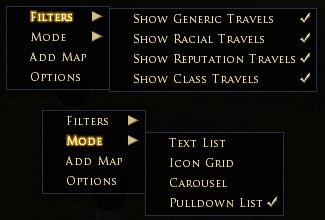
You can right-click almost anywhere on the window to open the context menu for selecting which mode and to filter what type of skills you want to show. You can also open the window for adding your own map home.

General
At the top of the window is a display of how many travel rations you currently have in your inventory.

At the bottom right corner is a slightly lighter box. This is the area where you can grab to resize the window. If we get access to change the mouse cursor, I will remove the box.

There is also an option for a button to use to toggle the window. This button can be moved by holding down the mouse button for a few moments. Once the icon turns blue, the button can be moved.

Modes

Text List - All the travel skills are listed as text. Click on one to activate the skill.

Icon Grid - Display all the skills displayed as icons in a grid, much like inventory bags.

Carousel - Use your mouse wheel to scroll through your skills. Only the middle icon will actually work.

Pulldown List - All the skills are in a dropdown list. Open the list, select the locations, then click on the icon to go. You can now also set the option to automatically start the travel as soon as you select a location.

Moors Map - If you are playing Creep, you can right click on the button and select 'Open Moor Map' to show a map of the moors and the approximate location for each creep travel skill. Each location is a clickable shortcut.

Map Home
Click on the Add Map selection in the menu. This opens a window with a quickslot and a button.

If you drag your map from your inventory to this quickslot, then press the button, your map home will be saved.

This works for maps to Glan Vraig.

9.10 Changes
- restored normal Glan Vraig map loading since Turbine Manager appears to be working proplerly now.

9.9 Changes
- added Stangard travel skills (hunter, warden and rep)

9.8 Changes
- added Galtrev Reputation travel skill

9.7 Changes
- fixed an issue where nil values in the saved settings file cause the plugin to fail to load

9.6 Changes
- added the .plugincompendium file to the project

9.5 Changes
- temp fix for Plugin Manager not loading the plugin for Glan Vraig map users
- fixed issue with OnCombatChanged event overwriting other plugins

9.3 Changes
- added Plugin Manager support
- fixed issue with bad monster play skill

9.0 Changes
- added a moors map with all creep travel shortcuts on it


Future things.....
Still hope to one day get access to the skills the characters have learned.
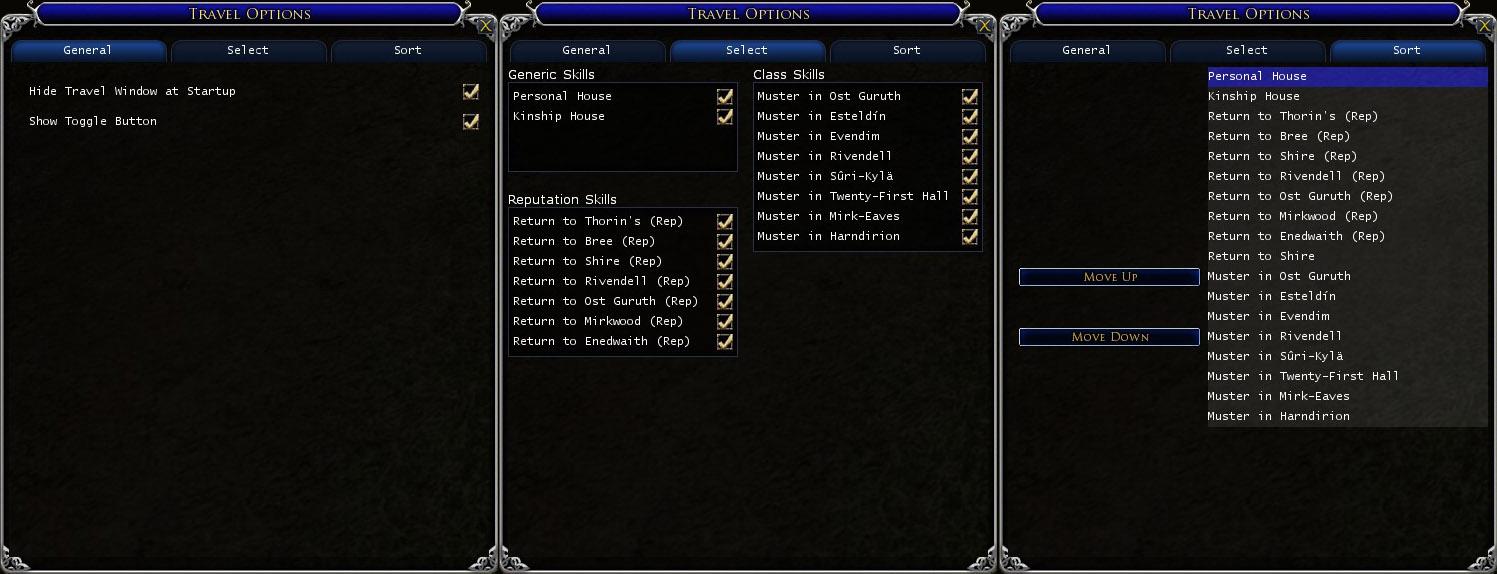
The sorting is very basic at the moment, I am thinking different methods of sorting that I might implement.

The Button
I don't really like the icon I have for the button. But, I am not an artist, so for me to make something original is difficult. If anyone out there would like to contribute a tiny bit, and can come up with a 32x32 graphic to use, I would greatly appreciate it. However, I do have a couple of important 'rules' about the icon. It cannot be something taken from the game already, such as an existing button/skill icon. Also, it somehow needs to be related to travel....

Credits
I would like to thank some folks for ideas and help:
Orendar - For a solution to the dropdown list
Frell - For some initial modifications to the dropdown, and ideas for selecting skills
Paulino - For the carousel idea
Rushl - For the request to add a button to toggle the window.
magill - For the folder layout description.
Archive List (Old Versions)
File Name
Version
Size
Author
Date
9.9
612.60 Kb
D.H1cks
03-17-2012 05:42 PM
9.8
612.57 Kb
D.H1cks
03-12-2012 05:12 PM
9.7
611.59 Kb
D.H1cks
01-09-2012 04:20 PM
9.6
611.51 Kb
D.H1cks
01-09-2012 05:42 AM
9.5
611.06 Kb
D.H1cks
12-27-2011 07:45 AM
9.3
610.72 Kb
D.H1cks
12-12-2011 11:24 AM
9.0
605.89 Kb
D.H1cks
11-01-2011 07:31 PM
8.9
55.41 Kb
D.H1cks
10-31-2011 09:04 AM
8.8
55.36 Kb
D.H1cks
10-30-2011 01:01 PM
8.7
55.36 Kb
D.H1cks
10-30-2011 09:14 AM
8.7
55.34 Kb
D.H1cks
10-22-2011 06:51 PM
8.6
54.81 Kb
D.H1cks
10-20-2011 06:06 AM
8.5
54.81 Kb
D.H1cks
09-26-2011 08:24 PM
8.2
53.76 Kb
D.H1cks
04-17-2011 02:49 PM
8.1
53.58 Kb
D.H1cks
04-14-2011 01:16 PM
8.0
53.42 Kb
D.H1cks
03-28-2011 11:54 AM
7.2
52.21 Kb
D.H1cks
03-24-2011 01:04 PM
7.0
52.18 Kb
D.H1cks
02-25-2011 06:21 AM
6.1
46.33 Kb
D.H1cks
12-01-2010 05:01 PM
5.0
41.46 Kb
D.H1cks
10-21-2010 03:31 PM
4.0
40.26 Kb
D.H1cks
09-08-2010 07:20 AM
File Statistics
User Rating:
5 out of 5 with 19 votes
Downloads: 54880
Views: 114816
Favorites: 105
Uploaded By:
 
Last Modified: N/A

View Pictures. Download Now! Post A Comment


Post A Reply
Author Comments Comment Options
Old Today, 04:54 AM  
Eleventeen
The Wary

Forum posts: 1
File comments: 5
Uploads: 0
Quote:
So just to be clear, the Turbine Plugin Manager will not load the Travel plugin automatically for any of your characters?
It doesn't appear to be isolated to just one particular character. It doesn't automatically load for any of them.

To help with the brainstorming (and just in case it's a compatibility issue), here is my laundry list of plugins:
  • Ctime
  • Palantir
  • MCHA
  • Buffbars
  • Tonicbars
  • This one, of course

Last edited by Eleventeen : 05-17-2012 at 04:59 AM.
Eleventeen is offline Report comment to moderator   Reply With Quote Reply With Quote
Old 05-09-2012, 11:12 AM  
Brina_22
The Wary

Forum posts: 0
File comments: 5
Uploads: 0
That solved it. Thanks!
Brina_22 is offline Report comment to moderator   Reply With Quote Reply With Quote
Old 05-09-2012, 04:33 AM  
D.H1cks
The Undying
 
D.H1cks's Avatar
Interface Author - Click to view interfaces

Forum posts: 152
File comments: 123
Uploads: 8
Start Automatically

Quote:
Ok. Scratch my last post! I finally got it to work. It was my computers fault. lol and mine. I guess I didn't open up the turbine 7 zip thingy correctly. Like my technical mumbo jumbo??? But it doesn't start up automatically like I thought it was supposed to. I have load it when I sign on to my characters each time. Any way I can fix that?

I went to the options and it asks if I want to hide the travel window at start up but not if I want to start it automatically for each character.
Glad you got it to work. However, plugins themselves are not able to control starting automatically on login.

In order to get the plugin to start automatically, you need to go into the Turbine Plugin Manager. If you have not found that yet, you need to click on the Menu Button on the Toolbar, highlight System, and the Plugin Manager is the 3rd option in the sub-menu.

Select Travel Window from the list of installed plugins, and then in the pulldown on the bottom right you can select which characters to start for automatically (or all).

Let me know if you have done that already. I have another user that cannot get the plugin to start with the manager, but I am not sure why yet.
D.H1cks is offline Report comment to moderator   Reply With Quote Reply With Quote
Old 05-09-2012, 01:01 AM  
Brina_22
The Wary

Forum posts: 0
File comments: 5
Uploads: 0
Re: Re: Re: Re: Re: Unable to load

Ok. Scratch my last post! I finally got it to work. It was my computers fault. lol and mine. I guess I didn't open up the turbine 7 zip thingy correctly. Like my technical mumbo jumbo??? But it doesn't start up automatically like I thought it was supposed to. I have load it when I sign on to my characters each time. Any way I can fix that?

I went to the options and it asks if I want to hide the travel window at start up but not if I want to start it automatically for each character.
Brina_22 is offline Report comment to moderator   Reply With Quote Reply With Quote
Old 05-09-2012, 12:13 AM  
Brina_22
The Wary

Forum posts: 0
File comments: 5
Uploads: 0
Re: Re: Re: Re: Unable to load

I doesn't hate you, honest. But it really does appear that the plugin cannot find the Turbine Debug files for some reason. The 'Unable to resolve package "Turbine.Debug" makes that quite clear.

Is your Lord of the Rings Online folder in the standard windows user documents folder (C:\Users\{username}\Documents\The Lord of the Rings Online)? I don't know if that would affect it at all.

Yes. Its C:\users\Brina\My Documents\The Lord of the Rings Online
The only difference is that its My documents not just documents. But if i go through Libraries and select the documents folder it just takes me to my documents anyways. Could my computers specifics have anything to do with this? I've only had the computer a month or two so I don't know all its capabilities yet. I have to use Direct x9 graphics if it makes any kind of difference.
Brina_22 is offline Report comment to moderator   Reply With Quote Reply With Quote
Old 05-08-2012, 08:45 PM  
D.H1cks
The Undying
 
D.H1cks's Avatar
Interface Author - Click to view interfaces

Forum posts: 152
File comments: 123
Uploads: 8
Quote:
Yeah, I have zero clue why it's not loading. Still, having a shortcut button to load it right next to the toggle doesn't eat a lot of screen real estate. Everything else works as intended.

Also, thanks for the filter tip. That indeed cleared the travel out.
So just to be clear, the Turbine Plugin Manager will not load the Travel plugin automatically for any of your characters?
D.H1cks is offline Report comment to moderator   Reply With Quote Reply With Quote
Old 05-08-2012, 08:44 PM  
D.H1cks
The Undying
 
D.H1cks's Avatar
Interface Author - Click to view interfaces

Forum posts: 152
File comments: 123
Uploads: 8
Re: Re: Re: Unable to load

Quote:
^^^ I do have that structure and that utilities file has already been downloaded. I even removed everything and started from scratch. I still got the same 3 error messages.

...the Rings Online\Plugins\DhorPlugins\Travel\Main.lua:2: Failed to import package "DhorPlugins.Travel".
...Rings Online\Plugins\DhorPlugins\Travel\__init__.lua:2: Failed to import package "DhorPlugins.Travel.TravelWindow".
...s Online\Plugins\DhorPlugins\Travel\TravelWindow.lua :2: Unable to resolve package "Turbine.Debug"

Those are backwards but you get the picture.
Any idea why this plugin hates me?
I doesn't hate you, honest. But it really does appear that the plugin cannot find the Turbine Debug files for some reason. The 'Unable to resolve package "Turbine.Debug" makes that quite clear.

Is your Lord of the Rings Online folder in the standard windows user documents folder (C:\Users\{username}\Documents\The Lord of the Rings Online)? I don't know if that would affect it at all.
D.H1cks is offline Report comment to moderator   Reply With Quote Reply With Quote
Old 05-08-2012, 08:06 PM  
Brina_22
The Wary

Forum posts: 0
File comments: 5
Uploads: 0
Re: Re: Unable to load

This line leads me to believe that the required Turbine utility files were not installed or are not in the correct location.

This plugin also requires the Turbine utilities file that is available at:
http://content.turbine.com/sites/lot..._LuaPlugins.7z

Unzip this file into the Plugins folder, you will end up with a folder structure like:
  • The Lord of the Rings Online
    • Plugins
      • DhorPlugins
        Turbine
        TurbinePlugins

^^^ I do have that structure and that utilities file has already been downloaded. I even removed everything and started from scratch. I still got the same 3 error messages.

...the Rings Online\Plugins\DhorPlugins\Travel\Main.lua:2: Failed to import package "DhorPlugins.Travel".
...Rings Online\Plugins\DhorPlugins\Travel\__init__.lua:2: Failed to import package "DhorPlugins.Travel.TravelWindow".
...s Online\Plugins\DhorPlugins\Travel\TravelWindow.lua :2: Unable to resolve package "Turbine.Debug"

Those are backwards but you get the picture.
Any idea why this plugin hates me?
Brina_22 is offline Report comment to moderator   Reply With Quote Reply With Quote
Old 05-08-2012, 06:11 AM  
Eleventeen
The Wary

Forum posts: 1
File comments: 5
Uploads: 0
Yeah, I have zero clue why it's not loading. Still, having a shortcut button to load it right next to the toggle doesn't eat a lot of screen real estate. Everything else works as intended.

Also, thanks for the filter tip. That indeed cleared the travel out.
Eleventeen is offline Report comment to moderator   Reply With Quote Reply With Quote
Old 05-08-2012, 04:08 AM  
D.H1cks
The Undying
 
D.H1cks's Avatar
Interface Author - Click to view interfaces

Forum posts: 152
File comments: 123
Uploads: 8
RE: few problems

Thank you for using my plugin, I always like to hear that people find it helpful.

Quote:
1. LOTRO UI plugin manager doesn't keep it in it's activate list. For some reason every time I log in I have to enable it via the Plugin Manager. Yes I've selected it for my characters (all).
I really don't know what is causing this issue. It currently loads automatically for all of my characters, so it may take some time to figure out what conditions will cause it to fail to start.

Quote:
2. I have both Return to Rivendell and Guide to Rivendell displayed in the list for my Elf Hunter. I've disabled the Return to Rivendell in the Travel Options list but it remains in the pulldown list.
The only way to disable the racial travel skill is selecting/deselecting the skill in the context menu. Right click on the plugin, select filters and check the racial skill option. You likely only disabled the reputation skill in the options.

Last edited by D.H1cks : 05-08-2012 at 04:17 AM.
D.H1cks is offline Report comment to moderator   Reply With Quote Reply With Quote
Old 05-08-2012, 12:19 AM  
Eleventeen
The Wary

Forum posts: 1
File comments: 5
Uploads: 0
An AMAZING plugin! Thank you for making it!

A few problems I've ran into though...

1. LOTRO UI plugin manager doesn't keep it in it's activate list. For some reason every time I log in I have to enable it via the Plugin Manager. Yes I've selected it for my characters (all).

2. I have both Return to Rivendell and Guide to Rivendell displayed in the list for my Elf Hunter. I've disabled the Return to Rivendell in the Travel Options list but it remains in the pulldown list.

Thank you again for your efforts with this plugin. It's simply damn handy!
Eleventeen is offline Report comment to moderator   Reply With Quote Reply With Quote
Old 05-07-2012, 04:21 AM  
D.H1cks
The Undying
 
D.H1cks's Avatar
Interface Author - Click to view interfaces

Forum posts: 152
File comments: 123
Uploads: 8
Re: Unable to load

Quote:
Unable to resolve package "Turbine.Debug".
This line leads me to believe that the required Turbine utility files were not installed or are not in the correct location.

This plugin also requires the Turbine utilities file that is available at:
http://content.turbine.com/sites/lot..._LuaPlugins.7z

Unzip this file into the Plugins folder, you will end up with a folder structure like:
  • The Lord of the Rings Online
    • Plugins
      • DhorPlugins
        Turbine
        TurbinePlugins
D.H1cks is offline Report comment to moderator   Reply With Quote Reply With Quote
Old 05-06-2012, 11:46 PM  
Brina_22
The Wary

Forum posts: 0
File comments: 5
Uploads: 0
Unable to load "Travel"

I got the Travel plugin downloaded and it says I have the Travel (9.10) plugin available. But says its unable to load. It gives 3 error messages.

Unable to resolve package "Turbine.Debug".
Failed to import package "DhowPlugins.Travel.TravelWindow".
Failed to import package "DhorPlugins.Travel".

What am I doing wrong?
Brina_22 is offline Report comment to moderator   Reply With Quote Reply With Quote
Old 04-20-2012, 09:26 PM  
magill
The Undying

Forum posts: 28
File comments: 82
Uploads: 0
Re: Re: Two enhancement requests

Quote:
1. The racial skill is automatically detected for each race, and can be toggled on/off using the context menu -> Filters -> Show Racial Travels. I am not exactly sure what you mean by 'separate out' the racial skills.
On the "select" page -- you have Generic Skills and Reputation Skills.
Which then propagate into the sort list.
Although, the sort list does contain the Racial skill, it's just not labeled. One must deduce that the unlabeled skill is Racial. -- at least I assume that is what it is.

I guess it is only an issue when you have the Icon Grid, and the Rep and Racial are the same icon...
magill is offline Report comment to moderator   Reply With Quote Reply With Quote
Old 04-20-2012, 04:35 AM  
D.H1cks
The Undying
 
D.H1cks's Avatar
Interface Author - Click to view interfaces

Forum posts: 152
File comments: 123
Uploads: 8
Re: Two enhancement requests

Quote:
1- Can you separate out Racial skills?

2- Can you Identify which capabilities are "live" rather than having to try each one and get the infamous "General Error 0x10000281?"
1. The racial skill is automatically detected for each race, and can be toggled on/off using the context menu -> Filters -> Show Racial Travels. I am not exactly sure what you mean by 'separate out' the racial skills.

2. Sadly no, the current API for LOTRO does not allow us to find out which skills a player has or not. Believe me, as soon as that capability is added to the API, I will start working on getting the plugin to do so.
D.H1cks is offline Report comment to moderator   Reply With Quote Reply With Quote
Post A Reply

 
Category Jump:
Search this Category:
 

All times are GMT -5. The time now is 12:52 PM.


Our Network
EQInterface | EQ2Interface | Minion | WoWInterface | VGInterface | LoTROInterface | MMOInterface | Swtorui