 |
 |
 |
|
 |


|
|||||||


|  |
| |||||||||||||||||||||||||||||||||||||||||||||||||||||||||||||




 |
|
 04-20-2014, 11:59 AM
|
|||
|
The Undying

Forum posts: 48
File comments: 72
Uploads: 2
|
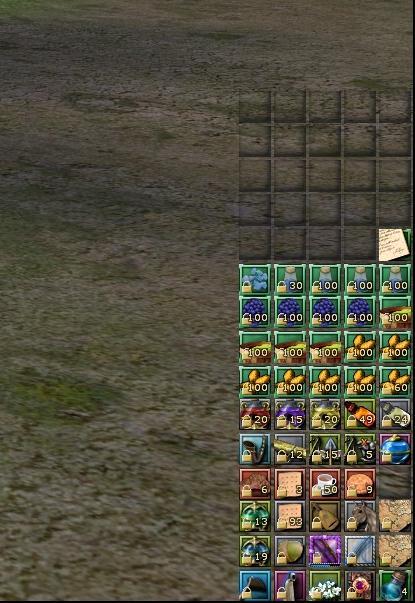
Any plans on updating this for the new inventory revamp? I love being able to see through my bags and miss that feature.
Last edited by Uthboth : 04-20-2014 at 11:59 AM. |
||


|


|

|
06-08-2012, 09:59 AM
|
|||
|
The Indomitable
Forum posts: 14
File comments: 20
Uploads: 2
|
Ultra Mini-Packs is now updated to include the 6th bag. Enjoy the minimalism!
|
||
|
|
|
|
06-05-2012, 08:19 PM
|
|||
|
The Indomitable
Forum posts: 14
File comments: 20
Uploads: 2
|
Sure, that is the plan. Unfortunately, I don't yet have the expansion. I will look into whether or not I can see the code even though I don't have the bag yet, and let you know!
|
||
|
|
|
|
06-05-2012, 06:53 PM
|
|||
|
The Wary
Forum posts: 0
File comments: 9
Uploads: 0
|
Hi - Would it be possible to make Bag 6 work the same?
Thanks. |
||
|
|
|
|
04-01-2011, 12:13 PM
|
|||
|
The Indomitable
Forum posts: 13
File comments: 13
Uploads: 0
|
Hi, I just wanted to thank you for this great work. I integrate it with my custom compilation of UI mods and it is one of my favourites.
|
||
|
|
|
|
11-25-2010, 02:55 PM
|
|||
|
The Wary
Forum posts: 2
File comments: 7
Uploads: 0
|
Great Stuff
Great stuff, however, I'm trying to figure out how to add a thin border of some kind around each bag - I've tried various things and can't quite get it to work - any hints or tips would be great, there's certainly not much documentation or guides out there, is there.
|
||
|
|
|
|
09-24-2010, 05:29 PM
|
|||
|
The Wary
Forum posts: 0
File comments: 3
Uploads: 0
|
"It's pretty easy to integrate with another UI!"
I did just that. I love Jack UI 5.1 so much (which in itself is a compilation of others work), I decided to edit the XML and add in your panel modifications - worked like a charm. Minimalist extreme!  Thanks for the bags! |
||
|
|
|
|
07-15-2010, 01:11 AM
|
|||
|
The Wary

Forum posts: 0
File comments: 4
Uploads: 0
|
how can i use it in other UIs?
Last edited by htyjswf : 07-19-2010 at 02:28 AM. |
||
|
|
|
|
08-14-2009, 07:27 AM
|
|||
|
The Wary
Forum posts: 3
File comments: 2
Uploads: 0
|
Nice skin!
I've done the same modifications to the bank slots last night. See http://www.lotrointerface.com/forums...read.php?t=788 Feel free to include it in your skin. Greets Fatal |
||
|
|
|
|
07-28-2009, 04:31 AM
|
|||
|
The Indomitable
Forum posts: 14
File comments: 20
Uploads: 2
|
It's pretty easy to integrate with another UI!
First, make sure that the UI you're using isn't already modifying the bags. Search the XML for this line: <PanelFile ID="ID_UISkin_BackpackView1_Template"> That's the beginning of the bag modification section. There's 5 of them (BackpackView1 is just the first). Each bag has it's own PanelFile which begins like that above, and ends in </PanelFile>. Remove all 5 of those, and simply paste in the PanelFile blocks from my XML. Note that you don't want to paste in the entire XML from my mod - just the blocks that begin like the PanelFile above, and end in </PanelFile>. If you don't find a PanelFile like the one above (or if the bags in the UI look identical to the ones from the basic UI), then all you need to do is paste those 5 PanelFile blocks into the XML of your UI. Where isn't important, as long as you're between the <opt> </opt> tags. rushl Last edited by rushl : 07-28-2009 at 04:33 AM. |
||
|
|
|
|
07-25-2009, 11:40 AM
|
|||
|
The Wary
Forum posts: 0
File comments: 1
Uploads: 0
|
quick question
Could i ask how to add this to a compilation? i use bgm blue 2 and would love to have your bag mod part of it. is there a quick way to add your xml to get it to load at the same time?
|
||
|
|
|
|
07-14-2009, 06:45 PM
|
|||
|
The Wary
Forum posts: 0
File comments: 5
Uploads: 0
|
Thanks!
I've got just a detail or two to finish on my 1650x1080 mini UI. I hope to release it soon! rushl Is there an easy fix to make some of these UI's work for 1280 x 1024, cause I don't have the money to get a widescreen anytime soon. :-S |
||
|
|
|
|
07-06-2009, 03:47 PM
|
|||
|
The Wary
Forum posts: 3
File comments: 6
Uploads: 0
|
 You are GODLY!
Thank you so much for this!!!
I told my kin about it, so expect a lot of downloads very soon!! 10/10 WIN! |
||
|
|
|
|
07-06-2009, 01:44 PM
|
|||
|
The Undying
Forum posts: 80
File comments: 15
Uploads: 0
|
Just want to say that I put this in my modified version of Dark UI (modified to get rid of all the panel/bag buttons). I have them lined up vertically so that it's just 15 rows of 5.
|
||
|
|
|
|


All times are GMT -5. The time now is 08:09 AM.
 |
© MMOUI
vBulletin® - Copyright ©2000 - 2024, Jelsoft Enterprises Ltd. |
 |
