.
Introduction :
This addon features two themes, each one consists of a compact toolbar integrated in JRR's main theme.
The featured grey toolbar is a revival of the GreySkin UI's toolbar.
The black edition is a JRR bonus.
JRR - Greyskin

JRR - Greyskin Black edition

 - Step 1 :
 Download the file, then unpack it on your desktop.
- Step 2 : Do you know your LOTRO client's display resolution ?
- If yes, you can jump to step 3
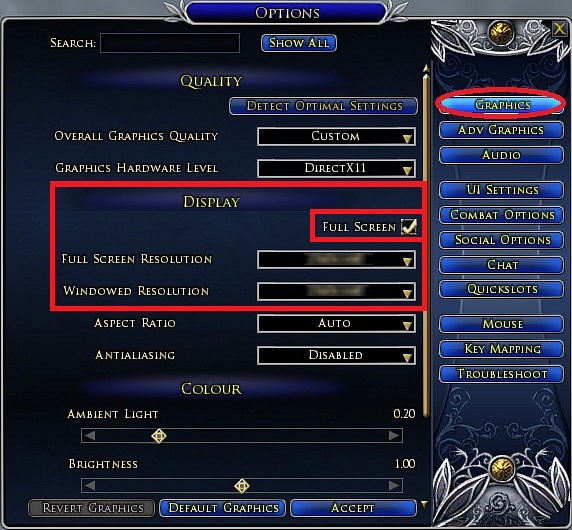
- If you ignore it, just open the option panel in LOTRO and select the first tab called "graphic" as shown on the picture below :
- If you play in full screen mode, note your corresponding resolution. (For optimal picture quality, it should be equal to your native screen's resolution.)
- If you play in window mode, note your corresponding resolution.
- If your resolution is already 1920x1200, Jump to step 4

- Step 3 : Your LOTRO display resolution
IS NOT 1920x1200 pixels, so you need to manually edit the
skindefinition.xml files present in the folder you unpacked,
within sub folders called
_Black toolbar and
_Grey Toolbar. There is 1
skindefinition.xml per folder.
To edit a skindefinition.xml file, open it with Window's Notepad,
Notepad++ (it's a freeware) or any else text editor.
Don't panic ! You'll just have to modify 2 numbers near the beginning of the text
The needed explanations about how to proceed are logged into the
skindefinition.xml file.
- Step 4 : Your
skindefinition.xml files are set for your own resolution.
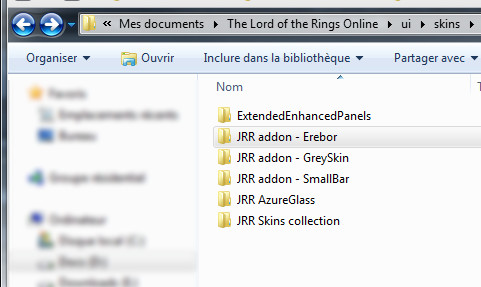
- Copy the "JRR addon - GreySkin" folder in your "my documents" --> "The Lord of the Rings Online" (this is where your LOTRO screenshots are located) --> "ui" (not in capitals) --> "skins" (plural), create these sub-folder if they don't already exist.
- When done, it should look like :
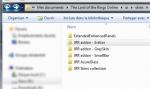
- Exit LOTRO client if it is running, then (re)launch LOTRO.
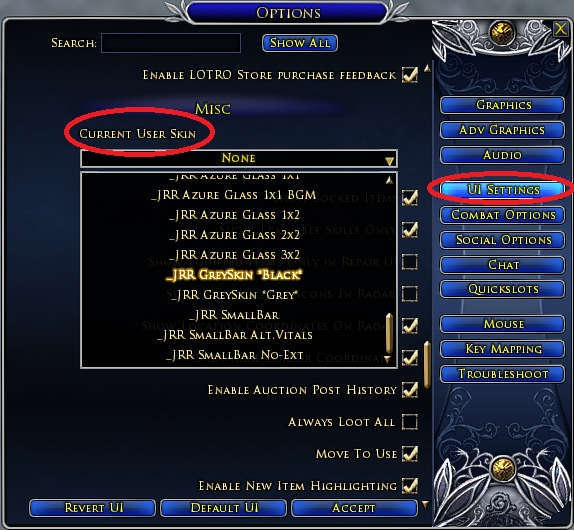
- Log on the character onto you want to apply the _JRR GreySkin *Grey* or the _JRR GreySkin *Black* profile. Select the theme from the panel menu --> UI Settings, as shown on the picture below.
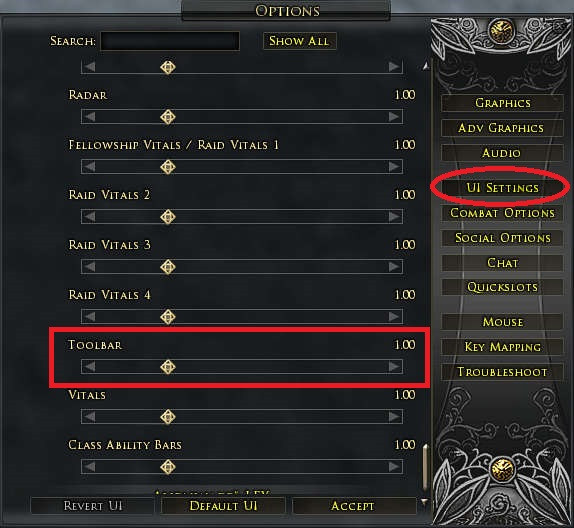
- In order to be displayed at the correct position, it requires you have the toolbar's default size defined in the option panel, as follow :
- logout (character selection menu) then come back into the game.
- You're done with install
Moving the UI skill bars to align it with toolbar slots :
A couple of people are unfamiliar with moving the UI bars to align with the skin and Caldric's directions are perfect for it:
To do so, once you replace the skin, you want to follow these steps:
1) Open your Option menu
2) Go to "UI Settings"
3) Go to "Quickslot Bars"
4) Select the Bar you wish to use (1-5)
5) On that Bar, check "Always Show" and make sure it's not docked
6) Add an Ability to that bar (for alignment purposes)
7) Use " Ctrl + * " or " Ctrl + \ " to unlock your UI
8) Drag the Quickslot Bar into the Bottom Bar graphic and align it
9) Lock your UI (" Ctrl + * " or " Ctrl + \ ") and you're ready to go !
Converting this add-on into a standalone release, a child's play !
To enjoy this release of
GreySkin, you first need to download and install
JRR Skins collection, then the
GreySkin file available for download on this page.
But if you think "
I just want to use GreySkin, I don't care the JRR other skins, I don't want to waste some space on my hard disk with all that crap..."
I answer you "
There's no problem !" Indeed, each JRR skin is built as an add-on, so the whole JRR pack is modular !
In the facts, this means :
- Once JRR main pack and the
GreySkin addon are installed on your computer, open the "
JRR Skins collection" folder, it is located there : "
...Documents/The Lord of the Rings Online/ui/skins/"
- Inside this "
JRR Skins collection" folder, delete all the
folders present, except
JRR CORE.
- You're done !
Credits :
Based on the toolbar from "
GreySkin UI" v.4, by Maximoz.
FAQ and Known issues :
- I just installed JRR and Greyskin and selected one of the skins on my character, some panels are displayed in a strange manner, like upside down.
Logout then login back, this is a necessary step to apply the new custom panel settings.
- I just installed the last version of this GreySkin release and selected it on my character, but some panels backgrounds or other elements are replaced by a light gray frame
If only a few elements are greyed, this can be a error from my side (indicating a wrong location of a file in the skin). Don't hesitate to report me this kind of issues.
If a big amount of gray frames occurs, first ensure you installed the JRR skins pack at the right location on your hard drive, then ensure you installed the "
JRR addon - GreySkin" folder side by side with the "
JRR Skins collection" folder.
(This is the new location for addons folders since JRR v4.0)
- My bags have no more borders neither their title bar with the big bag icon.
This is not a bug, this is a skinning choice.
If you consider this disappointing, not handy or ugly, you can use a bags replacement plugin, as
HugeBag, it is amazingly convenient and good looking !
Advanced users can choose to revert it by deleting the whole "Ultra Mini-packs" section in the skindefintion.mxl file of every skin they wanna fix, and repeat this operation after every Greyskin update.
- The map is no more full screen !
This is not a bug, this is a skinning choice, it is really convenient in some situations, and on multi screen systems.
In fact this displays the map in this actual size, without the zooming blur.
Advanced users can revert it by deleting the "Map Window" section in the skindefintion.mxl file of the used skin(s) profile(s), and repeat this operation after every Greyskin update.
- My character doesn't show in the dress room !
JRR skins doesn't supports resolutions with a height below 768 pixels.
If you run Lotro with a resolution height equal to 768, you have to play in full screen mode to get the dress room correctly displaying the character.
Higher resolutions allow to play indifferently in full screen or windowed modes.
- The auction house panel is too big !
Your screen is too small ^^
If you run Lotro with a resolution height equal to 768, you have to play in full screen mode to get the auction house panel entirely displayed and usable.
Higher resolutions allow to play indifferently in full screen or windowed modes.
"Toolbar buttons don't push"
Since Rohan, Turbine bugged the toolbar code, then you now have to edit the "Y" value of the toolbar code in addition of its "X" value.
All needed explanations about what to do are logged into the skindefinition.xml files.
These files are located in the Greyskin skins profiles folders (gray and black).
You can open and edit them with Window's Wordpad or any else text editor software.
I you play in window mode or switch between window mode and full screen mode, you can bypass the "Y" issue by simply setting the toolbar scale to a value different than 1.00 ( in lotro option panel -> UI settings tab) (0.99 or 1.01 is ok).
Release notes :
newer updates
- update contents are logged in JRR Skins Collection when there is no very specific fixes or content to mention.
Version 5.21.2 - October 28 2017
This update re-enables the toolbar's slots banks switching buttons(sword, shield and horse icons) on custom toolbar.
Version 5.21 - October 21 2017
Lotro update 21.2 introduced 2 new filter buttons on the quest log panel
This update consists only in a rebalancing of this panel to move properly these buttons at the bottom of the panel.
Thanks to Andvarion, ScottK and Osdor for taking me aware about this issue and about its solving from Siloren.
A special big thank to Siloren (software engineer in Standing Stones Games) for working and communicating about the panel code entries which made this fix possible.
Version 5.17 - December 23 2015 New major version !
- Redesigned both toolbars
- Grey toolbar profile now features the full same UI theme than "Fifty shades of Grey Wizard", which is the JRR revival of Greyskin UI.
- Grey toolbar profile is still embedded wih the same translucent black default JRR UI.
Version 4.17c - December 01 2015
- Slightly redesigned the grey toolbar.
- Level text indication on xp bar bar is turned off on both toolbars grey and black.
Version 4.17b - December 01 2015
- I have re-aligned auto attack button and fervor pips.
Version 4.17 - December 01 2015
- Bank switching buttons are disabled/hidden.
Version 4.13 - May 01 2014
- This update is just a patch to customize the new 4 bags greyed icons introduced with Update 13.
V.4.11b December 16 2013
- Fixes the opponent portrait bug introduced by lotro update 12.1
V.4.11 October 13 2013
- Various enhancements
- Requires JRR 4.11 installed on your computer
V.4.9 July 26 2013
- I've extended the crafting Panel, the Legacy Extraction Panel, and the Legendary Item Dismantling Result window.
- Fixed/adjusted the Weaver (PVMP) venom pip meter
- Reworked the quest log main bar to fix many French and German minor localization issues.
- Fixed many minor German localization issues on auction panel.
- Dressing room : Enhanced the dye panel design and the drag bar
- Re-worked the color bars from the stable master's travel panel.
V.4.8 June 20 2013 Update 11.1 release
V.4.7 May 11 2013 Update 11 release
- Changed the backpacks inventory background and borders.
- Requires JRR v4.7 installed.
V.4.6d April 21 2013 Hotfix
- Fixes a missing picture (unusable overlay icon)
V.4.6b April 21 2013 critical update
- Fixes a bug introduced in v2.6 which was blocking the display of the master loot window and need/greed/pass window, my apologies for this.
V.4.5a March 07 2013
- Update 10 release.
V.4.3 December 18 2012
- Fast fix for update 9.
V.4.2 October 29 2012
-Includes the new customizations featured in JRR v4.2
-Requires JRR v4.2 or above installed.
V.4.1 October 11 2012 Riders Of Rohan pre-release - Major update
- Requires JRR v4.1 or above installed. Please delete any previous installation foler of JRR and its addons before installing v4.1 (This doesn't concerns MMOUI Minion users)
- This update brings a preliminary support of the skill bank switching buttons and the new features embedded in JRR v4.1
-  Known issue : You will have to set the toolbar scale to 1.01 or any other size than 1.00 (in option panel -> UI Settings) to get the skills and buttons clickable !
Or edit the skindefinition.xml file and in the line containing ID="ToolbarField" set the "Y" value equal to your lotro display resolution height minus the "height" value indicated on the same line
V.4.0 09/11/2012
-Requires JRR v4.0 or above installed.
- Installation folder name and location has changed
Please delete any previous installation of JRR and its addons before installing version 4.
- Now supported by LotrOnion (Refer to JRR v4.0 release notes for further informations).
V.3.2 07/17/2012
-Requires JRR v3.2 or above installed.
V.2.9b2 06/13/2012
-Adjusted the position of the xp bonus meter.
V.2.9b (Hot Fix) 06/12/2012
- Fixed a display issue (undesired text title) on bag 6.
V.2.8 - Update 7 release. May 14 2012
- Toolbars reforged.
Lotro store button removed, main menu set compact, 3 button slots added.
There are now 12 buttons slots you can patch as you feel using the "option" menu -> "UI settings" -> "toolbar slots" (Right slots 6, 7 & 8 are disabled)
(the lotro store button can be re-allocated to a slot via this menu)
Highlight circle around bags is disabled.
- JRR 2.8 features enabled such as anniversary portraits, etc ...
- Requires JRR v2.8 or above installed.
V.2.5
Some fixes for the Lotro's 5th anniversary happy UI breakings.
v2.2Update 6 release
v2.0
- Requires JRR v2.0 or above installed.
v1.8.1
- Important changes on both toolbars
- Integrated JRR v1.8.1 new features.
- Require JRR v1.8.1 or above installed.
v1.8
- Corrected a visual bug in xp meter
- Extended a bit Black edition toolbar to reach the bottom of the screen.
- Integrated JRR 1.8 new features.
- Require JRR v1.8 installed.
v1.7c 3
- Integrated an alternate appearence : The black edition
v1.7c 2
- Toolbar's partial transparency removed to optimize new icons integration.
v1.7c
- Initial release (as JRR addon).
- The original code, dated from 2007, has been rewrote.
- Compared to original release (Greyskin UI 4), you can now freely assign the 9 first buttons to the features you desire. In addition, a "STORE" and a "MENU" buttons have been integrated.
You can receive an automatic email notification on each new release of this addon.
For this, just register on lotrointerface.com (it's free),
then click on the "add to my favorites" button on this page
(near the top right of the page, below download button).
You can turn this option ON and OFF here (first frame).





 09-12-2012, 03:58 AM