 |
 |
 |
|
 |


|
|||||||


|  |
| ||||||||||||||||||||||||||||||||||||||||||||||||||||||||||||||||||||||||||




 |
|
 09-30-2020, 04:18 PM
|
|||
|
The Wary
Forum posts: 0
File comments: 1
Uploads: 0
|
Button?
I have installed this and I see the window to select emotes but I do not see the button that is mentioned in the directions. I wonder if I am missing a file or just blind. Thanks for any help.
|
||


|


|
|
07-04-2020, 07:42 AM
|
||||
|
The Undefeated
Forum posts: 5
File comments: 27
Uploads: 3
|
Quote:
|
|||
|
|
|

|
06-11-2020, 07:34 AM
|
|||
|
The Undefeated
Forum posts: 5
File comments: 4
Uploads: 0
|
Hello,
did this plugin work with german client? |
||
|
|
|
|
11-28-2016, 06:16 AM
|
|||
|
The Undefeated
Forum posts: 5
File comments: 27
Uploads: 3
|
Filtered Emote List
This is a possibility. I could implement a "Show All" button and a "Show Selected" button and toggle the list that gets displayed. Is that what you mean?
|
||
|
|
|
|
07-16-2015, 04:04 PM
|
|||
|
The Wary
Forum posts: 1
File comments: 2
Uploads: 0
|
Filtered emote list?
(I have not had a chance to try out SocialGuy, so please forgive me if I am misunderstanding what it can do or if my suggestion is for something too far outside of the plugin's purpose.)
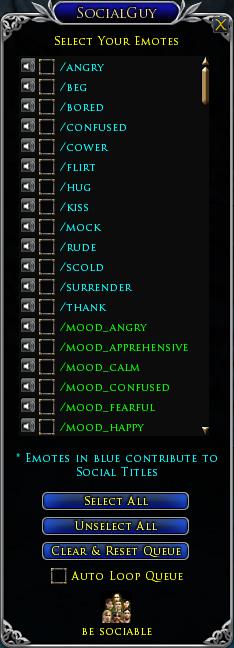
I'm not so interested in queuing emotes as I am in having quick access to the ones I frequently use -- without having to type on the command line, tie up quickslots, or scroll through a long list (or mouse hover through the builtin emote menu). There are usually no more than about 20 emotes that fall into that category for me at any given time (and 14 of them are just the dances). I would appreciate a plugin that, like yours, can list all the emotes, but can also be toggled to display only my preferred subset. (Similar to the locks and "show locked" checkbox functionality in the LI deconstruction window.) In "display all" mode, I would like to be able to check or uncheck each emote to determine which would appear when toggled to "display preferred". I have not come across a plugin that can do that. |
||
|
|
|
|
01-02-2013, 06:38 PM
|
|||
|
The Unscathed

Forum posts: 17
File comments: 62
Uploads: 0
|
This is a great plugin! Any chance you can change the graphic for the launcher button? The mouth with teeth just looks odd on my screen...lol
|
||
|
|
|
|
12-30-2012, 06:09 AM
|
||||
|
The Undying
Forum posts: 24
File comments: 170
Uploads: 20
|
Quote:
|
|||
|
|
|
|
12-02-2012, 09:20 AM
|
||||
|
The Undefeated
Forum posts: 5
File comments: 27
Uploads: 3
|
Quote:
|
|||
|
|
|
|
11-28-2012, 06:50 PM
|
|||
|
The Undefeated
Forum posts: 5
File comments: 76
Uploads: 5
|
Is it working on german/french clients? And if not: Any plans for supporting those clients too?
 |
||
|
|
|
|
11-26-2012, 09:37 AM
|
|||
|
The Undefeated
Forum posts: 5
File comments: 27
Uploads: 3
|
Doh! Didn't see that.
Working now, got the new scrolling layout up and running, so won't take up all your screen any longer. Thanks for the advice! |
||
|
|
|
|
11-25-2012, 11:40 PM
|
|||
|
The Undying
Forum posts: 24
File comments: 170
Uploads: 20
|
the problem is that you're using =
Code:
checkbox[k]=SetParent(listitem); Code:
checkbox[k]:SetParent(listitem); |
||
|
|
|
|
11-24-2012, 09:24 AM
|
||||
|
The Undefeated
Forum posts: 5
File comments: 27
Uploads: 3
|
Quote:
attempt to call global 'SetParent' (a nil value) Does it have something to do with the way we configured the list as an array previously? I had actualy tried setting it as the parent before. Here's what I have so far: Code:
-- Create Checkboxes & Emote Quickslots
checkbox = {};
emote = {};
emotebk = {};
emoteqs = {};
for k,v in pairs (_EMOTES) do
	local listitem = Turbine.UI.Control();
	listitem:SetSize(listbox:GetWidth(),15);

	-- Create Emote Quickslots next to Checkboxes
	emote[k]=Turbine.UI.Label();
	emote[k]=SetParent(listitem);
	emote[k]:SetSize(15,15);
	emote[k]:SetPosition(xpos,ypos+2);
	emote[k]:SetBackground("RadicusPlugins/SocialGuy/Resources/Spk.tga");
	emote[k]:SetMouseVisible(false);

	emotebk[k]=Turbine.UI.Control();
	emotebk[k]=SetParent(listitem);
	emotebk[k]:SetSize(emote[k]:GetWidth(),emote[k]:GetHeight());
	emotebk[k]:SetPosition(emote[k]:GetLeft(),emote[k]:GetTop());
	emotebk[k]:SetZOrder(-1);

	emoteqs[k]=Turbine.UI.Lotro.Quickslot();
	emoteqs[k]:SetParent(emotebk[k]);
	emoteqs[k]:SetSize(emote[k]:GetWidth()+34,emote[k]:GetHeight()+34);
	emoteqs[k]:SetPosition(-34,-34);
	emoteqs[k]:SetAllowDrop(false);

	emoteqs[k].DragDrop=function(sender)
		local sc=Turbine.UI.Lotro.Shortcut(Turbine.UI.Lotro.ShortcutType.Alias,"");
		sc:SetData(v);
		sender:SetShortcut(sc);
		Turbine.Shell.WriteLine(sc);
	end

	emoteqs[k]:SetShortcut(Turbine.UI.Lotro.Shortcut(Turbine.UI.Lotro.ShortcutType.Alias, v));
	emoteqs[k].AliasText=v;

	checkbox[k]=Turbine.UI.Lotro.CheckBox();
	checkbox[k]=SetParent(listitem);
	checkbox[k]:SetPosition(xpos+20,ypos);
	checkbox[k]:SetCheckAlignment(Turbine.UI.ContentAlignment.MiddleLeft);
	checkbox[k]:SetTextAlignment(Turbine.UI.ContentAlignment.MiddleLeft);
	checkbox[k]:SetFont(Turbine.UI.Lotro.Font.TrajanPro14);
	if k <=13 then
		checkbox[k]:SetForeColor(Turbine.UI.Color(0,1,1)); -- display 1st 13 emotes in blue
		checkbox[k]:SetChecked(true);
	else
		checkbox[k]:SetChecked(false);
		if k <= 24 then
			checkbox[k]:SetForeColor(Turbine.UI.Color(0,1,0)); -- display mood emotes in green
		else
			checkbox[k]:SetForeColor(Turbine.UI.Color(1,1,0)); -- the rest in yellow
		end
	end
	checkbox[k]:SetText(" " .. v);
	checkbox[k]:SetSize(150,20);

	listbox:AddItem(listitem);
end
Last edited by Radicus : 11-24-2012 at 09:27 AM. |
|||
|
|
|
|
11-24-2012, 07:59 AM
|
||||
|
The Undying
Forum posts: 24
File comments: 170
Uploads: 20
|
Quote:
e.g. Code:
PARENTCONTROL = Turbine.UI.Control(); PARENTCONTROL:SetSize(LISTBOX:GetWidth(),DESIREDHEIGHT); CHECKBOX = Turbine.UI.Lotro.CheckBox(); CHECKBOX:SetParent(PARENTCONTROL); LABEL = Turbine.UI.Label(); LABEL:SetParent(PARENTCONTROL); LISTBOX:AddItem(PARENTCONTROL); |
|||
|
|
|
|
11-24-2012, 03:56 AM
|
|||
|
The Undefeated
Forum posts: 5
File comments: 27
Uploads: 3
|
Hi, I've been trying to implement the scrolling window suggestion, but have hit a brick wall.
I've created the scrolling listbox and scroll control, but how can I combine several elements to create a single listitem to add to the listbox? ie. listitem = emote[k] + emotebk[k] + emoteqs[k] + checkbox[k]; listbox:AddItem(listitem); The latest incarnation of the plugin has had some minor changes since you last saw it. (its in the Window-testing.lua file) The above returns an arithmetic error of course. Last edited by Radicus : 11-24-2012 at 04:02 AM. |
||
|
|
|
|


All times are GMT -5. The time now is 12:16 AM.
 |
© MMOUI
vBulletin® - Copyright ©2000 - 2024, Jelsoft Enterprises Ltd. |
 |
