NOT JUST FOR THE 'MOORS ANYMORE!
(well actually not for a loooong time now )
Ever wish you could annotate your own copy of the parchment maps?
Want to keep track of where that rare mob spawns? Or where the best places to mine ore are?
Want to know quickly where Soldier Pashum is located?
Ever wish you could just click on the map to activate your creep's map instead of trying to find the map in your inventory or remember the right hot key you assigned, especially after taking a break for a month or two?
Ever wish there was a way to let new players know what the abbreviations we use all mean?
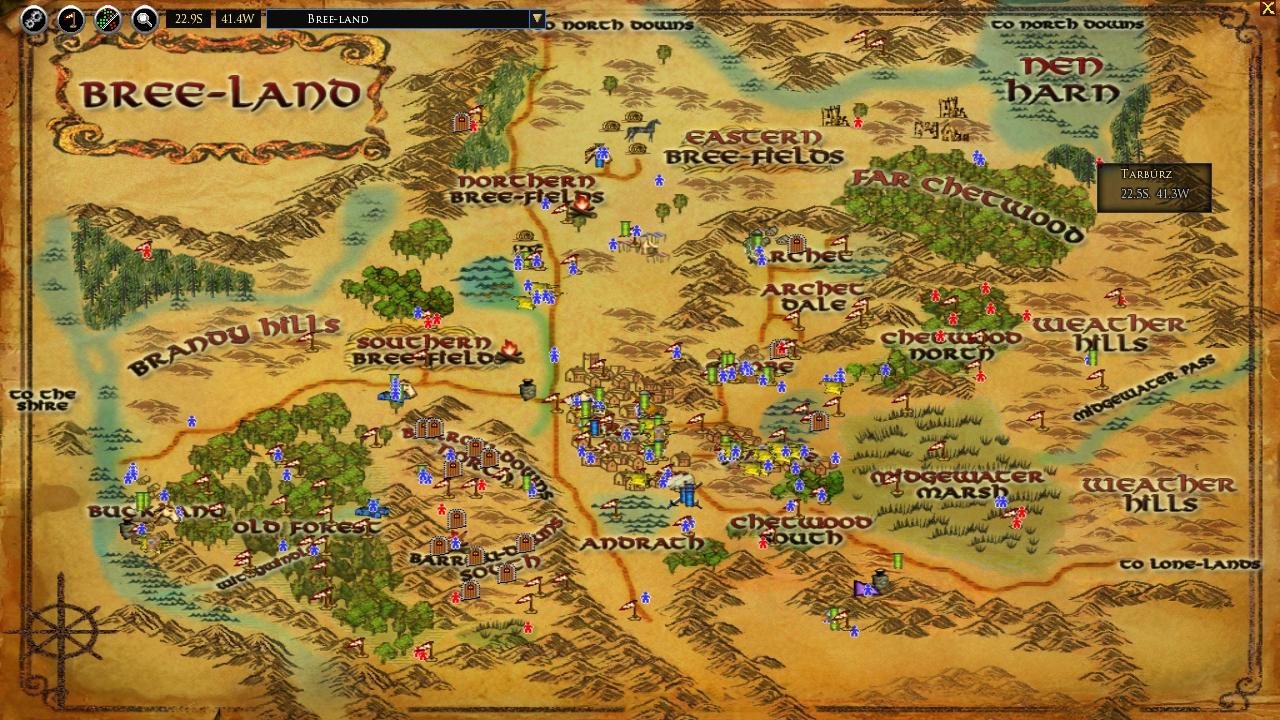
Welcome to MoorMap, the map with More. Originally, only the Ettenmoors were included, but I expanded to all of the parchment maps so that players can mark any location they want to be able to find again. All of the parchment maps and many interior/instanced areas are available as well as a couple of city maps that Turbine has not yet added.
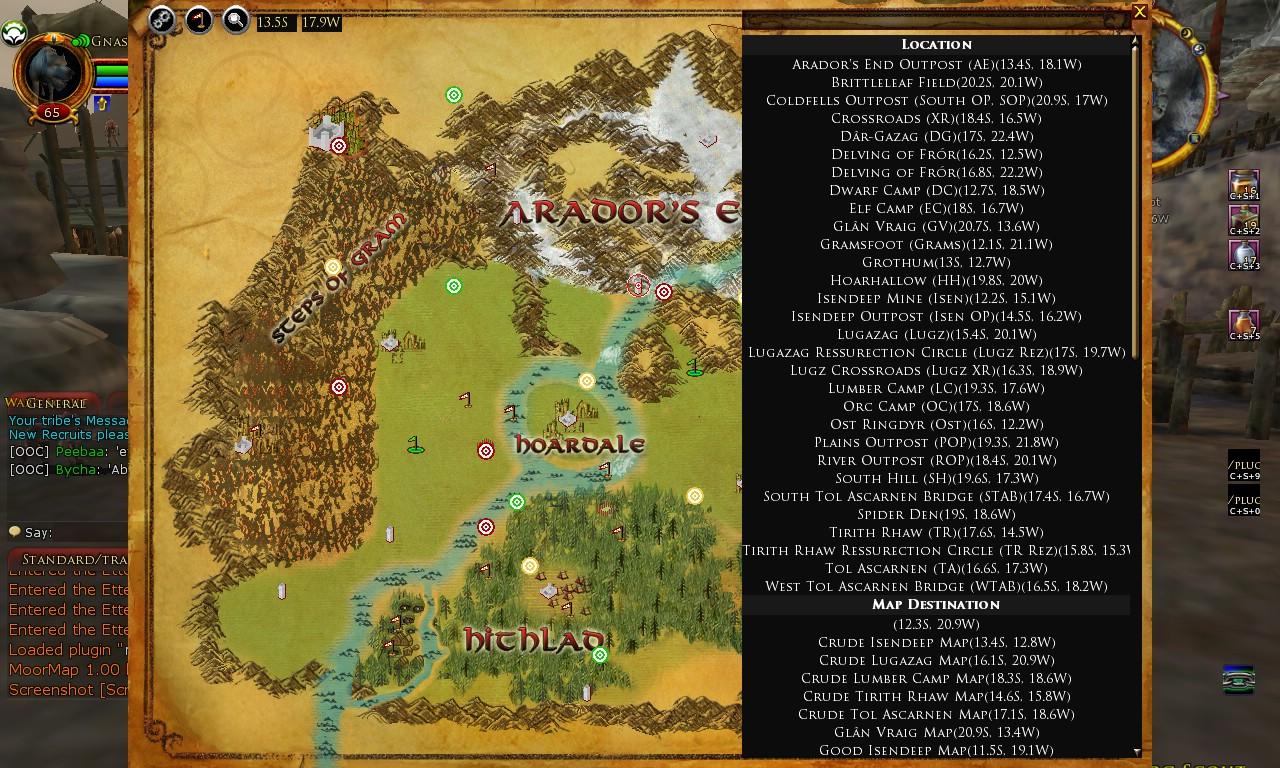
There is a filterable list of annotations, just enter a few characters in the name of the location or NPC you are looking for, then click on the entry in the list and a "ping" will show up on the map telling you where it is or right click on the entry to see the annotation detail. Hover over any icon on the map to see a brief summary of the annotation or left click the icon to see the detailed entry. You can left click on the map and choose "Add Annotation" to add your own annotations. The entire map can be moved and resized. You can also change the language, colors, opacity and other customization setttings in the Options Panel (click the gears button on the top left of the map).
If you have Lunarwater's Waypoint installed, you can enable integration with Waypoint in the MoorMap Options panel and then any time you click on an annotation's coordinates (hover over the annotation to display its coordinates) Waypoint will be activated for those coordinates.
MoorMap will now track Treasure Caches and Rare Chests as you find them (you can also manually mark those you already found). When you open a new chest, a large button will display for "Mark Chest Found". Click it before moving away (the location is important). It will automatically retrieve your location from the click, match it to all known chests to determine which one you found and add a checkmark on the icon in MoorMap. To manually mark a chest as found, open the correct map, click on the chest and click the "Mark" button in the pop-up detail dialog. If the chest was marked, the button will be "Clear" to clear the mark. Additionally, the pop-up detail will list all of the characters on the current account that have found that chest.
You can now quickly swap to TerrainMap to view the terrain at a location by simply left clicking on the map and choosing "Show in TerrainMap". Note that this only works for non-instanced exterior locations (places that have world coordinates that are on the world map).
You can also enable custom annotation synchronization with TerrainMap (TerrainMap ver 1.24 and higher now supports custom annotations). You will be prompted to enable TerrainMap compatability when you first run MoorMap 1.39 or higher. The process takes less than a minute on most systems unless you have significantly more than a thousand annotations per map. If you do have a great many annotations, you can choose not to enable TerrainMap compatability initially and then enable it at a future time in the Options window by selecting "Prompt" for the TerrainMap compatability option (it is not recommended to switch directly from "No" to "Yes").
Note, while TerrainMap also has the ability to share custom annotations with other users that functionality is not yet available directly through MoorMap - however, any annotations shared via TerrainMap will display and can then be maintained in MoorMap.
Installation
Just download the Zip file and unzip it to your Plugins folder. There are no dependancies on any outside files.
When upgrading from a prior version please either exit the game client or execute "/plugins refresh" in the chat window after copying the files but prior to executing "/plugins load moormap" for the new version.
Usage
To load the map, use "/plugins load moormap".
NOTE: If using a plugin manager to load "MoorMap", do NOT load "MoorMapLoader", "MMCust", "MMExport" or "MMSearch". They are launched by MoorMap itself as needed and loading them automatically will generate an error message reminding you not to load them with a manager or manually.
When first loaded, the map is minimized by default. There will be two icons in the extreme lower left of your screen which can be dragged to any location you want by holding the Alt or Shift key while dragging to move the icons (SSG broke the Ctrl key functionality). The left icon is the Minimized Icon and is used to display the map. The right icon is the Quick Annotation control and is used to add an annotation for your current target at your current location. You can hide either or both of these icons in the Options Panel . To open the map initially, click the Minimized Icon.
There are three chat commands for controlling the display of the map,
"/moormap show" will display the map
"/moormap hide" will minimize the map and show the icon if the icon hasn't been disabled in options
"/moormap toggle" will toggle the display of the map
There is a fourth chat command which you can bind to a quickslot in lieu of using the Quick Annotation control (if you prefer having it bound to a key stroke). This command is locale specific, please assign the command for your client:
Code:
EN:
/MoorMap add ;loc:5::;target
FR:
/MoorMap add ;loc:5:FR:;cible
DE:
/MoorMap add ;pos:5:DE:;ziel
(I used code tags to prevent accidental text conversion to smilies)
To add a custom annotation, just left click on the map, select "Add Annotation", fill in the information and click "Save". You can also use the Quick Annotation icon, just target a resource node or item while standing next to it and click the Quick Annotation icon (looks like a flag) and an annotation will automatically be added to each map that matches your current coordinates. Note, the Quick Annotation tool only has access to your coordinates, not the object you are targetting, so get as close to the location as you can before clicking the tool.
To zoom out, right click anywhere on the map that doesn't have an annotation - basically the same as the built-in game map.
The map selection list is a little different than the built-in map. Since MoorMap also supports many interior/instanced maps, an asterisk may appear in the entry for a map indicating there are interior/instanced maps available on that map. Hover over any entry with an asterisk to expand the list to include the available interior/instanced maps for that area (click on the interior/instanced name to display that map).
There are two search functions, local and global. They are both case insensitive and accent insensitive meaning that you can type search text without capitalization or accents and it will still match.
To find a location or NPC on the
current map, click the
silver magnifying glass button. A filter field and list will appear on the right side. If the filter field is blank, all annotations are listed alphabetically, grouped as "Locations", "Map Destinations", and "NPCs". If you type in the filter field, only those items with the filter string in their name will be displayed in the list AND only those annotations matching the filter text will be displayed on the map. Clicking on an entry in the list will hide the list and cause an animated "ping" to appear on the map at the location of the selected entry. You can also hide the list by simply clicking anywhere on the map. You won't be able to click on the icon under the ping or see the hover information until you click once on the "ping" to clear it.
To search
all maps, click the
gold magnifying glass button. A search dialog is displayed, type in the text to search for and click "Search". All of the default data files are searched and the matches are displayed in a list. Click an entry in the list to display the map with a "ping" at the location.
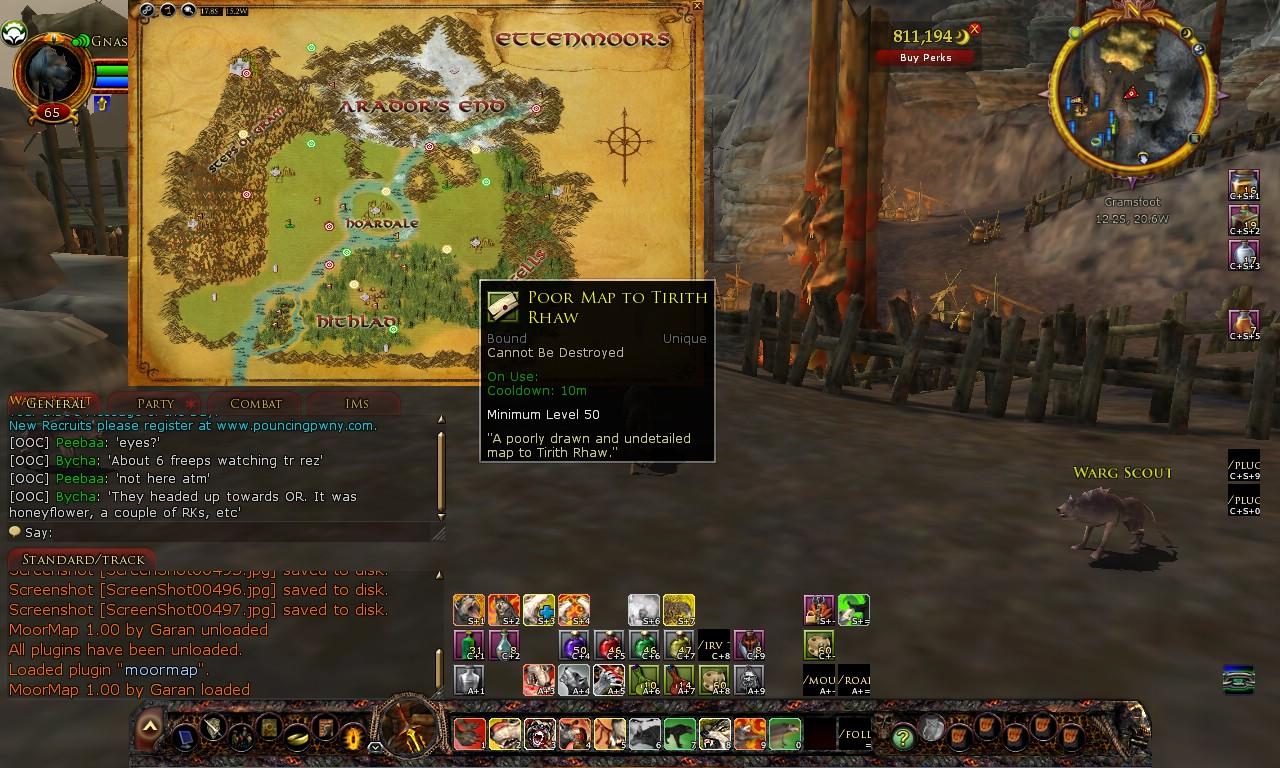
To use the map to activate a Map Item or Creep Map Skill, just right click on the icon on the map at the destination location. As long as the map location is available and not on cooldown the map will activate. Note, if you have both of the maps to Gramsfoot or both of the maps to Glan Vraig, only the better map will be activated.
MoorMap supports Server specific annotations for the Ettenmoors. To use a specific server version, just open the Options Panel, select your server and save your changes. If your server has special names for any Ettenmoors location and you would like those names included in the defaults for your server, please submit them as Feature Requests (see the top right of this web page). When submitting a request, please include your server name, a short name for each location, a description of the location (and if possible a reason for the name) and the location map coordinates. Please keep the annotation names and descriptions appropriate. Submissions that are acceptable will automatically merge with the existing defaults when you download and install an updated version.
There is an additional chat command, "/moormap ping" which takes a number of parameters and will allow external plugins to add annotations and display them on the map. See the Readme.txt file for more details.
Future Plans
I hope to continue adding more support for the French and German clients
I continue to add instance/dungeon maps.
Incorporate Custom Annotation sharing
Add the ability to share player locations (static locations shared via chat - there is no way to dynamically update those locations)
Known Issues
RU language support is very limited at this time.
Tier 12 craft nodes won't work with DE/FR Quick Annotation tool (you can still add manually)
Version Log
Version History and Change Log:
Ver 1.55
Added annotation data for U38
Fixed Mordor and Haradwaith offsets for custom annotations (only affected compatability with TerrainMap)
Ver 1.54
Fixed coordinate calculations for Hiddenhoard maps
Fixed treasure caches in Ered Mithrin - some were missing and some wouldn't mark properly.
Added an optional checkbox in the Global Search dialog to "Use Lua Patterns" which defaults to unchecked
- this changes the default behavior of the search to a non-pattern search with no special characters but if the checkbox is checked, the search will use the search parameter as a Lua Pattern (special characters will have to be escaped)
- this is now more consistent with the Local Search which does not support patterns and is easier for novice users to understand.
Added the ability to share "Set Checked - No RT" status on the RT Overlay - this is still compatible with the Mathwald's RT Plugin, but in RT Plugin the extra info will simply be ignored (the same way the distinct RT names are ignored)
Added Region 5 Haradwaith
Added Maps for U38 - NOTE, there is no default data for U38 yet, only Treasure Caches
Fixed bug that caused error when finding a treasure cache in region 5
Ver 1.53
Added a minimize button to the top left of the Deed Overlay Legend. When minimized, the Legend will appear as an icon in the bottom right of the map window. Clicking the icon will redisplay the Legend (note, the icon is only visible when a Deed Overlay is currently displayed and the legend is minimized)
Added maps for Return to Carn Dum
Resized Mordath map and added an Overlay for the path to the bosses and pages (I got tired of getting lost trying to find page 8)
Ver 1.52
Fixed bug in custom annotation name format reported by Torgulfson. The ":" character is no longer restricted from custom annotation names and descriptions (in fact, no characters are now restricted) and ore node names including an embedded ":" character will now save correctly using the quick annotation tool.
Fixed bug in Lothlorien coordinates/bounds reported by Drekskald
Added U34 Before the Shadow maps for Cardolan, Swanfleet, Mossward and default annotations.
Added basic Deed Data maps for Cardolan and Swanfleet
Ver 1.51
Fixed a bug in the custom annotations for Azanulbizar reported by Jethpriel
Added missing Treasure Caches in Azanulbizar reported by Jethpriel
Added many missing default annotations in Azanulbizar
Added custom annotation integration for the Tales of Yore maps with TerrainMap
Note, saved custom annotations in Azanulbizar will not display in TerrainMap until TerrainMap is also updated to version 1.34 (coming soon) or higher
Ver 1.50
Restored map definition for Byrgenstow upper floor that went inexplicably missing
Added Yondershire map and default data
Added Chest Tracking. When you collect a Treasure Cache or Rare Chest, a large popup button will appear to "Mark Chest Found". Click the button immediately since it will get your location when you click it and compare it to all known chests and if one is found within .1 distance in any direction, it will be marked as found.
When you open the map, any treasure chest you have marked on the current character will display a green check mark. You can mark off chests manually (if you already discovered them and are trying to determine which ones you missed) by clicking the chest on the map and then clicking the "Mark" button in the pop-up detail window. Similarly, if you click a marked chest, you can unmark it by clicking it and clicking "Clear" in the detail window. Additionally, the detail window will list all of the characters on your current account that have marked that chest as located.
Fixed many, Many, MANY missing FR and DE translations. A few still need translations, notably Tier 12 resource nodes and a few interior/instanced maps. I will get back to fixing them when I can see straight again (too many hours staring at itty bitty in-game fonts to get exact translations

)
Ver 1.49
Fixed bug when using quick annotation tool with Riddermark Skarn and Rich Riddermark Skarn nodes reported by HandeeDandee - the nodes will now be properly added as ore nodes rather than generic custom annotations.
Added a couple more maps for instanced areas that don't have maps including Deep Beneath Gundabad, Distant Snowfields and Kolo-hampat
Fixed mixed up annotations in Mattugard (the second quest plaque was mislabeled as the third and the third plaque was masquerading as an NPC)
Added ability to set Custom Map images - from the left click menu (left click on map), select Custom Map, this displays the custom map maintenance window with the current map selected. Enter the path to a custom map image file and click save - that image will then display as the background for the selected map. Note, the image has to be the same resolution as the actual map resource (typically 1025x768 for parchment maps). The file path is relative to the plugin folder, so, for instance, the file path of the default map for dale is "GaranStuff/MoorMap/Maps/Dale.jpg". Only .jpg and .tga files are supported by the API. This can be especially handy when planning an Overlay image based on collected annotations but could also be used to create your own artistic maps if you don't like the style of the built-in maps (you would have to update your map if the bounds/scale of the built in map ever changed as happened to Breeland and a few other maps recently)
Fixed bug in custom annotation export and update functions for Rhovanion region for synching annotations with TerrainMap.
Added Angle of Mitheithel map and data
Updated Trollshaws map to use the new image and added stablemasters/Mitheithel data
Added Erebor Housing map
Replaced terrain version of Glittering Caves with the client parchment map - the in-game map was added to the client in the latest update but for some reason SSG haven't yet implemented it (you can manually select it from the map list but it doesn't appear when you are actually in the Glittering caves and open the map).
Ver 1.48
Added maps and data for Gundabad
Added Overlays for Deepscrave to aid with understanding levels
Added new Rohan overview map and moved Westemnet and Estemnet to be under new overview. Adjusted all map connectors to account for new map
Fixed some issues that can arise if MMSearch, MMExport, or MMCust are manually loaded. Note, they should still NOT be manually loaded, this is just to prevent problems from people who don't follow instructions...
Translated warning message for MMSearch, MMExport, and MMCust so that the warning is displayed in the current client language.
Ver 1.47
Added maps for 'Woe of the Willow' and 'Agoroth, the Narrowdelve' instances (simple terrain-based maps)
Added the ability to type a partial map name into the map selection list. The list will jump to the first matching entry (if any). If the entry is a normally hidden entry (an interior instance) it will be displayed. This should make finding maps a bit easier since there is such a long list now.
Improved detection of interior locations as well as z coordinates for interior maps with multiple layers such as Writhenset. This should significantly improve detection of player location in interior maps and eliminate erroneously placing characters on parchment maps when they are actually in an interior (issue introduced in Elderslade).
Note, not all vertical interior locations with multiple maps are cleanly seperated by their z-axis coordinates, that is, parts of some upper levels are actually lower than parts of some lower levels and, likewise, some parts of lower levels are higher than some parts of higher levels (for example Haycliff has several overlaps between levels) making map detection erroneous at some locations. However, for the most part, vertical interiors do have z-axis delimiters between their maps so this should help significantly in detecting the correct map for these locations. Unfortunately, there are a few maps such as Anglach, The Great Forge, that are three dimensional but only use a single map which prevents cleanly denoting the different levels so annotations still pile up on top of each other - I will consider seperating those maps manually in the future to better represent their three dimensional aspect (Anglach should be easy since the vertical seperation would be at the stairs).
Changed local search filtering, search text will no longer filter out map connectors (the hotspots that allow navigating to other maps). This filter was never intended to apply to the map connectors and was interfering with the implementation of the Roving Threat overlays.
Fixed throttle timer for ping animations on main map and Berrys Deed data maps. Pings will now animate at a reasonable speed no matter how fast the client machine is.
Added overlays for Roving Threats - the data is based on Mathwold's RTPlugin, but the overlay is an extension of the functionality from the Berrys Deed Data overlays combined with the chat sharing capabilities of RTPlugin (with some minor tweaks).
Sharing spawn info via chat with the Roving Threat overlay in MoorMap is compatible with the RTPlugin by Mathwold, that is, sharing Active spawn points via chat from RTPlugin will display in MoorMap as "Active" (without the RT name since RTPlugin does not support naming the spawns) and sharing named spawns from MoorMap will show up in RTPlugin as "Active" - note, spawn locations flagged with the RT name in MoorMap will show the name in other users MoorMap when shared via chat.
The major difference in sharing spawn info via chat between RTPlugin and MoorMap is that Moormap will only allow sending on Fellowship, Kinship, UC1-8 and Tell (not World, Regional, Say, etc.) to prevent unwanted spam on global channels. MoorMap will however properly receive spawn locations shared by RTPlugin on any channel. Note, RTPlugin does not allow sending and receiving via UC5-8, only UC1-4.
Note, when the Roving Threat overlay is active, all other annotations are suppressed so that the overlay is more obvious. To display the other annotations, deselect the overlay from the Select Overlay list.
MoorMap displays the Central Gondor Roving threats as overlays on the Ringlo Vale, Lebennin and Dor-en-Ernil maps rather than the overview Central Gondor Map. Sharing however will work correctly between MoorMap and RTPLugin (if you share from Lebennin in MoorMap it will show up in Central Gondor in RTPlugin)
Added Hidden Threats Overlays in Udun, Lhingris, Talath Urui, Dor Amorth, and Agarnaith (uses the same basic mechanism as Roving Threats). War Bands may be added in a future release (the mechanism is in place, just the data needs to be collected and put into the proper format - I haven't had a need to locate any war bands so it's pretty low on the priority list)
Fixed broken map display on DE client - some map backgrounds were displaying as missing images (grey and white checkered pattern) when the plugin language was set to DE (or client was DE and language was set to "Kunde")
Added many FR and DE translations - some are still pending
Added icons and filters for the Eagle and Far-ranging Stablemaster annotations.
Added a number of missing annotations on Elderslades War of Three Peaks map.
Fixed bug that prevented Breadcrumbs from saving correctly.
Ver 1.46
Fixed bug that was preventing icon filtering from working in DE/FR clients
Added icons and filters for Far-ranging Stablemasters and Dock-masters. Far-ranging Stablemastes in prior regions will be added/updated over the next few updates. Dock-masters should be all accounted for
Modified the definitions of Berry's Deed overlays to allow for creating deed overlays that are not based on Berry's data but follow the Berry's Deed Map style.
Added a beta Deed map for Wildwood - note, this currently is only for exploration deeds, not slayer deeds. Slayer deeds require more research and may not be feasible with the time I have available.
Ver 1.45
Added Wildwood map and data
Adjusted Breeland, Shire and Ered Luin maps and connectors to account for new style maps
Ver 1.44
Added WoTP maps
Ver 1.43
Tweaked settings handling to be more tolerant of accidentally setting the accessory plugins to load automatically. This will also eliminate the bug that occurred when updating from very old versions of MoorMap reported by Beriahim.
Added MT midsummer map
Fixed conflict with other plugins' /loc commands reported by jojobean. Added a new setting, "Respond to /loc when minimized" (default=unchecked). When unchecked, MoorMap will ignore /loc chat responses when miminized. That will prevent the map from refreshing or displaying in response to /loc commands generated by other plugins such as Waypoint and RTPlugin. If checked, then MoorMap will respond to all /loc messages and display even if it was minimized - this could be handy for people with multiple monitors that run with MoorMap on a second monitor and want their position updated and displayed when they update Waypoint.
Fixed Waypoint integration for Berry Deed map annotation bug reported by vecny.samotar
Fixed bug in custom ore/wood/scholar nodes that wasn't saving the Tier for the nodes which prevented filtering by Tier. This bug was introduced in ver 1.39 with MMCust but any nodes that were previously saved with an incorrect tier of 0 should be automatically detected and corrected the next time their map is loaded.
Reworked the custom annotation maintenance dialog to improve maintenance of custom annotations.
Patch for location string change in EN, DE and FR clients
Ver 1.42
Added Langflood wood and ore nodes
Patch for location string format change for EN clients
Fixed bug in DE client location string
Ver 1.41
Added map for Kam Lagurz (Brokencleft) in Mordor (SSG never made one for this instanced area)
Fixed bug in Custom Annotations that prevented saving custom annotations in interior/instanced areas (accidental carryover from TerrainMap where such coordinates are off-map)
Fixed bug in Quick Annotations tool that was preventing saving custom annotations in new format
Added Sarnur interior maps (yeah, about 12 years too late, but better late than never...)
Fixed typos in Dor Amarth data - "Rare Modor Chest" are now "Rare Mordor Chest"
Fixed bug that would create duplicate custom annotations when editing an existing custom annotation and saving multiple sequential changes to the same annotation
Added the partial Berry's Deed Data maps for West Rohan - as many know, Whiteberry stopped playing in 2014 and stopped publishing her wonderful deed maps. These are the last maps she was working on and only include explorer deeds, not slayer or other deeds.
Added many Minas Morgul interior maps
Added default annotations for Minas Morgul and Mordor Besieged
Fixed a couple missing map connectors in Morgul Vale
Added Wells of Langfold map and data
Ver 1.40
Fixed bug that reported an error on unload when option "Client" is the selected Language choice in Options.
Fixed bug in Options window where Language option "Client" was being improperly overridden by the current client language when reopenning the Options window.
Fixed a bug that could prevent loading Icons after update from certain older (really older) versions
Fixed a bug reported by Kalex and Altair7 on lotrointerface that would prevent the plugin from loading if a default map was set
Ver 1.39
Fixed outdated <Descriptor> section of .plugincompendium file reported by Jeremy Stepp
Added maps for U25.
Note: Default data could not be added for quest items and Torech Ungol since I do not yet have the Minas Morgul expansion. Expansion specific data will have to be added in a later update.
Added left mouse click menu item "Show in TerrainMap" - if TerrainMap version 1.24 or newer is installed, this will open the clicked location in TerrainMap
Note, this does require that TerrainMap ver 1.24 or newer be installed (if it is not loaded it will be automatically loaded but it must be installed first)
Fixed erroneous boundaries for Eryn Lasgalen that was preventing correctly identifying the "best fit" map for parts of the Vales of Anduin and the Iron Hills
Fixed erroneous coordinates and boundaries for Grimbeorn's House (they never got updated when Grimbeorn's House was moved south back in U22)
Added MMCust and MMExport support plugins for keeping TerrainMap and MoorMap custom annotations synchronized (for support of custom annotations in TerrainMap ver 1.24)
Added synchronization of custom annotations - the first time you run MooorMap ver 1.39 it will automatically export all custom annotations in TerrainMap format and annotations maintenance will keep both the MoorMap and TerrainMap files in synch moving forward
Fixed the corrupted strings.lua file that was preventing the RU translations from displaying correctly (sorry chirick86, I didn't notice the corruption until recently
- I know the RU client isn't officially supported but there was a lot of work put into the translations...)
Updated some missing FR/DE and RU translations - note, the RU translations are rough (Google Translate) because I don't know Russian and don't have the russian modified client so I don't know what the location names translate to.
Ver 1.38
NOTE: Changed Mouse handling to be more consistant with in-game map. Right click will now auto zoom out and left click will now pop up the mouse menu.
Removed erroneous 'Sulfurous Deposit' annotations from Ered Mithrin map
Fixed bounds on Nargroth map
I finally spent some time fixing my tool for determining interior location coordinates so I can more easily (and more accurately) add interior maps.
Fixed coordinates/bounds for all interior maps that were not yet set.
Added several interior maps, more to come in a future update.
Updated existing instanced maps to use in-game resources. Removed old JPG files from zip file. Note, users that had prior versions installed can delete all of the .jpg files in the MoorMap\Maps folder except Cliving.jpg, dale.jpg, Eaworth.jpg and laketown.jpg if they wish to save some space on their drives. Unfortunately, even with Compendium, authors have no way to automatically delete files that are no longer used.
Added an asterisk in the Map Selection list for any map that has interior maps - this makes it more obvious which maps have interior maps. As previously, hovering over an entry in the map selection list will expand the list to display the interior maps for that entry (interior map names are displayed with gold text).
Added a new option, Lock Aspect Ratio - this will force the map to preserve the 4:3 aspect ratio of the actual map images. Open the settings panel, click "Lock Aspect Ratio" under the map size and save settings. The map will snap to a 4:3 ratio and resizing will enforce this ratio. This will allow users to scale the map with less distortion.
Fixed a bug that was preventing breadcrumbs from displaying properly
Fixed bug in player position icon 'ping' when changing maps to show location
Fixed erroneous bounds on Lothlorien map reported by Altair7 on lotrointerface
Added Vales of Anduin
Updated coordinates for region overviews to better align with in-game coordinates (character marker can still have a fairly large margin of error in some parts of regional maps since they still do not completely coincide with the game world but they are a lot closer than before the revamped maps).
Added option to set plugin language to automatically use the current client language - in Options panel, select "Client". If set to "Client" then the language will change each time the plugin is loaded to whatever is the current language. If set to a specific language it will act as before, overriding the client language. Note, for new installs the default is "client", for prior users it will retain whichever language you previously chose until you change it.
Ver 1.37
Fixed rounding discrepancy that affected certain map sizes when reloading as reported by Singest on lotrointerface.com
Updated Cape of Belfalas map image
Thanks to a discussion with Therzok on lotrointerface.com, I was motivated to revisit the local search filter panel. More specifically, the application of the filter panel search text to the actual map annotations. I had originally disabled this functionality due to significant impact on performance, however, I realized I had not revisited this functionality after changing the way annotations were loaded and handled by the map (several versions and many years ago). With the enhanced annotation handling, I was able to re-implement this functionality so the local search filter not only applies to the list of annotations in the filter list but is also applied to the actual annotations on the map.
SSG somehow broke functionality of the Control key so I have changed Breadcrumbs to work by holding Control OR Alt while pressing the position icon at the top of the map (or executing the /loc chat command).
I also changed moving the quick annotation tool icon and the map icon to work by holding Control OR Shift OR Alt and then left dragging the icon.
Added maps and default data for U23
Ver 1.36
Fixed bug in External Ping command (not sure when this bug crept in, but it looks like it was there for a while) that prevented ping from actually showing up.
Added External Ping by Region command. If you only know the region and NS/EW coordinates you can let the plugin determine what it thinks is the best map (basically the closest zoomed map in that region that also contains the coordinates)
The syntax for the new ping command is very similar to the old one but with region instead of map ID, i.e. "/MoorMap ping_r region:NS:EW:Name

escription"
Added maps for Northern Mirkwood, Felegoth, Dale (custom), Lake Town (custom), Hall Under the Mountain, Dol Guldur (Razed) and default data for U22
Updated Rhovanion map and connectors for U22 and revised player positioning.
Fixed bug reported by Invizet when loading the Ettenmoors map with the Russian language selected.
Added missing POI, Anglanthir, reported by Rigantona as well as several other missing POIs in Angmar.
Fixed some missing translations for DE/FR clients. There are still a few missing translations, mostly in obscure, relatively unused parts of the UI
There is a known issue when using the global search with DE/FR clients - if the name or coordinates don't return correctly, clicking on the returned value doesn't re-position the map at that location. I will be looking into this further for the next release.
Ver 1.35
Changed all Trajan fonts to Verdana fonts since Trajan does not support cyrillic characters
Added Russian translation of UI, translations thanks to chirick86 on lotrointerface.com
-- note, Lua window titles do not support cyrillic fonts so they will probably show as "?????" characters when Russian is selected.
-- additionally, popup menus do not support cyrillic so the help text and other popup menus will also show as "?????" characters.
-- both of these have been submitted as bugs but it is doubtful that SSG has the resources to fix this at this time.
Fixed miscellaneous strings missing from translate table.
Fixed bug that prevented node filters from filtering unselected node tiers for languages other than English
Fixed bug where node filter text would not update correctly without reloading plugin after changing languages
Added Tier 10 crafting node types from The Wastes to quick annotation tool
Added Tier 11 crafting node types to quick annotation tool
Added Tier 11 to node filter
Added Mordor expansion maps (Plateau of Gorgoroth, Agarnaith, Dor Amarth, Lhingris, Orodruin, Sammath Naur, Talath Urui, Nargroth, and Udun)
Added Mordor default annotations
Fixed a bug in the quick annotation tool that was causing it to fail for DE/FR clients. Apparently Turbine stopped using native strings for coordinates so location responses to the ;loc and ;pos chat commands are now all in english regardless of the current language (and probaby have been for a while, this bug was probably added when EU servers were taken over from Codemasters).
Ver 1.34(a)
Fixed the location of Thargelon in North Ithilien reported by Altair7
Added ability to resize the markers for Berry's Deed Data requested by fade2gray. Just click the +/- on the Marker Size in the Legend - be patient, it takes a second or two to refresh.
Added The Wastes map and default data.
Changed some default annotations in Rivendell and Trollshaws due to past game updates.
Fixed Evendim Treasure Caches that were erroneously flagged as NPCs.
Ver 1.33
Bug fix for update bug reported by Altair7 and Tappo
Ver 1.32
Fixed Euro handling bug reported by Murxx.
Fixed settings bug when switching between EN and DE/FR clients.
Fixed missing Treasure Caches in Far Anorien reported by Jethpriel / verified by Murxx.
Added missing Treasure Caches in Eriador (Angmar, Evendim, Forochel, Mirkwood, Misty Mountains and North Downs) reported by chaotic2091
Added Mordor region
Added maps and default data for Cape of Belfalas, Mordor, March of the King, North Ithilien, Pelennor after Battle, Minas Tirith after Battle and Osgiliath after Battle
Ver 1.31
Major revamp of Default data processing. No more processing screen. Much faster initial load after updates. Slight (very slight) performance increase when changing maps.
Fixed bug in global search handling certain special characters
Fixed bug in Reload Defaults that could fail to fix missing overlays
Removed the "MoorMapDefaults.plugin" and "MoorMapTerminator.plugin" definition files from the zip package - these files are no longer used and can be manually deleted from existing installations
Removed the "Terminator.lua" source file from the zip package - this file is no longer used and can be manually deleted from existing installations
Added Custom Annotations to global Search in response to request by fade2gray @ lotrointerface.com. Added radio buttons to select search type, "Default","Custom" or "Both". Note, this may have a slight performance impact on slower/older machines as the search has to load its child plugin for every map now instead of just once per search but once the search is complete, the resources should all be released so there should be no permanent increase in resource usage.
Major behind the scenes update to filters to allow future additional annotation/filter types and some other customization options...
Added a distinct icon (blue flag instead of red flag) and separate filter for Custom PoIs in response to request by fade2gray @ lotrointerface.com - I didn't add a separate filter for Custom NPCs as there are far fewer NPCs and less issue with distinquishing them
Added Icon Maintenance for assigning custom icons for annotations. Now you can replace the default icons with your own images, simply copy an appropriately sized (32x32 for normal/hover icons, 16x16 for small icons) .jpg or .tga file to the Resources folder, right click the annotation type in the Filter panel to open the Icon Maintenance window and enter the file name (without path) for the icon you wish to use and click Save. Each annotation has three icons, Normal, Hover and Small (used in the Filter Panel). If you want to restore the default icon, simply click Reset Default on the Icon Maintenance Window. You can use other sizes than 32x32 and 16x16 but they will be cropped/tiled when displayed. Note, you can also use built-in resources if you know the resource ID, just enter the number instead of a file name.
Fixed the PoIs for the History of the Dunedain deed (reported by Thiok and fade2gray)
Added Default data for U18
Ver 1.30
Added separate icon and filter options for Treasure Caches (requested by Jethpriel). Existing default data Treasure Cache Points of Interest should automatically use the new icon.
Changed "Sage's Lockbox" to "Sage's Locker" (reported by DJPorterNZ) and other moria crafting nodes that were changed.
Changed all farmlands to simply "Farmland"
Added Talath Anor, Minas Tirith, Pelennor, and Old Anorien maps
Ver 1.29
Added Eastern Gondor maps and default data
Ver 1.28
Fixed Search Window location bug when resizing main window reported by bunny.
Added "pin" to keep Annotation Window open. When pressed in the window will stay open even when the map is closed (but can still be dismissed by clicking OK or the close button). When un-pinned the window will close when the map closes as normal.
Modified the "Show Location" function - if the player can not be shown on the current map then the "best" fitting map will be displayed. Note, this may not coincide with what the in-game map considers the correct map as that information is not exposed to Lua.
Removed language specific maps now that Turbine has moved the language specific maps back into the language libraries. The hardcoded map images were blank, so the client now selects the image based on the client language. Basically, Turbine went back to saving language specific maps the way they did prior to Isengard so I had to revert my display mechansim to avoid blank maps.
Ver 1.27
Added Western Gondor maps and Dead Marshes map and default data
Added custom image for Eaves of Fangorn map to replace the one incorrectly shown in-game
Added overlay for Matalan's quest start locations in Entwood
Ver 1.26
Added Nan Curunir (flooded) and Entwood maps and default data
Ver 1.25
Bug fix for users experiencing load error on line 1726
Ver 1.24
Fixed a bug that prevented global searches of Western Rohan
Changed search window to process search when Enter is pressed in the search field
Fixed conflict bug that would cause search to hang when TerrainMap and MoorMap were both loaded
Added workaround for bug in GetCommands() that sometimes returns a non-sorting 0th element in the command table which would cause search to hang
Ver 1.23
Added Western Rohan maps and default data
Fixed Moria overview default data
Fixed a few invalid annotations
Added support for Whiteberry's Deed Maps as Overlays. Any map that has a Deed map Overlay
will show the "Select Overlay" message - hover over the message to display the available overlays.
Click the checkbox to display the Overlay and the Deed Map Legend for that map. Note,
each map overlay is separate so you have to enable/disable the overlay on each map where you want
the overlay to display.
You can click the entries in the legend to activate a "ping" on the map to make the deed markers easier to find.
Slayer Deed Recommended Areas can have more than one location per map so they can be listed more than once in the legend.
Ver 1.22
Changed settings to store at the Character level instead of the Account level. When loaded on a character for the first time settings will automatically inherit the last character's settings or defaults if the plugin has never been loaded on any character.
Fixed default data bug for server specific ettenmoors data (since no one has reported this bug in over 2 years I suspect that no one actually uses this feature )
Converted default data files for use with global search functionality
Fixed bug in placement of hover help for control buttons when map was less than full screen.
Implemented accent insensitive filtering for local search
Implemented global search functionality - the silver magnifying glass is local search, the gold magnifying glass is global search
Added default data for Wildermore and Forlaw
Fixed the Options Panel Cancel button
Added Map size and position to Options Panel
Added Icon position to Options Panel
Added Quick Annotation Tool position to Options Panel
Ver 1.21
fixed upgrade bug in 1.20
Ver 1.20
Changed the way the quickannotation icon is selected for moving. If you hold the Alt (or Shift) key BEFORE moving the mouse over the icon, you can grab any part of the icon to make moving it easier.
Fixed the Good TR and Poor TR map locations (they got swapped with the Ettenmoors revamp and I kept forgetting to fix them, thanks to LagunaD for reminding me).
Added Opacity to Overlays
Fixed a bug that would cause overlays to improperly resize when the map was resized if they were a different original size than the map they were displayed on.
Added maps for Goblin-town. Breadcrumbs are very handy in there...
Updated Bree default data.
Fixed incorrect annotation label. "Writhenbores" was incorrectly labeled "Erforgh Cleft". reported by Areswolf.
Updated default data for Moria revamp.
Modified Annotation pop-up dialogs to include Location.
Annotation pop-up text is now selectable for copying to clipboard.
Updated coordinates in Delving of Fror to allow use of Breadcrumbs and Player Position
Updated NPCs in Delving of Fror (removed NPCs that no longer exist since the Moors revamp)
Fixed bounds on Byrgenstow Upper and Lower for Breadcrumbs/Position. Changed map for Byrgenstow Upper and Lower to 1024x768 and added annotations.
Fixed bounds on Sprigley's Cellar
Added a check to automatically remove out-of-bounds annotations the next time a map is loaded - this will automatically fix the Sprigley's Cellar (or any other map) custom annotation file by removing annotations that were accidentally added due to invalid bounds.
Added an Overlay list to the main map window for quickly turning on/off overlays. If any overlays are defined for the current map, the "Overlay" caption will appear next to the map select box. Hover over or click on the "Overlay" caption to display the list of defined overlays and check/uncheck to show/hide the overlays.
Ver 1.19
Fixed bug in Breadcrumbs that would save the breadcrumbs to the wrong map when switching maps.
Fixed a bug in Breadcrumbs that could require the user to switch maps or reload the plugin to get breadcrumbs to display after clicking "Clear" and then adding a new breadcrumb.
Changed Breadcrumbs to only add on the currently displayed map
Changed the Breadcrumb "Clear" button to only clear breadcrumbs on the currently displayed map
Changed how the mouse hover function works in the map selection so that interior maps remain showing if you hover over another map in the same area (makes the list a little less volatile)
Added sample default overlays for Isengraf and The Ancient Tomb showing the path to the enemy leader
Updated guild-hall info for Thorin's Hall and Esteldin
Fixed interior bounds for Thorin's Hall so breadcrumbs and player location now work in Thorin's hall upper and lower.
Added "stair up/down" map connectors for interior locations (Thorin's Hall, Ost Magol, Byrgenstow, Gerngarth, Wyrmdelf, etc)
Note, for player position, breadcrumbs, and quick annotations the maps do not account for elevation (yet) so be sure to have the correct level displayed when checking location or adding breadcrumbs/annotations
Added interior maps for Byrgenstow, Langraf, Ost Magol, The Living Deep, Gerngarth, Isengraf, Wyrmdelf, Dwergfant, The Ancient Tomb, Dígelon and The Creeping Wood
Added default data for Eaves of Fangorn, Entwash Vale, East Wall and Sutcrofts (not including Hytbold)
Ver 1.18
Fixed icon dragging. again.

Hopefully I won't accidentally delete this again. You must now hold down the Alt (or Shift) Key to drag the Map and Annotation Icons to new locations
Fixed some inconsistent display mechanics with F12 and Escape.
Added hover help for control panel icons.
Added Overlays - users can now view Overlays on maps. An Overlay is mearly a transparent image used to show pathways, directions, guides, etc. on top of a map. Users can make their own overlays as well as displaying built in overlays. To open the overlay selection and maintenance window, click the Overlay button in the control panel near the top left of the map.
To add a custom overlay, create a .tga file (more detailed instructions are available in the readme) with transparency and copy it into the GaranStuff/MoorMap/Overlays folder (or a subfolder within the Overlays folder). Then in MoorMap, select the map for the overlay, then click the Overlays button, select "New" and enter the info for the overlay.
This should make it fairly easy to add "guides" to maps and will be even more useful as additional interior maps are added. Users may also want to add overlays to show good areas for grinding deeds, questing, etc.
Maps can have multiple Overlays and the user can decide which if any are displayed as well as the order in which they display.
Added "Breadcrumbs"
Breadcrumbs allow you to mark your way by putting a flashing trail of dots where you have travelled. Since LotRO's implementation of Lua does not allow us to automatically retrieve player position, you have to hold down Alt while entering the /loc command. The easiest way to do this is to bind the /loc command to a built-in quickslot which uses the Alt key as a modifier. Otherwise you can also drop a breadcrum by holding Alt while clicking the "Location" button on MoorMap.
It is important to remember to hold the Alt key until the chat message displays with your location (just hold it for half a second after you click the button). This is because MoorMap's breadcrumbs are actually triggered by the chat message response, not the actual button press.
Breadcrumbs are persistant until manually cleared using the "Clear" button on the Breadcrumbs window - click the new "Breadcrumbs" button to display the Breadcrumbs Window.
You can also change the color of the breadcrumbs in the Breadcrumbs window.
Fixed a couple glitches in percent sizing. Users will no longer get an error if they change to a smaller resolution before unloading the plugin but the map may be too large to display and the user will have to unload and reload to force it back to a size that fits on screen. That's the best I can do until Turbine exposes an event for display resolution changes.
Updated quick annotation tool and node filter for Tier 7 and Tier 8 nodes
Added "Most Recent" default map option - this will cause the plugin to remember your most recently used map as your default when reloading
Ver 1.17a
Hotfix for the missing defaults, loader and unloader plugins.
Ver 1.17
Added Hidden Burrow in Great River
Added Tal Mathedras maps (Before and After have distinct data points).
Updated Great River and Stangard map backgrounds.
Changed Iron Pit map from the compass version to the Turbine art version.
Ver 1.16 Updates
Added the Great River and Stangard maps and default data
Ver 1.15 Updates/Fixes
Changed window and icon locations to be stored as a percentage of display, reducing positioning issues when changing resolutions (plugin should not be loaded when changing resolutions or odd behaviour will still occur as the change can not be detected)
Re-added the Option Window and Button (I just couldn't get used to having to open the plugin manager and then find the plugin to get to Options). If you use the Plugin Manager to set options, the panel will show there by default. If you prefer to use the button on the map, the options panel will be displayed in its normal in-game Window. The PluginManager version of the options panel disappears when the in-game version is being displayed but will reappear when the in-game version is closed (using one panel prevents a situation where two options panels could be overriding each other).
Added integration with Lunarwater's Waypoint plugin. If you have Waypoint installed, you can enable Waypoint on the MoorMap Options and then clicking on the coordinates of any annotations will display Waypoint with those coordinates set. Note, after enabling or disabling Waypoint you have to either change the currently displayed map or reload MoorMap for the setting to take effect.
Updated several annotation icons to use the in-game resources. There are a number of icon resource IDs that I have still not identified.
Removed Faction Rep Item Traders.
Added default data for Waterworks, Flaming Deeps, Zelem-melek, Redhorn Lodes and Foundations of Stone
ver 1.14 Updates/Fixes
Updated the Quick Annotation tool to support DE & FR clients. Fixed the Quick Annotation tool for the EN client (it had worked for EN prior to 1.13).
Added The Great Delving, Durin's Way, The Silvertine Lodes and ZirakZigil default data
ver 1.13 Updates/Fixes
Added the Oxclan Merchant Camp to Nan Curandir
Added Frostbluff NPCs
ver 1.12 Updates/Fixes
Fixed the resizing bug introduced with the Character Location icon.
Added Image, Description and Options Panel for U5 Turbine Plugin Manager
Added Mirkwood, Lothlorien and Caras Galadhon default data.
ver 1.11 Updates/Fixes
Added RoI maps and most of the RoI default data. This includes Galtrev, Dunland, Dunlending, Gap of Rohan, Nan Curandir, and Isengard. Some of the NPCs exist in different locations based on your quest status, especially in Dunland, so some of the locations are still missing.
Added a special map for Pit of Iron since Turbine didn't include one for some reason
Added the Character Position button that places the character position marker on the map IF the character's coordinates are on the current map. This has to be repetitively clicked by the user to update the position but it's better than no marker.
Updated the Ettenmoors map to to use the new Creep map skills instead of the old inventory items
Fixed a couple of bad location values
ver 1.10 Updates/Fixes
Added a "mini" icon option that uses a 16x16 circular icon instead of the 32x32 square icon for those that like to put plugin icons on their compass-map frame
Added default data for Shire, Shire Homesteads, Trollshaws
ver 1.09a Hotfix
Fixed a bug that caused a load error for new installations
ver 1.09 Updates/Fixes
Fixed map dropdown positioning bug that was added in 1.06 when implementing hiding interior map names until hovering over the parent map name.
Added a Default Map option so that users can set their own prefered default map. Hopefully Turbine will someday expose the map coordinates and heading to Lua so this will no longer be necessary.
Changed the description popups to retain position as long as MoorMap is loaded.
Added default data for Lone-lands. Note that a couple of the NPCs inside the Garth Agarwen instances have only approximate locations until I get a chance to actually run the instances.
Added default data for Rivendell. Yeah, it's out of sequence but I was on my way to Misty Mountains so...
Added default data for Misty Mountains. Note, Helegrod and Goblin-town instanced locations are not yet included.
Added default data for North Downs. Note, Fornost instanced location is not yet included.
ver 1.08 Updates/Fixes
Fixed the sizing and positioning bugs for the map when resolution is changed
Fixed the positioning bug for the Quick Annotation when resolution is changed
Added Allegiance to the Annotation Maintenance dialog for NPCs and fixed the bug that was setting Allegiance to the Type value
Added default data for Forochel.
ver 1.07 Updates/Fixes
Modified pop-up dialog to handle significantly larger text values - changed width/height calculations to favor 8/3 ratio, changed min/max limits and added a scrollbar
Color coded NPC icons and Search List results
Added default data for Eregion, Walls of Moria, Annuminas and Evendim. Note that most of the interior maps for these areas are still not identified even though they are shown with the "Interior Map" icon. Those maps will be added over time as they are identified.
ver 1.06 Updates/Fixes
Added ability to display interior maps (currently, only a limited number of interior maps are implemented)
Changed the Search List so that vendors, traders and other interactable NPCs show up under the NPC header.
Added default data for Thorin's Hall Homesteads, Thorin's Hall (main floor and basement), Thorin's Gate, Falathlorn Homesteads, Ered Luin and The Delving of Fror.
Fixed bug that didn't refresh view when "Select Default" filter button was clicked.
Fixed missing Staddle icons
Modified how Custom Annotations are stored. The global file only contains those annotations who's maps have not been loaded since they were modified. This will significantly reduce load times for those with a large number of custom annotations (once they reload each map with annotations at least once) and prevent those long load times in the future.
ver 1.05a Hotfix
Fixed the bug that prevented saving options changes when not in debug mode.
Fixed mapID for Enedwaith stables and skirmish camp on Eriador map (they weren't showing on Eriador).
ver 1.05 Updates/Fixes
Added the default data for Enedwaith
ver 1.04 Updates/Fixes
Added the default data for Breeland, Archet, Bree, Old Forest, Barrow-downs North, Barrow-downs South and Breeland Housing maps
Eliminated the last jpg map files for the parchement maps, thanks to Equendil for providing the missing resource IDs
Fixed typo in Southern Barrow-downs map name.
Added the last Free Peoples Ettenmoors NPCs (TA and Lugz)
ver 1.03 Updates/Fixes
Added Quick Annotation control
Added Ore Node, Wood Node, Scholar Node, Scholar Ingredient, Cooking Ingredient, Skirmish Camp, and Mustering Horn icons
Added Tier filtering for Ore, Wood and Scholar nodes
Updated Annotation Maintenance to remove non-user assignable icons
Updated Icon Filter Panel to only show Ettenmoors specic icons when the Ettenmoors map is displayed (to cut down on need for scrolling)
Added Angmar zone default data
Added server specific Ettenmoors annotations for Brandywine, Elendilmir, Firefoot and Landroval. No other servers had special annotations noted at this time, but they will be added as people report them.
Ver 1.02 Updates/Fixes
Added a "Reload Defaults" button in the Annotation Maintenance window
Updated the "Save" mechanism to insert new annotations in alphabetical order in the Annotation Maintenance window
Fixed language selection to reload the translated annotation list in the Annotation Maintenance
Added several fields Allegiance, NPC Type, NPC Rank and Quest type) to the default annotations in preparation for Filter capability
Expanded to include all of the parchment maps - major overhaul
Added Icon filter
Added all of the default map icons plus a new custom icon for Skirmish Camps
Added default data for Archet
Started adding default data for Angmar
Implemented external "ping" command
Ver 1.01 Updates/Fixes
Added N/S, E/W radiobuttons for the coordinates on the Annotation Maintenance window
Added validation to the Annotation Maintenance window
Added Creep NPCs from Lugz and TA areas
Fixed a bug that would disable the coordinates in the Annotation Maintenance window when adding a new annotation after editing a default annotation.
Fixed missing Icon files


 )
) escription"
 Hopefully I won't accidentally delete this again. You must now hold down the Alt (or Shift) Key to drag the Map and Annotation Icons to new locations


 02-25-2024, 08:43 PM


 Next time I experience an issue with any of your plugins (love 'em all!) I'll wait a day or two to see if it magically clears itself up before reporting.


