 |
 |
 |
|
 |


|
|||||||


|  |
| ||||||||||||||||||||||||||||||||||||||||||||||||||||||||||||||||||||||||||||||||




 |
|

 03-09-2024, 03:03 PM
|
|||
|
The Indomitable
Forum posts: 13
File comments: 779
Uploads: 11
|
 Version 2.35.18
This is a minor update that fixes some subscriber requirements. I noticed that most of the Minas Tirith(Midsummer) destinations don't have the current/past subscriber requirement, which opens up routes to several important destinations like Galtrev for players who aren't subscribers.
I also added a check for the Shift key when selecting Zone that will override the Hide option for higher-level zones. Note: Lotro Update 39 is due to be released on 3/13, but it doesn't add any new stable locations so there won't be a new version of TravelRef. |
||


|


|
|
02-17-2024, 01:58 PM
|
|||
|
The Indomitable
Forum posts: 13
File comments: 779
Uploads: 11
|
Version 2.35.16
This is a minor update fixing some errors.
While working on adding stable locations to my Lost Lore map window using the Travel Ref data, I discovered a few locations had the wrong coordinates. This would affect the Find Nearest result. I also noticed that when I moved the main window after opening, the ToolTips didn't move with it, so that has been fixed also. (As it is a common library routine, it fixes it in my other plugins also.) Lastly, when listing stables in a zone, I decided to sort them by name. Last edited by Vinny : 02-17-2024 at 06:15 PM. |
||
|
|
|
|
02-04-2024, 11:07 PM
|
|||
|
The Indomitable
Forum posts: 13
File comments: 779
Uploads: 11
|
Version 2.35.13
This is a significant update that includes numerous enhancements as listed below:
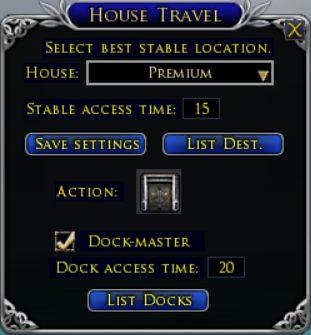
- Made Lalia's Market a travel location instead of an alias for S Bree as it is often used to get the crafting hall instead of going to a stable. - Fixed the lists displayed for the Return/Guild/Muster/Sail travel skills to use the actual skill name instead of the destination name and sorted them by name. - The "Not Visited" checkbox for stables wasn't always excluding them from route planning. It also now reports an error if selected as a destination. - Added a new selection to the plugins Options panel to "Hide above level". This will hide all stables in zones where the mobs are all purple difficulty to simplify the selection menus for lower-level players. - Added Return/Guide/Muster to the "Bloody Eagle Tavern" in central Umbar Baharbel. This has manual travel to the nearby Dock-master. - Added Journey to the Ledger-keepers in northern Umbar Baharbel. This is granted at Allegiance Level 10 with the Ledger-keepers and is an alias for the north gate stable. - Added Journey to the Order of the Eagle in eastern Umbar Baharbel. This is granted at Allegiance Level 10 with the Order of the Eagle and is an alias for the east gate stable. - Added support for the summonable Dock-master in housing yards. This can be purchased from the Umbar Quartermaster for 3 housing writs. This adds 8 usable dock travel locations (the Lothlorien destination is bugged). Many of these additions are only useful for level 141+ players. Last edited by Vinny : 02-05-2024 at 01:58 AM. |
||
|
|
|
|
12-27-2023, 10:45 PM
|
|||
|
The Indomitable
Forum posts: 13
File comments: 779
Uploads: 11
|
Version 2.35.5
This is a minor update that only affects finding routes that begin at a housing stable. I removed the level restriction on checking housing stables as any level can recall to a house if it is owned by a higher-level character. I also added the missing King's Gondor locations to the housing stable destination. Finally, I fixed a logic error that could cause a destination to print twice in the route list.
|
||
|
|
|
|
11-28-2023, 01:19 PM
|
|||
|
The Indomitable
Forum posts: 13
File comments: 779
Uploads: 11
|
Version 2.35.4
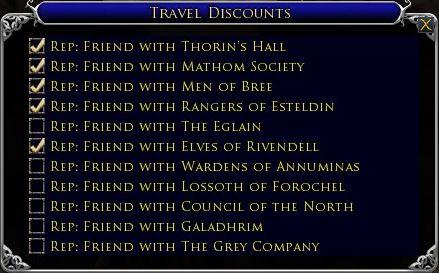
I've finished adding the slow travel times for the Corsairs expansion and I've made significant updates to the travel discounts system. Several areas had the wrong discount % and others had no discount data. I've also revised the descriptions in the Tavel Discounts window and now sort them by description to make them easier to find.
|
||
|
|
|
|
11-11-2023, 10:35 PM
|
|||
|
The Indomitable
Forum posts: 13
File comments: 779
Uploads: 11
|
Version 2.35 (Lotro update 38)
This is a big update with many new stable locations and several boat dock locations. Island locations can only be visited via boat. You can start by visiting the dock in southwest Pelargir. In order to get this version out in a timely manner, I'm releasing it without the slow travel times as these will take a very long time to check and won't be used most of the time. It will probably be sometime next month before I'm finished with that as I have other plugins to work on first.
Some of the other improvements include using the Shift key with the Return or the Guide/Muster/Sail buttons to display the learnable skills. These now show where to barter for the skill and what the coin cost is. I've updated the Mariner "Sail to" skills and added Egladil (in Lothlorien) as "Boat to Mirkwood". The "Sail to Lothlorien" skill takes you to this location. |
||
|
|
|
|
11-08-2023, 09:19 AM
|
|||
|
The Indomitable
Forum posts: 13
File comments: 779
Uploads: 11
|
Re: Lotro update 38
I was able to get several good days of testing in during Beta and have all the new locations and destinations entered. However, with so many new routes, even getting all the swift travel times calculated will take more work. I'll release a preliminary update when that part is completed and then start on the slow travel times (at least a week or more).
|
||
|
|
|
|
10-19-2023, 11:38 PM
|
|||
|
The Indomitable
Forum posts: 13
File comments: 779
Uploads: 11
|
Lotro update 38
I'm currently testing the beta of Lotro update 38 and it is a huge expansion. There are 31 new stable/dock locations spread out over multiple map areas! I'm trying to at least get the map locations recorded in the 2 days of testing being allowed, but I can already tell that this is going to take at least a week after release to get all the details in.
In addition to this plugin, there are new materials for Daily Tasks and a whole new crafting tier for Craft Mats and Cooking Ref! And to top it off, Vocations are being eliminated so you can now pick your own mix of professions(which will be nice, but means even more revised code). |
||
|
|
|
|
10-19-2023, 09:27 AM
|
|||
|
The Indomitable
Forum posts: 13
File comments: 779
Uploads: 11
|
Version 2.34
This is an enhancement to the list of learnable Return/Guide/Muster/Sail skills. They now include the name and location where they can be learned or the level at which they are learned.
It also includes several fixes: Fixed a logic error for manual travel when finding routes. Fixed the spelling of "Echad Dunnan". Renamed "Sail to Sarn Ford" to "Sail to Tharbad". |
||
|
|
|
|
10-07-2023, 03:38 PM
|
|||
|
The Indomitable
Forum posts: 13
File comments: 779
Uploads: 11
|
Version 2.33 (Mariner update)
This update adds the Mariner "Sail to" skills with 14 destinations. These skills function similarly to Hunter "Guide to" skills.
I'll need to make minor changes as my Mariner character learns these skills and is able to verify the technical details. |
||
|
|
|
|
08-30-2023, 03:20 PM
|
|||
|
The Indomitable
Forum posts: 13
File comments: 779
Uploads: 11
|
Version 2.32.3 (Lotro update 37)
This is just a minor update. Lotro update 37 didn't add any new stable locations. It removed the level requirements for routes going to Shire destinations and it added return routes for other areas that could be reached from King's Gondor (so now you can get to King's Gondor locations directly from major hubs like South Bree).
I also added Return/Guide/Muster to Clegur skill. Some of these skills can now be bartered for using a second currency. Last edited by Vinny : 08-30-2023 at 03:27 PM. |
||
|
|
|
|
08-27-2023, 05:32 PM
|
|||
|
The Indomitable
Forum posts: 13
File comments: 779
Uploads: 11
|
Version 2.32.1
After much procrastination, I finally finished the timings on all the tediously slow routes in King's Gondor.
 With update 37 coming on Tuesday, I'll have more work ahead this week. |
||
|
|
|
|
06-12-2023, 03:00 PM
|
|||
|
The Indomitable
Forum posts: 13
File comments: 779
Uploads: 11
|
Version 2.32 (Lotro update 36)
This adds the large new zone of "King's Gondor" with 15 new stable locations. This zone can only be accessed from After Battle Minas Tirith. Several locations have stables in both this zone and Old Anorien, so for those stables, I've had to add the suffix " (KG)" to the names to make them unique. There is also a Return/Guide/Muster to Pelargir (West Gate) skill that can be bartered for after achieving Acquaintance standing with "the Renewal of Gondor".
This version includes all of the Swift Travel routes, but I've only started on the slow routes and will add them in a minor update. This may take a couple of weeks, but I don't know why anyone would use them when they can take the faster route. |
||
|
|
|
|
06-09-2023, 08:08 PM
|
|||
|
The Indomitable
Forum posts: 13
File comments: 779
Uploads: 11
|
Re: Lotro Update 36
I'm still working on the ST routes and it's going to be sometime next week before I post those without the slow routes. It is incredibly tedious and I can only do about 50-60 routes before it starts to put me to sleep.
 I did get the Return/Guild/Muster to Pelargir added and all you need is acquaintance reputation. |
||
|
|
|
|


All times are GMT -5. The time now is 09:07 AM.
 |
© MMOUI
vBulletin® - Copyright ©2000 - 2024, Jelsoft Enterprises Ltd. |
 |
